Superb quality and spec AB-Com PULSe 4K SE. Crazy offer! Only £99! FREE UK DELIVERY! 4K UHD, Enigma 2, Multiboot 4 images & more!...
Superb quality and spec AB-Com PULSe 4K Rev II Twin Satellite tuner only £149! FREE UK DELIVERY! 4K UHD, Enigma 2, SATA HDD facility, Multiboot 4 images & more!...

VIX Team Vu+ Duo Image - 05/09/2010 - Discussion

Status
Not open for further replies.
P.S.

Also, I can't scan 16E, whole satellite. I get message to check my tuner configuration. No such problems with other sats.
Please can someone tell me how to find 160.0E Optus D1 as it isn't in the list of satellites.


can u find the sat on the list for the tuner or not.
if u can't find the satellite in the then u need another satellites.xml file which u may obtain from

Code:
http://satellites-xml.eu/
hth
 
Last edited:
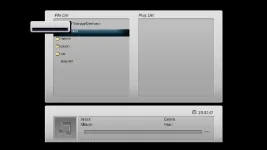
Installed it tonight, so far so good, except, I tried to mount a CFIS drive, it said it was already mounted but :
1 It doesn't appear under 'Media Player ' I did copy my setting across.
1 I have a small unlabelled window with a black bar sitting on top of my HDD info and the directory below it
 

Attachments

  • screenshot.webp
    screenshot.webp
    6.8 KB · Views: 44
Thanks for the nice image. I also have an issue with EPG. I'm watching mostly 39E and the provider is Bulsatcom. With the other images I never need to download any information. When I installed VIX image, the EPG stay empty. On the info bar I can see now/next broadcast, but nothing in EPG menu. From the sources I can download the epg that I need. Please advise me what to do and sorry for my poor english.

P.S.

Also, I can't scan 16E, whole satellite. I get message to check my tuner configuration. No such problems with other sats.

did you manage to get the epg working as I am having the same problems
Regards
jcl
 
Another thing about the subtitles on this image.
Is it possible to change the font and the colour of the the subs anywhere?
Purple insn´t the best colour regrding to visability.
On the PLi it was all white and much more easy to read.

Oh, and where do I put the satellites.xml file? If I want a newer one?
 
did you manage to get the epg working as I am having the same problems
Regards
jcl

blue button than press the epgimport than blue button than sellect from the list by pressing ok button on remote than grean button than yellow button than sellect yes then press ok you done...
 
Last edited by a moderator:
epg

Hi mates

To get EPG working choose either blue button EPGImport or menu setup vu+hd

once loaded you can select what channels you wish in your epg..set time for update and number of days to source once you done this i would then select manual to start downloading EPG data to start your planner up then it should update at the set times after.

regards
satmanbasil
 
Hi m8s

Incase nobody has found it you can see CCcam connection data in the channel banner press ok once to see normal channel prog details press twice for addional CCcam data regarding connection hops etc

regards
satmanbasil
 
Just playing with the new image and like it, was using pli before.

Just a few problems/queries

Can I

Format a USB stick (timeshift) to ext3 with this image can't find anything in the menus

I can't see my NAS drive with this image it was in storage device list on the pli image

For some reason alot of the channels (mainly HD) in the chanel list are greyed out rather than white. I can select them Ok just a bit strange, i'm using the B16MCC Bouquets

Great work & thanks
 
Hi m8s

Im wondering with old enigma1 you was able to move OSD anywhere on the screen withing the program when enigma 2 was introduced was this removed as i feel this would resolve all the problems members are having using various tv sets the option to be able to move the osd would be a simple solution


regards
satmanbasil
 
To answer one of my own questions regarding the color of the font used for the subs just do the following to have it changed from red to white.

If you're using the default skin (Vu+ HD-Plus), then edit the file /usr/share/enigma2/Vu_HD_Plus/skin.xml
Find the <subtitle> section and locate this part:

<sub name="Subtitle_TTX" font="Regular;30" shadowColor="#40101010" shadowOffset="3,3" />

and add a color definition:

<sub name="Subtitle_TTX" font="Regular;30" foregroundColor="#FFFFFF" shadowColor="#40101010" shadowOffset="3,3" />

(notice the forgroundColor bit is being set to FFFFFF, or 'white' to us humans)

Now, you need to restart Enigma GUI or simply reboot your box.

I assume this would also work for a different skin, provided you edit it's associated skin.xml file. Take backup of the original skin.xml before you change anyhing.
I guess you can tweak it more but for now this does it for me. It works great but as usual, backup the file BEFORE you change anything!
Do you think you can implement this in a future release of VIX?
 
Last edited:
Hi mates

To get EPG working choose either blue button EPGImport or menu setup vu+hd

once loaded you can select what channels you wish in your epg..set time for update and number of days to source once you done this i would then select manual to start downloading EPG data to start your planner up then it should update at the set times after.

regards
satmanbasil

Thanks. I know this very well, but as I mention in my request for help, this sources are very limited to just a few providers. I need for 39E, Bulsatcom. With the other images EPG working like a charm and I don't need to download or import anything. I like this image, but I will go back to VTI until this issue is fixed somehow.
 
First things first, a big thanks to Andy and the rest of the team iinvolved with the development of this new image. I've been using it all day and must say its one hell of an accomplishment for a first effort. Sure there are a few things not perfect as yet but as has been stated some of these may not be image specific but originating from the official release. Really love the feature that works like Series Link, superb!

I always tried new images when they were released but always ended up going back to BH as I this is what was familiar to me from my DM800 days, and for me it did everything i needed it to do, and I loved Armys Ghost skin. But I will be keeping this one on. The improvements outweigh the niggles for me.

Is it possible to get the ecm time displayed rather than Nan showing. I have read the instruction on how to but also the caution on using this method and i dont wanna be slowing down my Duo.

Again thanks for all the hard work, time and effort put into this.
 
Last edited:
First things first, a big thanks to Andy and the rest of the team iinvolved with the development of this new image. I've been using it all day and must say its one hell of an accomplishment for a first effort. Sure there are a few things not perfect as yet but as has been stated some of these may not be image specific but originating from the official release. Really love the feature that works like Series Link, superb!

I always tried new images when they were released but always ended up going back to BH as I this is what was familiar to me from my DM800 days, and for me it did everything i needed it to do, and I loved Armys Ghost skin. But I will be keeping this one on. The improvements outweigh the niggles for me.

Is it possible to get the ecm time displayed rather than Nan showing. I have read the instruction on how to but also the caution on using this method and i dont wanna be slowing down my Duo.

Again thanks for all the hard work, time and effort put into this.

thanks for the nice words, really appreciated.

as for ecm time, unfortunately this is a limited by cccam and the official release. i had tried the so-called fix for almost a weak and must say it is very effective slowing down the box and so i reverted back and stopped using it. thus, wouldn't recommend on a practical basis and not just theoretical.
 
here you go mate.

sorry about this i know you and the guy's have put a lot of hard work in for us, and i do like the image generaly speaking.

its' just this text problem driving me nuts.

i can't seem to add attachments to PM's, so i'll post 'em here.

just to add it's the text on CCcam info it's not a consistant size each page has a varying degree.

regards: canthackit


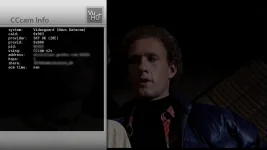
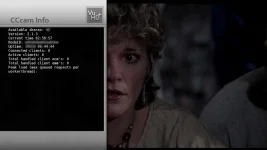
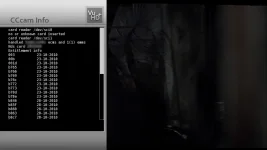
hows this for the ECM Info screens, as for the main menus, i am coding an option the shift the menus to right slightly when enabled:)
 

Attachments

  • cccam_ECMInfo.webp
    cccam_ECMInfo.webp
    28.1 KB · Views: 54
  • cccam_GeneralInfo.webp
    cccam_GeneralInfo.webp
    38.6 KB · Views: 51
  • cccam_providers.webp
    cccam_providers.webp
    37.3 KB · Views: 49
Last edited:
can u find the sat on the list for the tuner or not.
if u can't find the satellite in the then u need another satellites.xml file which u may obtain from

Code:
http://satellites-xml.eu/
hth

Thanks for that. Now that I have generated the new satellites.xml file where do I copy it to?
 
@ the FABULOUS VIX team: Just installed VIX but seems to suffer like canthackit do... All the menus are cut off a bit on the left side. But I'm currently using a Philips 32" CRT WS TV.
I edited the skin.xml file for a test. Positioned the Information/About menu to "60,0" instead, and I think it was spot on. What does actually this mean? Overscan? Dont't think I can det rid of it in the TV's menu(?)...
Also I found out that Vu_HD_plus skin is the only one functioning properly right now. Greenscreens when using some of the other default installed, and going into the "Softcam" menu...

Keep up the good work!

/Yngve
 
I think you have made it too easy to delete a recording ,i prefer a two button press asking me if i'm seriously going to delete "how fat is your step mothers granddaughter" ,the wife or kids could easily delete them without much effort.
Just my opinion, others might prefer it.
 
Status
Not open for further replies.

OpenViX Feeds Status

Back
Top