Superb quality and spec AB-Com PULSe 4K SE. Crazy offer! Only £99! FREE UK DELIVERY! 4K UHD, Enigma 2, Multiboot 4 images & more!...
Superb quality and spec AB-Com PULSe 4K Rev II Twin Satellite tuner only £149! FREE UK DELIVERY! 4K UHD, Enigma 2, SATA HDD facility, Multiboot 4 images & more!...

MODIFIED - ViX Night HD Skin

  • Thread starter Thread starter Etk
  • Start date Start date
E

Etk

Guest
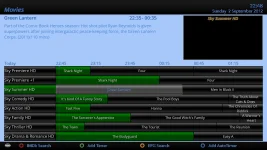
Here's my modded version of the ViX Night Skin, main changes are the EPG colours are now more like the sky ones and the font is different:
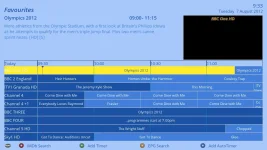
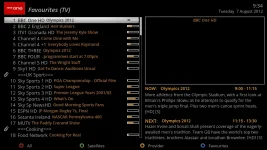
screenshot-7.webp

screenshot-8.webp


The files you need are the modded skin.xml (which goes in usr/share/enigma2/ViX_Night_HD/) and the fonts (ttf files which go in usr/share/enigma2/ViX_HD_Common/Fonts/)

Download here: View attachment Modified Files.zip
 
Not sure if I should try and recolour the channel select screen to bring it into line with the EPG - any thoughts? I've been searching the web for other colour schemes too but not really found much yet so if anyone's got any they like post them up so I can have a look at incorporating them. :thumbsup:
 
I gave this a try, in general it looks ok, but changing the font seems to affect fonts everywhere else and not just this EPG, it's looks bad..... maybe i did something wrong? but i followed the instructions perfectly
 
I gave this a try, in general it looks ok, but changing the font seems to affect fonts everywhere else and not just this EPG, it's looks bad..... maybe i did something wrong? but i followed the instructions perfectly

Hi Jay

I've changed the font system-wide as I prefer it to the standard one. Seems to work with the other settings I've got but might not be so good if you've got things set differently. Any examples or screenshots of the stuff that doesn't look great?
 
I agree, this fonts looks very tidy, where it doesnt fit too well is the single EPG bar (using the + - channel buttons), the clock, text along the bottom.

HTH

Dale
 
New VIX EPG supports background graphics, so no need in editing xml files. Just overwrite background graphics with new graphics/colours if you want a new look.
Will be out any day soon...
 
New VIX EPG supports background graphics, so no need in editing xml files. Just overwrite background graphics with new graphics/colours if you want a new look.
Will be out any day soon...
But the existing options to change all colours will still be there. So users have lots of choices then.
 
Right, fixed the fonts in the info bars so they should show properly now:
screenshot-13.webp
screenshot-12.webp

Any other issues people are finding? I'll post the latest files if it's all looking ok now.
 
But the existing options to change all colours will still be there. So users have lots of choices then.
We do, but users playing with a complicated xml file V creating simple graphics as background colours seems an easier option to me.
 
ETK, Love what you have done with the skin.
Just wondering if it would be easy to replace the infobar with the second infobar (excluding the program info).
I dont like the simple infobar as it doesnt have Sat Position or SNR that Id like to see all the time.
I dont want to try different skins as Im 100% happy with the rest of it...


Right, fixed the fonts in the info bars so they should show properly now:
View attachment 18571
View attachment 18572

Any other issues people are finding? I'll post the latest files if it's all looking ok now.
 
Install the plugin, software management, the text doesn't fit in the boxes anymore, can you put the files up so we can test for you

Thanks
 
Can you upload a screen shot to see if I have the same issue...

Ta


Install the plugin, software management, the text doesn't fit in the boxes anymore, can you put the files up so we can test for you

Thanks
 
Here's the latest version of the skin.xml file, just needs to be copied into the Vix Night HD directory. I'll have a look at the new 3.0 image after the weekend and see where to go next...

@dfdream, is it just the sat info and SNR/AGC that you want in the 1stinfobar?

View attachment skin.zip
 
Here's the latest version of the skin.xml file, just needs to be copied into the Vix Night HD directory. I'll have a look at the new 3.0 image after the weekend and see where to go next..
that is not a wise thing to do, as it will be overwritten on every image update.

Just rename the file to skin_user.xml and locate it in etc/enigma2
That way it will never be overwritten, and even be backed up by a settings backup.
 
Sorry very new to VIX and VU+ please can someone tell me why my epg looks like this and what I can do about it - I'm on 3.0 (in case this is the issue).

Thanks

screenshot.webp
 
Sorry very new to VIX and VU+ please can someone tell me why my epg looks like this and what I can do about it - I'm on 3.0 (in case this is the issue).

Thanks

View attachment 19260
are you looking for the look in the first post?
If so, press EPG, press Menu, set View Mode to Text.
 
No worries, glad you're sorted.
Graphics is a nice new addition in VIX 3 & I haven't tried the above mod, but I'm all for folks trying new EPG looks & graphics.
 

OpenViX Feeds Status

Back
Top