Superb quality and spec AB-Com PULSe 4K SE. Crazy offer! Only £129! FREE UK DELIVERY! 4K UHD, Enigma 2, Multiboot 4 images & more!...
Superb quality and spec AB-Com PULSe 4K Rev II Twin Satellite tuner only £179! FREE UK DELIVERY! 4K UHD, Enigma 2, SATA HDD facility, Multiboot 4 images & more!...

[VU+ Duo] Vix 3.0 373 lost my HDD, and USB Mounts. Help

mickyblueys

Forum Supporter
Donated Member
Joined
Sep 6, 2012
Messages
1,086
Reaction score
1
Points
0
Location
Newcastle upon Tyne
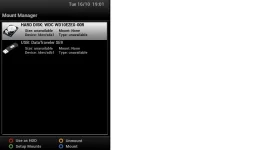
i've just noticed my HDD and USB mounts have gone and i'm unable to re-mount them. No settings have been changed on my box, they were last night and now today box on and they're are gone........... i was gonna restore an old backup to build 370 but am un able to because the said drives hold my backups. i have sent in some crash logs ref:1350409477.56

PLEASE HELP..... I DO NOT WANT RE FORMAT HDD IF I CAN HELP IT, IT HAS ALMOST 500GB WORTH OF FILMS ON!.......AAARGGGHHH!!:mad:
 

Attachments

  • HDD fault.webp
    HDD fault.webp
    19.7 KB · Views: 73
Crisis averted done a clean install back to 370 and HDD is back.
:confused:

Don't know how it has happened but but I have had problems with timeshift since update to 373 also.


Sent from my GT-I9100 using Tapatalk 2
 
i just had the same issue.

i did a fresh install to 3.0.339 and checked the HDD was working fine with my recorded data.
i then did an online update and when it rebooted there was no HDD installed.
everytime i tried to mount it would crash. so in the end i just reflashed back to 339.

anyone got any ideas?
 
same here with my ultimo, cant update otherwise I lose my mounts and they wont re-mount....
 
Please make sure you guys send us your crash logs in situations like this.

Sent from my GT-I9300 using Tapatalk 2
 
id have to do an online update just to get the crash log.
as the HDD is shown as unavailable once i update and i cant access any of the backups i have to reflash to 3.0.339 for the HDD to be detected.

iv checked the HDD for crash logs but there are none. (i guess reflashing removed them?)

even though i have created backups, when doing an online update it creates another backup which takes a while and then reboots. everything else works fine.
its only when trying to select 'mount' or 'use as HDD' that the box crashes. i didnt try initialize as i dont want to do that.
 
Last edited by a moderator:
id have to do an online update just to get the crash log.
as the HDD is shown as unavailable once i update and i cant access any of the backups i have to reflash to 3.0.339 for the HDD to be detected.

iv checked the HDD for crash logs but there are none. (i guess reflashing removed them?)

even though i have created backups, when doing an online update it creates another backup which takes a while and then reboots. everything else works fine.
its only when trying to select 'mount' or 'use as HDD' that the box crashes. i didnt try initialize as i dont want to do that.

This is why I always recommend changing the default path for crash logs and backups to a USB stick instead.

Sent from my GT-I9300 using Tapatalk 2
 
it still happens with 381 and it is not a crash so no log to send. I did not have debug logs set
 
just to clarify, theres no crash, so no crash log, just the hd and usb wont mount with the newer versions. Someone mentioned booting without the usb in, will do that in the morning when our lass is not watching tv :)
 
just to clarify, theres no crash, so no crash log, just the hd and usb wont mount with the newer versions. Someone mentioned booting without the usb in, will do that in the morning when our lass is not watching tv :)

you dont need to have a crash in order to generate debug logs though.
 
had a similar issue when I tried to force mount in vix menu it crashed out using latest image, reverted back to old image
 

Attachments

had a similar issue when I tried to force mount in vix menu it crashed out using latest image, reverted back to old image
No idea what that log is from.

Anyway, the general ised when having problems with local mounts:
1- stop Enigma (init 4);
2- delete etc/enigma2/automounts.xml
3- open etc/fstab and look for any entry showing local devices; delete such an entry (make sure not to delete root etc). If unsure, ask us;
4- restart the box (init 6);
5- after the reboot, go to mountmanager and make the correct settings. Reboot when asked to do so.
 
No idea what that log is from.

Anyway, the general ised when having problems with local mounts:
1- stop Enigma (init 4);
2- delete etc/enigma2/automounts.xml
3- open etc/fstab and look for any entry showing local devices; delete such an entry (make sure not to delete root etc). If unsure, ask us;
4- restart the box (init 6);
5- after the reboot, go to mountmanager and make the correct settings. Reboot when asked to do so.

I don't see the automounts.xml file in that location and this is how my fstab file looks which lines do i delete?

Code:
rootfs               /                    auto       defaults              1  1
proc                 /proc                proc       defaults              0  0
devpts               /dev/pts             devpts     mode=0620,gid=5       0  0
usbdevfs             /proc/bus/usb        usbdevfs   noauto                0  0
tmpfs                /var/volatile        tmpfs      defaults              0  0
usbfs                /proc/bus/usb        usbfs      defaults              0  0

Also i'm on the Uno not Duo also i'm on 385

Here is the crash log i get when i try to setup the HDD and USB mount
 

Attachments

Last edited by a moderator:
I don't see the automounts.xml file in that location and this is how my fstab file looks which lines do i delete?

Code:
rootfs               /                    auto       defaults              1  1
proc                 /proc                proc       defaults              0  0
devpts               /dev/pts             devpts     mode=0620,gid=5       0  0
usbdevfs             /proc/bus/usb        usbdevfs   noauto                0  0
tmpfs                /var/volatile        tmpfs      defaults              0  0
usbfs                /proc/bus/usb        usbfs      defaults              0  0

Also i'm on the Uno not Duo also i'm on 385

Here is the crash log i get when i try to setup the HDD and USB mount

i'll add some debug info into tonights build, so wait till tomorrow, then update the give me a new crash log. so i see whats going on.
 
I updated to 386? Which i think is the right update version.

I have attached a new crash log.
can you reflash with 386, instead of updating, it for some reason can not find the requied applet

Code:
[MountManager] RESULT: blkid: applet not found
 
Hi I have the same issue after update to 385 and 386 now I loose my mounted usb and hdd. Flashing back to an older version <385 seems to restore them with no loss of data although I did format my hdd to try and sort this :(. Where can I find the 386 image to reflash with? Thanks. Find attached my crash log that occurs when you try to mount any drive.
 

Attachments

can you reflash with 386, instead of updating, it for some reason can not find the requied applet

Code:
[MountManager] RESULT: blkid: applet not found

I'm not able to re-flash at the moment. If i re-flash would i lose all my settings or can i make a backup? Also as asked below where would i found 386? i looked here OpenViX Download Centre but it's not there

Hi I have the same issue after update to 385 and 386 now I loose my mounted usb and hdd. Flashing back to an older version <385 seems to restore them with no loss of data although I did format my hdd to try and sort this :(. Where can I find the 386 image to reflash with? Thanks. Find attached my crash log that occurs when you try to mount any drive.
Hello, Which receiver have you got? Uno?
 

OpenViX Feeds Status

Back
Top