Superb quality and spec AB-Com PULSe 4K SE. Crazy offer! Only £129! FREE UK DELIVERY! 4K UHD, Enigma 2, Multiboot 4 images & more!...
Superb quality and spec AB-Com PULSe 4K Rev II Twin Satellite tuner only £179! FREE UK DELIVERY! 4K UHD, Enigma 2, SATA HDD facility, Multiboot 4 images & more!...

How to flash a VU+ Duo using a USB stick

hi i am thi i am tatley new be i have dowlode image its reding use and its showing me starting but nothing is happning and i can see red light only in my box what i am doing wrong have i mess up my box

As has been cover on this very forum100`s of time.. and prolly this very thread 10 times..

You need to flash the cfe bootloader for your duo 1st.. then flash the image of your choise..
 
Hi Guys,

I like to try the VIX image on my VU DUO but I see the vuplus/duo folder contains two more files then I am used to see in other images.
The "reboot-update" and the "image version", is that OK can I leave these files on the USB stick and flash it?

Thanks

Edmund
 
I like to try the VIX image on my VU DUO but I see the vuplus/duo folder contains two more files then I am used to see in other images.
The "reboot-update" and the "image version", is that OK can I leave these files on the USB stick and flash it?
Yes.
The reboot-file doesn't do anything on the DUO & Solo (it does on other VU's) and the image-version is for your info only.
 
The USB files required to flash are placed in the vuplus/duo folder in the USB drive.
There are 3 files whch if come in a zip, need to be extracted to the duo folder.
The 3 files are :
boot_cfe_auto.jffs2
kernel_cfe_auto.bin
root_cfe_auto.jffs2

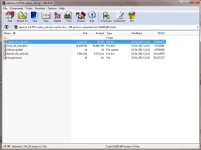
Hi I'm Trying To Flash My Duo From Vix 3.0 Build 404 To Build 552 And The Download Include The Following Files:-
splash_cfe_auto.bin
root_cfe_auto.jffs2
reboot.update
kernal_cfe_auto.bin
imageversion

Where Do I Get The "boot_cfe_auto.jffs2" File From??? :confused:
 
winrar.webp
No If You Look Above They Are The Only Files Within The ZIP... I Am Downloading From The Link You've Provided... There Is No "boot_cfe_auto.jffs2" File...

Thanks For Your Quick Reply... I've Attached The Winrar File List As An Image...
 
Last edited:
Have you tried flashing with the download?
Sorry, the thread is too long to read through every post, so not really sure what the issue is? Just stick the download on your USB stick in the correct folder structure & you should be fine.
 
Thanks Judge, I Used My 8Gb Instead Of My 32Gb And That Worked... Just Confused Me At The First Few Posts Stipulating That You Needed The "boot_cfe_auto.jffs2" File...
 
Glad you are sorted, some boxes get shitty about USB sticks, my DUOs take any stick I throw at them though.
 
Thanks Judge, I Used My 8Gb Instead Of My 32Gb And That Worked... Just Confused Me At The First Few Posts Stipulating That You Needed The "boot_cfe_auto.jffs2" File...
Those 'boot_cfe_auto.jffs2' files are not required for VU's (they were in the old days for DreamBoxes, never for VU's). Some imagemakers still provide them, but as they are useless you can omit them.
 
Hi All I am going to flash up also I currently have build 527 and I have the same issue as another duo user I can't use the software update option within the menu as it starts the process and then stalls saying it needs to do a background check and then says check back in a few mins. Anyway I see on the forum that issue has been resolved but I need to flash on this occasion to get from build 527 to the current 558 which I am happy to do via usb.

My question is as I have never flashed an image before will the flash change anything on the duo ie my wifes auto timers, will the auto timers hold after the flash on the box or will I have to re add all these auto timers again via the epg ?

second question - should I do the vix updates on a regular basis even if my duo is working ok.
 
Yes, the flash will wipe the box & all it's settings.
The good news is, you can create a settings back-up first.
Menu -> Setup -> ViX -> Backup Manager -> green button for new backup.

Then, when you flash the image, you can do a settings restore, so all timers, cams, other settings will be restored in no time.
 
ah cheers mate I forgot about that back up you just saved me an ear bashing from her indoors ha ha
 
second question - should I do the vix updates on a regular basis even if my duo is working ok.
If you want to use the latest updates, bugfixes and features: yes.
I can't really give a good advice here: I always update to the latest version (at the risk of sometimes accepting a bug, and sometimes even have to revert to a previous version), some do it on a weekly or monthly basis, some never do.
 
Hi I am a newbie, so don't really have a clue but I really need to learn how to update my box :eek:. I have manage to download the update and I put two new folders in my usb stick 1st vuplus and 2nd duo, I then extracted the update to the duo folder however I have ended up with 5 files, which are as follows, imageversion, kernel_cfe_auto.bin, reboot.update, root_cfe_auto.jffs2, splash_cfe_auto.bin. does anybody know where I have gone wrong? would appreciate any HELPPP.
Thanks
 
Hi I am a newbie, so don't really have a clue but I really need to learn how to update my box :eek:. I have manage to download the update and I put two new folders in my usb stick 1st vuplus and 2nd duo, I then extracted the update to the duo folder however I have ended up with 5 files, which are as follows, imageversion, kernel_cfe_auto.bin, reboot.update, root_cfe_auto.jffs2, splash_cfe_auto.bin. does anybody know where I have gone wrong? would appreciate any HELPPP.
Thanks

Just download the image and drag and drop the folder VUPLUS to your usb stick and insert and restart and follow the instructions on the VFD
 
Format your stick fat 32 extract the update then drag and drop the extracted files to the stick. you do not need to make any extra folders or anything it should extract to the correct structure.turn off duo, pull it any other USB. Insert you're USB with files on, power back on follow VFd display.

Sent from my GT-I9100 using Tapatalk 2
 
Format your stick fat 32 extract the update then drag and drop the extracted files to the stick. you do not need to make any extra folders or anything it should extract to the correct structure.turn off duo, pull it any other USB. Insert you're USB with files on, power back on follow VFd display.

Sent from my GT-I9100 using Tapatalk 2

Thanks for the reply, I have a fat32 stick already didn't need to convert, I have tried everything but just can't seen to end up with the 3 files:eek::confused: been trying for hours :mad:
 
On the the usb stick, you should have:

USBSTICK -> vuplus -> duo -> then all 5 files.
 

OpenViX Feeds Status

Back
Top