Superb quality and spec AB-Com PULSe 4K SE. Crazy offer! Only £99! FREE UK DELIVERY! 4K UHD, Enigma 2, Multiboot 4 images & more!...
Superb quality and spec AB-Com PULSe 4K Rev II Twin Satellite tuner only £149! FREE UK DELIVERY! 4K UHD, Enigma 2, SATA HDD facility, Multiboot 4 images & more!...

VIX Team Vu+ Duo Image v1.1 - 26/09/2010

I've not tried it, but couldn't you vist the recording channel and press the record button?(since it is already recording, the worse it could do is carry on recording, hopefully it will stop it!)
I'm only suggesting trying this as this is how my SKY HD box works if i want to stop a current recording etc....Paul
 
Hi,

On the Plugins Browser screen (Menu -> Plugins) I can see 10 plugins on the first page, but I can only go down to the 9th. When I go to the 10th the browser goes to page 2, where the 10th and 11th are shown.

I can access the plugin from page 2, no problem. This is v1.1.
Cheers,
Sonc.
 
Hi,

I was tryimg to stop a recording, and it seems that the only way is from the timers list with "delete", but this erases the timer completely even if it is a daily or weekly, so I have to recreate it. Is there another way? If not, could you add a "stop" button to active timers, or leave the "disable" on for this purpose?

Thanks,
GiP

If you set it up via atutotimer, you can delete that entry but it will still carry on picking up future showings.
 
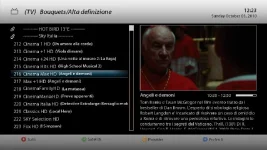
For those having a cut summary in channel list as below (sky it uses that maximum numer of lines):
screenshot.webp

open (with a unix compatible editor) the following file:
/usr/share/enigma2/Vu_HD_plus/skin.xml

find the line (should be #770):
Code:
    <widget source="ServiceEvent" render="Label" position="670,480" size="560,140" font="Regular; 22" backgroundColor="black" foregroundColor="window-fg" transparent="0" valign="top">

change the following value
from:
font="Regular; 22"
to
font="Regular; 20"

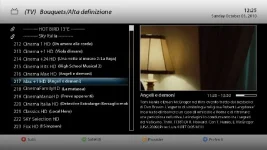
now the summary should appear as follows:
screenshot2.webp
 
If it's just a single event timer then you only get the option to delete. If however you've set a repeat daily or weekly timer then you get options, the first being delete current event without deleting coming events on this timer.

hope this helps

YES! I have to chose "disable" and then I get the options. I don't know why I didn't try it the first time....

Thanks to all.

Gip
 
hi i changed my libgcc_s.so.1 file in lib folder on vix 1.1 to get the emc time working before i had read it had problems and didnt backup the orig file can someone plz upload the orig libgcc_s.so.1 file from the vix 1.1 so that i dont have to reinstall the image to get it back

thanks

Cozmo
 
hi i changed my libgcc_s.so.1 file in lib folder on vix 1.1 to get the emc time working before i had read it had problems and didnt backup the orig file can someone plz upload the orig libgcc_s.so.1 file from the vix 1.1 so that i dont have to reinstall the image to get it back

thanks

Cozmo
Here you go..I also want to see ECM time instead of "nan". Did the "fix" slowed it down to much or other probs?
 

Attachments

MyB5 not 100% sure yet but think its affecting other people did see any slow down my end but there defo a problem with other pepole just hope its this file it all i have left i can think

and thanks for the file very greatfull saved me a longer job :)

Cozmo
 
Hello .. i have try this LT6 HD Skin that I think is a beautiful skin , and it seems to work ok, i only miss PIG in Coolepg , can anyone else try maybe i have missed something , i found it on another board.And many thanks to author for this beautiful skin

View attachment enigma2_skin_lt6.hd_0.1.1_all.rar
 
Last edited by a moderator:
Here is another plugin that's I like, just ftp to /usr/lib/enigma2/python/Plugins/Extensions/

its make remotecontrol as neutrino
 

Attachments

Here is another plugin that's I like, just ftp to /usr/lib/enigma2/python/Plugins/Extensions/

its make remotecontrol as neutrino

if you guy's want a plugin adding to the feeds you need to attached the ipk this thread, we are not going go to look for them all over the place, BUT make sure they are working 100% before posting them.

and only IPK's please no rar's, zip's or anything else, links to them in the download section are find as well , i will just delete them else, you have been warned.

thanks
andy
 
Last edited:
Hi all,

Well done for the VIX image, I've played around with it for a few minutes and it's very very neat and uncluttered. I've hit a bit of a snag however and hopefully someone can help me out.

I'm setup with 3 LNBs for hotbird, astra and sky so after installing the image I set the tuners up for these (simple for tuner A and loop through for tuner B) and this was all fine. I then downloaded ccam and that also installed well. Before I got to try the sky card with the ccam I came across the Sky UK bouqet in the download section so I thought I'll set this up too and this is where I got stuck. While downloading the Sky UK bouquet the installation seemed to got stuck during the configuring of the fiels that had just been downloaded and this was stuck for about 5 mins. SO I switched off the box from the main power and rebooted but now I found that all the satellites had gone and I couldn't add them again. I tried reinstalling the image from the usb but when I restarted the box it did not read from the usb. I also tried a factory reset but this didn't help either. Have I made myself a very expensive paper weight?

Thanks in advance

Rob
 
no not at all, hopefully.

disconnect all peripherals (hdd, usb at rear, network cable) and unplug the box for like 5 minutes then try again.

i would suggest to format the usb again and freshly move the files over to it.

after these 5 minutes plug the installaion usb only and start up the box
 
OK giving that a go. Do I need to disconnect the internal hdd too?
 
OK doing that know. while waiting for the 5 minutes... do you know why this happened? i.e. is it normal for the bouquet installation to crash or had it not crashed at all and I should have left it for longer? Also, when the Sky bouquet installs properly, does it delete all the non sky satellites from the config or was this just an artifact of me pulling the plug on the installation?
 
Just followed those steps but no joy. The usb stick flashed for a little bit during loading but that was it. The box didn't try to install the new image even though the usb stick is freshly formatted. Any other tips?

Also tried flashing with a VTI image and nothing happened. Beginning to worry now :(
 
Last edited:

OpenViX Feeds Status

Back
Top