


bluepeter
New member
- Joined
- Sep 6, 2010
- Messages
- 49
- Reaction score
- 0
- Points
- 0
A couple of nights ago while using the Media Portal Plug-in my Vu+duo froze. My usual course would be to do a hard reset (power off wait 10sec power on) What I was faced with was what now appears to have become know as the "Red Light of Death".......
The repair and what you will need: REMEMBER TO EARTH YOURSELF
1: 25 watt soldering iron.
2: Good quality 60/40 silver solder, eutectic solder 63/37 in an ideal world (do not use plumbers solder eg wickes)
3: Philips screwdriver
4: Cotton Buds... the wife does have her uses.
5: PCB Cleaner not necessary but I am a tad anal.
6: Tin Snips
7: The replacement Electrolytic Capacitor 200uF 16v (Maplins Part# (VH41U) £0.49p.
I stripped down my Duo and took the importunity to give it a good clean, especially the fan and now it's almost silent. This RX could be getting on for 3yrs old now and it get heavy/daily use.
One thing I did find, I initially started out using my 15watt iron to remove the old cap, couldn't generate enough heat to melt the old solder, be warned, this is not an environment for blow torches. Take your time and if you don't feel confident in doing the repair use those who have offered their services. I ended up needing to use my 25watt iron to remove the old cap but switched to my 15watt iron to resolder the new one. This leads me to believe the original PCB manufacturer used pretty hard solder (too much tin) in making their boards. 15watt should be sufficient for 99% of electronic soldering.
After you've desoldered the old cap use a cotton bud + pcb cleaner to remove any old flux, crap etc.
On to soldering the new cap in, Tip: do not cut off the legs at this stage. Make sure you get the polarity correct. depending where you source your capacitor from you will see from the attached photos that they are well marked. The have a coloured band running vertically denoting the - (negative) side. This faces the front as you look a the RX (display being the front). I removed the motherboard to do the work as in the long run you'll do a better job and it makes things a whole lot easier.
Once you've soldered the new cap in, snip the unwanted legs off and give the area a quick clean. Job done bar putting the whole thing back together. Tip: take some piccies this will help to remember how the thing came apart (what plugs in where/which way round)
Hope this guide helps.
Regards
Peter
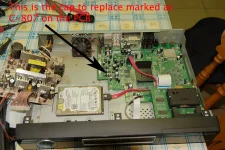
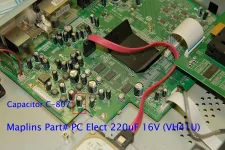
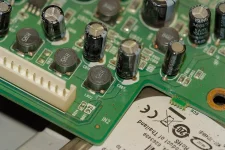
The repair and what you will need: REMEMBER TO EARTH YOURSELF
1: 25 watt soldering iron.
2: Good quality 60/40 silver solder, eutectic solder 63/37 in an ideal world (do not use plumbers solder eg wickes)
3: Philips screwdriver
4: Cotton Buds... the wife does have her uses.
5: PCB Cleaner not necessary but I am a tad anal.
6: Tin Snips
7: The replacement Electrolytic Capacitor 200uF 16v (Maplins Part# (VH41U) £0.49p.
I stripped down my Duo and took the importunity to give it a good clean, especially the fan and now it's almost silent. This RX could be getting on for 3yrs old now and it get heavy/daily use.
One thing I did find, I initially started out using my 15watt iron to remove the old cap, couldn't generate enough heat to melt the old solder, be warned, this is not an environment for blow torches. Take your time and if you don't feel confident in doing the repair use those who have offered their services. I ended up needing to use my 25watt iron to remove the old cap but switched to my 15watt iron to resolder the new one. This leads me to believe the original PCB manufacturer used pretty hard solder (too much tin) in making their boards. 15watt should be sufficient for 99% of electronic soldering.
After you've desoldered the old cap use a cotton bud + pcb cleaner to remove any old flux, crap etc.
On to soldering the new cap in, Tip: do not cut off the legs at this stage. Make sure you get the polarity correct. depending where you source your capacitor from you will see from the attached photos that they are well marked. The have a coloured band running vertically denoting the - (negative) side. This faces the front as you look a the RX (display being the front). I removed the motherboard to do the work as in the long run you'll do a better job and it makes things a whole lot easier.
Once you've soldered the new cap in, snip the unwanted legs off and give the area a quick clean. Job done bar putting the whole thing back together. Tip: take some piccies this will help to remember how the thing came apart (what plugs in where/which way round)
Hope this guide helps.
Regards
Peter


