Superb quality and spec AB-Com PULSe 4K SE. Crazy offer! Only £99! FREE UK DELIVERY! 4K UHD, Enigma 2, Multiboot 4 images & more!...
Superb quality and spec AB-Com PULSe 4K Rev II Twin Satellite tuner only £149! FREE UK DELIVERY! 4K UHD, Enigma 2, SATA HDD facility, Multiboot 4 images & more!...

MetrixHD_MOD (Now includes a full 1080 HD version too)

MetrixHD v.2.0

I apologize for my English - Google translator.

No need to install the new firmware.
You must remove the existing (if set) version of the skin MymetrixHD.
With an established skinned MyMetrixHD_MOD quite compatible.

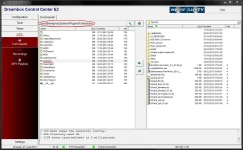
To manually remove the need to gain access to your receiver via FTP (for example through DCC_E2 v.1.5) and delete the following folders:
(See the attached screenshots)
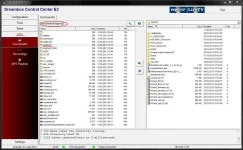
dcc1.webpdcc2.webp
and files: (with the same name *.py and *.pyo)

From folder /usr/lib/enigma2/python/Components/Converter
ClockToTextMod.py, -.pyo
EventNameMod.py, -.pyo
MetrixCombinedEventName.py, -.pyo
MetrixRefString.py, -.pyo
MetrixWeather.py, -.pyo
RemainingToTextMod.py, -.pyo
ServiceName2.pyo

From folder /usr/lib/enigma2/python/Components/Renderer
XPicon.py, -.pyo
XPiconChannel.py, -.pyo

Tonight I will lay out your skin and makeup work (edited) skin.hml
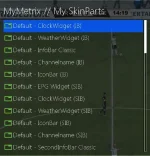
 
We also managed to show a lack of SIB.
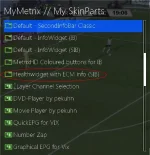
"Default HealthWidget" (IB & SIB) does not show show SIB, because converters used for VTI image.
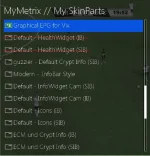
Here is my set of Skinparts which is generated by working skin.hml. If you need, a set "HealthWdget with ECM info (SIB)"
from scwheeler
mm-sp1.webpmm-sp2.webpmm-sp3.webp

2 scwheeler
It is advisable to add "MetrixHD colored buttons" for SIB.
 
Hi

I haven't installed nothing as of yet and i currently use the skin from the first few pages of the topic. Can you please let me know how i install this skin and eg extras onto my receiver (TM TWIN)? Also can you please let me know if i need to remove anything and what needs to be installed to get to where everyone is on the last message.

Your help is much appreciated.
 
setup a git, and i could build for feeds.
 
Thanks Andy - it is very nearly there ;)

Stav - at this stage I would wait and and get from the feeds very soon. I hope you will not have to uninstall anything this way.
 
2 scwheeler
Hi
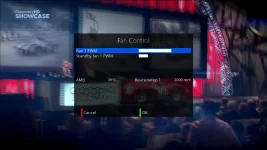
SkinPart - screen for vix plugin TempFanControl

Code:
<!-- /*ViX system plugin TempFanControl -->
  <screen backgroundColor="metrixBackground" flags="wfNoBorder" name="TempFanControl" position="center,center" size="570,400" title="Fan Control">
    <ePixmap pixmap="MetrixHD/buttons/key_red.png" position="10,360" size="140,40" alphatest="on" />
    <ePixmap pixmap="MetrixHD/buttons/key_green.png" position="290,360" size="140,40" alphatest="on" />
    <widget source="red" render="Label" position="45,360" zPosition="1" size="140,40" font="Regular;20" halign="left" valign="center" backgroundColor="metrixBackground" transparent="1" />
    <widget source="green" render="Label" position="325,360" zPosition="1" size="140,40" font="Regular;20" halign="left" valign="center" backgroundColor="metrixBackground" transparent="1" />
    <widget backgroundColor="metrixBackground" font="SetrixHD; 32" halign="center" position="10,10" render="Label" size="550,50" source="Title" transparent="1" zPosition="1" />
    <widget name="config" position="10,70" size="550,120" scrollbarMode="showOnDemand" />
    <widget source="SensorTempText0" render="Label" position="10,210" zPosition="1" size="90,40" font="Regular;20" halign="left" valign="top" backgroundColor="metrixBackground" transparent="1" />
    <widget source="SensorTemp0" render="Label" position="100,210" zPosition="1" size="100,20" font="Regular;19" halign="right">
      <convert type="SensorToText">
      </convert>
    </widget>
    <widget source="SensorTempText1" render="Label" position="10,250" zPosition="1" size="90,40" font="Regular;20" halign="left" valign="top" backgroundColor="metrixBackground" transparent="1" />
    <widget source="SensorTemp1" render="Label" position="100,250" zPosition="1" size="100,20" font="Regular;19" halign="right">
      <convert type="SensorToText">
      </convert>
    </widget>
    <widget source="SensorTempText2" render="Label" position="10,290" zPosition="1" size="90,40" font="Regular;20" halign="left" valign="top" backgroundColor="metrixBackground" transparent="1" />
    <widget source="SensorTemp2" render="Label" position="100,290" zPosition="1" size="100,20" font="Regular;19" halign="right">
      <convert type="SensorToText">
      </convert>
    </widget>
    <widget source="SensorFanText0" render="Label" position="290,210" zPosition="1" size="150,40" font="Regular;20" halign="left" valign="top" backgroundColor="metrixBackground" transparent="1" />
    <widget source="SensorFan0" render="Label" position="440,210" zPosition="1" size="120,20" font="Regular;19" halign="right">
      <convert type="SensorToText">
      </convert>
    </widget>
    <widget source="SensorFanText1" render="Label" position="290,250" zPosition="1" size="150,40" font="Regular;20" halign="left" valign="top" backgroundColor="metrixBackground" transparent="1" />
    <widget source="SensorFan1" render="Label" position="440,250" zPosition="1" size="120,20" font="Regular;19" halign="right">
      <convert type="SensorToText">
      </convert>
    </widget>
    <widget source="SensorFanText2" render="Label" position="290,290" zPosition="1" size="150,40" font="Regular;20" halign="left" valign="top" backgroundColor="metrixBackground" transparent="1" />
    <widget source="SensorFan2" render="Label" position="439,290" zPosition="1" size="120,20" font="Regular;19" halign="right">
      <convert type="SensorToText">
      </convert>
    </widget>
  </screen>
<!-- ViX system plugin TempFanControl*/ -->

tfc_vix.webp
 
Last edited by a moderator:
Thanks Sowa, your skinpart is uploaded here :)

Code:
http://live.mymetrix.de/?page=view-skinpart&skinpart_id=145&titleext=Temp%20&%20Fan%20control%20for%20Vix%20by%20Sowa
 
MetrixHD_MOD

I find the epg a bit slow since using this skin. Normally solo 2 flies. But now there's a delay between pressing the epg key and display showing up. Anyone experience this? Wonder of its because if the large picons? Same with mini epg (right direction key).
 
Jugulator - Possibly on solo2, but I have just compared to VixBMC and Night on Duo and can't tell the difference
 
Still wondering how I can get picons to show in this skin on my VU+ Solo2. Picons do work on the MOD theme.
 
Stav- will be in the feeds very soon, then some small updates for epg, timeshift window for vix with current timeshift programme.

SLK - No picons at all? Imaxx changed the picon renderer, and as it worked it here i was loathed to change it to keep future updates. Can you check you have XPicon.py, XPicon.pyo, XPiconChannel.py, XpiconChannel.pyo in usr/lib/enigma2/components/renderer.
 
Same for me, skin and picons working fine on my duo, but on solo just did a fresh new install, installed ipk and applied the skin, no picons being picked up from my usb. USB is mounted as /media/hdd and formatted to ext4.
 
working fine now...changed usb mount from hdd to usb!
 
No joy here, can you please explain how to install them on usb?

Just found out that this xpicon shd package is available in pluginspanel. After install from there it works fine except for channels on 0,8w that wont show picon. 4,8e, 13e and 19,2e are fine. Anyone knows whats up with 0,8w? Im using default satellites.xml.
 
Can't answer your question as doesn't use this, but pleased you've got some.
 
MetrixHD_MOD

My epg has gotten more slower now. Now, for the first time, I am getting a message "please while gathering data" when I press epg button on solo2. When I change the skin back to vix night theme also I get the same. So not sure if its entirely due to the skin. But this started since I installed this skin. Any other solo2 users experience this?

Another this I noticed is that the digit "2" and 8 appear cut. I think it is to do with the font.
 
Last edited by a moderator:

OpenViX Feeds Status

Back
Top