Superb quality and spec AB-Com PULSe 4K SE. Crazy offer! Only £129! FREE UK DELIVERY! 4K UHD, Enigma 2, Multiboot 4 images & more!...
Superb quality and spec AB-Com PULSe 4K Rev II Twin Satellite tuner only £179! FREE UK DELIVERY! 4K UHD, Enigma 2, SATA HDD facility, Multiboot 4 images & more!...

[VU+ Duo2] NFS Mounts - share name issue

  • Thread starter Thread starter Snookiwooki
  • Start date Start date
S

Snookiwooki

Guest
All,

I tried adding an NFS mount point on my DUO2 running the current VIX build (checked to see if there was a newer version) - When I select the NFS mount in the browser I get to the next screen where I can change various settings. The share is called TV and the host is NAS but in the config screen NAS is displayed as the share name not TV...then when I go to change it I get the button layout at the bottom of the screen showing letters etc, but it won't cannot cycle through eg 2ABC or 6MNO- only the numbers are displayed so can only get say 1111222 etc

Is this a bug?

Cheers
 
All,

I tried adding an NFS mount point on my DUO2 running the current VIX build (checked to see if there was a newer version) - When I select the NFS mount in the browser I get to the next screen where I can change various settings. The share is called TV and the host is NAS but in the config screen NAS is displayed as the share name not TV...then when I go to change it I get the button layout at the bottom of the screen showing letters etc, but it won't cannot cycle through eg 2ABC or 6MNO- only the numbers are displayed so can only get say 1111222 etc

Is this a bug?

Cheers

you need to enable 'Text support' in remote control setup.
 
you need to enable 'Text support' in remote control setup.

Many thanks - much appreciated.

Though can anyone confirm why mount in the config window appear as the host name rather than share names? is this expected?

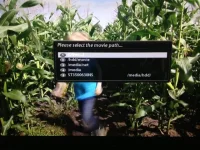
Also once the mount is created I cannot find it anywhere within movie player - maybe I need to read a how to on NFS mounts?

Cheers
 
Also once the mount is created I cannot find it anywhere within movie player - maybe I need to read a how to on NFS mounts?
Use 'Location' (default is yellow) to navigate to any desired location. You can also make symlinks to often used locations.
 
Are you using NFS or CIFS?
Make sure the NAS is setup correctly.

If that is the case:
stop E2 via telnet ('init4')
remove the files etc/fstab and etc/enigma2/automounts.xml
then restart E2 via telnet ('init3') and setup all mounts again
 
Rob,

Thanks will try deleting the files...

I have tried via NFS and CIFS. It is a QNAP running 4.0x firmware. For CIFS I set up a user with access to the share and set the username and password in the mount manager. - same as for NFS - mount states it is being created sucessfully but never appears...

Cheers
-Steve
 
Ok,

So removed the 2 files and restarted E2, on trying to configure a mount point the box (E2 probably) crashes and reboots, tried this 3 times and each time the same.

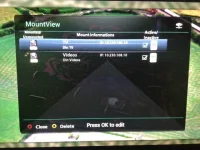
Copied the 2 files from my old ET9000 box over to the DUO2 and creating mounts now show under Mount Manger - though do not show when choosing location "yellow"...

-Steve
 
So removed the 2 files and restarted E2, on trying to configure a mount point the box (E2 probably) crashes and reboots, tried this 3 times and each time the same.
We would need to read the crashlogs to be able to see what happened.


Copied the 2 files from my old ET9000 box over to the DUO2 and creating mounts now show under Mount Manger - though do not show when choosing location "yellow"...
Are they showing to be active in mountmanager?
 
Are you using NFS or CIFS?
Make sure the NAS is setup correctly.

If that is the case:
stop E2 via telnet ('init4')
remove the files etc/fstab and etc/enigma2/automounts.xml
then restart E2 via telnet ('init3') and setup all mounts again

NO!!!, never remove the file 'etc/fstab' it will lead your un-useable.
 
Rob,

Thanks will try deleting the files...

I have tried via NFS and CIFS. It is a QNAP running 4.0x firmware. For CIFS I set up a user with access to the share and set the username and password in the mount manager. - same as for NFS - mount states it is being created sucessfully but never appears...

Cheers
-Steve

have you installed NFS from network setup menu ?
 
have you installed NFS from network setup menu ?

Andy,

Thank you - I had copied back a copy of etc/fstab from my ET9000 but will update it with the one you attached incase of issues.

Yes I do remember enabling NFS under Networking, but will double check later.

thanks again
 
Hi guys I have a duo2 and a solo2 using my synology NAS. I am no expert but have stumbled my way through it and managed to get it working the way I want.

First thing I did was to create some shared folders on my NAS. I have made 4 shared folders. Music,Video,Photos and TV Recordings. After creating the shared folders I have to set up the privilages for each, so I put the ip address of my duo2 and solo 2 in here. You can also set the read/write parameters here too. When thats done goto Network/Mounts Setup/network browser on the set top box and scan the network. When the device appears click on it to expand and show the shares. Just give it a local share name and green to save. The only other bit I changed was for the TV Recording share. I toggled the Use as HDD replacement tab to yes as I dont use internal hard drives in any of my boxes. This way i can record from and watch from any of my boxes. All shares are available by pushing the yellow location button and navigating to the desired folder.
 
Update...

Stopped E2 - Copied over the fstab file from Andy, re-started E2, removed previous mounts, restarted the box just to be sure... Excactly as before could create mounts but not showing under the "yellow" locations...

To test if it was a share issue I created a new share and full access to everyone and NFS on my QNAP - testing mount again the same as above, and again same share with CIFS.


Decided to do a factory reset - (mainly to check another oddity, with movie player with AutoResolution outputs a 720x504 24frames file as 1080p 24, default res is 576i (have a video processor to upscale) ... but anyway)

Configured the basics - making sure NFS was running under Network... now back to the very beginning - ie creating a mount will not even show under mounts manager. So maybe be an issue with the default automounts.xml?

Will try creating a mount to a W8 machine share later and mounting with CIFS... to isolate if it is a QNAP issue though I am sure I am not the only one with a QNAP NAS and a DUO2...

If all else fails I will do a fresh install of of the the build...

Cheers
-Steve
 
Update...

Stopped E2 - Copied over the fstab file from Andy, re-started E2, removed previous mounts, restarted the box just to be sure... Excactly as before could create mounts but not showing under the "yellow" locations...

Cheers
-Steve


are they showing in About screen ?
 
Today's update.

On updating to 733, weirdly I can add some shares, though they don't all show in Mounts manager, but do via yellow. The one which does - if I add a new one I get the message I have changed the name and do I want to change the existing one? - which is odd as I have used a different share name...

Checking the files:
In automounts.xml there is 1 share listed where as in FStab there are three of which 2 work/are visible via yellow the other relates to a test share I created yesterday but never showed under mounts manager or yellow... and no longer exists on the NAS.

I am guessing fstab is the file system table with automounts being the visual representation for E2

Is there a config reference I could use to create the correct details in the files manually please? I could guess\fiddle but a definitive answer on layout would be superb.

What file permissions should be on both files please?

It is as if the files are not having the correct\any data written to them. maybe due to incorrect permissions, a file handle is incorrect\corrupt or file is already open...

cheers.
-Steve
 
Last edited by a moderator:

OpenViX Feeds Status

Back
Top