Superb quality and spec AB-Com PULSe 4K SE. Crazy offer! Only £99! FREE UK DELIVERY! 4K UHD, Enigma 2, Multiboot 4 images & more!...
Superb quality and spec AB-Com PULSe 4K Rev II Twin Satellite tuner only £149! FREE UK DELIVERY! 4K UHD, Enigma 2, SATA HDD facility, Multiboot 4 images & more!...

Skipping time in media player

GiP

Forum Supporter ,
Joined
Sep 19, 2010
Messages
309
Reaction score
1
Points
18
Location
Firenze, Italy
Hi,

I saw in the help page that I should be able to skip by an asked amount of time with a long press of Red (forw) or Blue (back) beside the fact that it seems backward, it dosn't work. If I use the help page and press OK when on the proper line it asks and it works, but a long Blue or Red does the usual work as when not in media player. I had this problem in Vix 1.1 and just upgraded to 1.2 (that was flawless, Great!) but it does the same.

G
 
Hi,

I saw in the help page that I should be able to skip by an asked amount of time with a long press of Red (forw) or Blue (back) beside the fact that it seems backward, it dosn't work. If I use the help page and press OK when on the proper line it asks and it works, but a long Blue or Red does the usual work as when not in media player. I had this problem in Vix 1.1 and just upgraded to 1.2 (that was flawless, Great!) but it does the same.

G


try press and hold the back/forward skip buttons :D, think it is what you want
 
try press and hold the back/forward skip buttons :D, think it is what you want

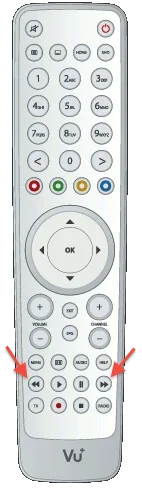
According to the Help page Skip Forw/Back are the Red and Blue buttons and they don't work, short or long. Are there other skip buttons.
G
 
According to the Help page Skip Forw/Back are the Red and Blue buttons and they don't work, short or long. Are there other skip buttons.
G

just try holding he fast forward/rewind, the help might need updating :)
 
Try what? What are the "skip buttons"?

G

long press on these buttons,

attachment.php


you can also press:

'1' to jump back 15sec '3' to jump forward 15 secs
'4' to jump back 60sec '6' to jump forward 60 secs
'7' to jump back 300sec '9' to jump forward 300 secs
 

Attachments

  • rc.webp
    rc.webp
    13 KB · Views: 21
I would have called them fast forw/back and not skip but OK, I'll try that. I know about the '1','3' etc....

But seriuosly, how do you know about this things? Is there a manual or guide or something? As it seems that the help page is not always correct.

G
 
I would have called them fast forw/back and not skip but OK, I'll try that. I know about the '1','3' etc....

But seriuosly, how do you know about this things? Is there a manual or guide or something? As it seems that the help page is not always correct.

G

just many hours of reading through the Engima2 code, there no manual :)
 
just many hours of reading through the Engima2 code, there no manual :)

I see, "Use the source Luke!"

Anyway those keys work, thanks! I tried the Fast forw/back before but using the right/left arr not the proper keys and it didn't work.

G
 

OpenViX Feeds Status

Back
Top