Superb quality and spec AB-Com PULSe 4K SE. Crazy offer! Only £129! FREE UK DELIVERY! 4K UHD, Enigma 2, Multiboot 4 images & more!...
Superb quality and spec AB-Com PULSe 4K Rev II Twin Satellite tuner only £179! FREE UK DELIVERY! 4K UHD, Enigma 2, SATA HDD facility, Multiboot 4 images & more!...

[VU+ Duo] Streaming away from home not working

avi68

Member
Joined
Dec 18, 2013
Messages
307
Reaction score
0
Points
16
Hi Everyone! Firstly this is my first post (so please be gentle :p)

I purchased a vu plus duo and everything works great! However I cannot stream tv from outside my network. When I type my address xxxxxx.dyndns.org:85 it directs me to openwebif however when I want to stream it doesn't work. This is the same thing on the ipad, when I take it to my brothers house, it just comes up with an error, cannot stream. I have a 11.5mg upload speed and my brother has 40mg download, so it cant be a issue with the speed.

Everything inside my network works fine, its only when I want to stream from someone elses house, I cant view anything.

Any ideas/help anyone. Oh yeah I have changed my port to 85 due to me portforwarding my nas on port 80 and my cctv on port 88.

Thanks in advance!

[latest vix build 806]
 
Have you forwarded the stream port 8001 as well?
 
No I have not done that. In the router I have just forwarded 85.

In openwebif plugin I have put in:

Openwebinterface Enabled = yes

http port = 85

enable https = yes

https port = 85

start services remaining for xbmc =yes

parental control = no

add service name to stream info = no
 
Forward port 8001 to the IP address of your duo.

Should work then
 
Forward port 8001 to the IP address of your duo.

Should work then

Do I have to do this in the router settings? Do I have to change the configuration in the plugin on the box?
 
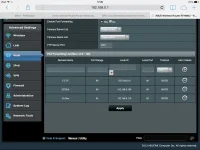
image.webp
Just to double check, I just have to change the port range to 8001 and leave local port to 85.
 
Last edited:
Can you access web if ok?

Is port 8001 set in the android app for the streaming port?
 
No I can't. Internally I can, externally I can't.
 
Not sure as it works on my duo 2 with vix using webif port 80 and streaming port 8001 forwarded in the router.

Try port 80 on http
 
Last edited:
Not sure as it works on my duo 2 with vix using webif port 80 and streaming port 8001 forwarded in the router.

Try port 80 on http

The only problem is my nas is port forwarded to port 80. Is there a transcoding plugin I have to install?
 
No transcoding plugin on the duo.

Try port 90 on http.

If you can access it internally but not externally it suggests the problem is at the router.

Do you have the correct external IP address?
 
Now I can't access it internally. The duo's settings are the same, only thing I did was do a complete reboot of the box. I might need to change https port to 8001 then reboot again to see if it comes back.

Yes I'm using dyndns so no need for external ip.
 
Has your duo IP address changed on the reboot? I notice on your screenshot it's in the 100 range which some routers reserve for DHCP ?
 
You need to forward both ports.

So set a rule to forward port 85 as you have done and set another rule to forward port 8001.

Do not set https to 8001 on the box as 1 you won't be able to do this and 2 thats for enabling a secure connection in to the web interface and nothing to do with streaming.
 
Thanks guys!! Thanks dwarf, did exactly as you said and it works! Thanks a million!:thumbsup:
 
Hi sorry to jump in but I have been pullingy hair out trying to get this to work. I have a vu duo running 808. I have an android device with vu app. But I can't get this to work. Internally I can play no bother on my LAN. I have 18meg upload.
Any chance of a step by step of what you did. Thanks
 

OpenViX Feeds Status

Back
Top