satmanbasil
V.I.P
Hi
On flashing my duo with the new image i didnt see the splash screen on my tv at first it was only when i noticed on the front panel of the receiver it was scrolling through the hdmi scart etc so i waited until it came back to hdmi and i pressed ok but still had to reselect on my tv the output to enable me to see the screen.
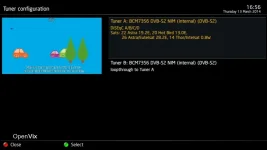
Also not sure but i think the default for tuner wasnt right normally its tuner A as default with tuner B looped to A but for some reason it did it as tuner B default and i had to loop A to tuner B anyway I managed to change the default in the menu to tuner A then made the changes but maybe you might look at that to make sure Tuner A is the default at the point of install for those who may not be able to work out whats wrong.
otherwise guys good job worth the wait
On flashing my duo with the new image i didnt see the splash screen on my tv at first it was only when i noticed on the front panel of the receiver it was scrolling through the hdmi scart etc so i waited until it came back to hdmi and i pressed ok but still had to reselect on my tv the output to enable me to see the screen.
Also not sure but i think the default for tuner wasnt right normally its tuner A as default with tuner B looped to A but for some reason it did it as tuner B default and i had to loop A to tuner B anyway I managed to change the default in the menu to tuner A then made the changes but maybe you might look at that to make sure Tuner A is the default at the point of install for those who may not be able to work out whats wrong.
otherwise guys good job worth the wait