Superb quality and spec AB-Com PULSe 4K SE. Crazy offer! Only £129! FREE UK DELIVERY! 4K UHD, Enigma 2, Multiboot 4 images & more!...
Superb quality and spec AB-Com PULSe 4K Rev II Twin Satellite tuner only £179! FREE UK DELIVERY! 4K UHD, Enigma 2, SATA HDD facility, Multiboot 4 images & more!...

CCam not activating after restart? Bug or setting?

steveharman

New member
Joined
Mar 8, 2014
Messages
175
Reaction score
0
Points
0
Age
57
Hi,

Zeus 0.22
CCam 2.3.0
GigaBLue QUAD

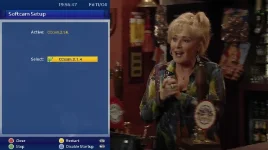
Whenever I restart the box, CCam isn't active any more - I have to go into SoftCam Manager and set it to active again whereupon my channels burst into life - is this a bug, or a setting I missed somewhere [to automatically activate CCam on startup] ?

Thanks,

Steve
 
Sorry I'm not with you - blue button gets me a list of extensions, including CCam... then what?

Thanks,

Steve
 
Re; the comment in the duplicate of this post (which I didn't deliberately duplicate - no idea how that happend...) The little tick is ticked in CCam "active" via SoftCam Manager - but it doesn't persist after a restart. I have to go in and re-tick the thing.

Steve
 
When you select to start CCcam on startup press the red button to close not the exit button.

It's CCcam not CCam :)
 
Active shows whether the cam is running or not.

You have to enable startup, so taht iyt starts automatically. Press teh blue button. If Autostart is enabled, there will be a tick next to it and legend next to Blue button will change name.
 
Brilliant, thanks for the blue button tip - no way I would have found that, absolutely no buttons shown on screen!! Cheers, Steve
 
The buttons and their functions are clearly displayed at the bottom of the screen (GB Quad, Zeus)
 
It looks like it's enabled. I would unticked and disable startup and restart box, go into cams and tick cam and start it, once done press enable start up and then restart box and see if that works, otherwise try another cam
 
Having issues with CCcam not updating after doing an online update to build 015 and 016 on vu+solo. It's ticked to auto start at startup, but it's not doing so.
 

OpenViX Feeds Status

Back
Top