
Superb quality and spec AB-Com PULSe 4K SE. Crazy offer! Only £99! FREE UK DELIVERY! 4K UHD, Enigma 2, Multiboot 4 images & more!...
Superb quality and spec AB-Com PULSe 4K Rev II Twin Satellite tuner only £149! FREE UK DELIVERY! 4K UHD, Enigma 2, SATA HDD facility, Multiboot 4 images & more!...
You are using an out of date browser. It may not display this or other websites correctly.
You should upgrade or use an alternative browser.
You should upgrade or use an alternative browser.

- Status
- Not open for further replies.

simonsez
ViX Skinner-Dev
- Joined
- Sep 26, 2011
- Messages
- 66
- Reaction score
- 0
- Points
- 0
- Location
- Worcester UK (Bolton Boy at Heart)
The green update arrow means..... You have an update ready to download 
R
ReigningSemetex
Guest
Thanks guys for creating this skin its really nice congrats
R
rborhara
Guest
Hi ive just updated to Apollo 001 image on my Vu Solo2 - installed this skin,
checked for further updates to the image and there arnt any (didnt do unstable updates) but i dont see the fix for the fast forward / rewind screen icon placement its still in the top left
checked for further updates to the image and there arnt any (didnt do unstable updates) but i dont see the fix for the fast forward / rewind screen icon placement its still in the top left
Last edited by a moderator:
R
rborhara
Guest
Did the deed , enabled unstable feeds, tried updates a few times but didnt get anywhere, dont think its working, so cant check if the skin is updated
Hi ive just updated to Apollo 001 image on my Vu Solo2 - installed this skin,
checked for further updates to the image and there arnt any (didnt do unstable updates) but i dont see the fix for the fast forward / rewind screen icon placement its still in the top left

Larry-G
V.I.P ,
- Joined
- May 19, 2010
- Messages
- 32,540
- Reaction score
- 405
- Points
- 0
- Age
- 48
Did the deed , enabled unstable feeds, tried updates a few times but didnt get anywhere, dont think its working, so cant check if the skin is updated
Read post two of this thread.
http://www.world-of-satellite.com/showthread.php?38533-Apollo-online-update
R
rossi2000
Guest
i dont know about transparent but i'll see about removing the outer black edge aswell.
R
rborhara
Guest
im confused, ive updated to Apollo 003 - ran the update , setup the bluehd skin as the default
Watch a recording press the forward button and the FW icon is still in the top left which covers the adverts to end countdown on some channels
I thought it amended?
Watch a recording press the forward button and the FW icon is still in the top left which covers the adverts to end countdown on some channels
I thought it amended?

Andy_Hazza
Moderator
I'm on latest BlueHD build and fast fwd/rewind icon is at the bottom left, has been for the past week or so now. If I was you, I would go back to default skin, remove plugin, reboot, re-install plugin and add it and then it asks to restart gui say yes and see if that corrects it.
N
nibor52
Guest
Hi Guys
I know I am probably being a bit of a numpty but where could I manually download the latest version of the skin if I cant download it from the feeds?
Many Thanks
I know I am probably being a bit of a numpty but where could I manually download the latest version of the skin if I cant download it from the feeds?
Many Thanks

Stanman
Well-known member
- Joined
- May 1, 2010
- Messages
- 11,284
- Reaction score
- 44
- Points
- 48
- Age
- 59
It's in the feeds. If you can't see it its a ready installed and will need deleting before installing.
Only other way is by an.ipk file AFAIK there isn't one for latest build.
Sent from my SM-N9005 using Tapatalk
Only other way is by an.ipk file AFAIK there isn't one for latest build.
Sent from my SM-N9005 using Tapatalk
R
rborhara
Guest
did exactly as you mentioned changed default skin, reboot, removed skin plugin, rebooted, reinstall, rebooted, changed blue hd to default, rebooted
checked for software update (none found on apollo 003) and FF / REW its still at the top,
ive got a vu solo2 - could it be box specific?
checked for software update (none found on apollo 003) and FF / REW its still at the top,
ive got a vu solo2 - could it be box specific?
I'm on latest BlueHD build and fast fwd/rewind icon is at the bottom left, has been for the past week or so now. If I was you, I would go back to default skin, remove plugin, reboot, re-install plugin and add it and then it asks to restart gui say yes and see if that corrects it.
R
rossi2000
Guest
did exactly as you mentioned changed default skin, reboot, removed skin plugin, rebooted, reinstall, rebooted, changed blue hd to default, rebooted
checked for software update (none found on apollo 003) and FF / REW its still at the top,
ive got a vu solo2 - could it be box specific?
not sure what could be causing that issue with the icons, its definatley not box specific.
Rahat786786
New member
- Joined
- Apr 8, 2012
- Messages
- 369
- Reaction score
- 0
- Points
- 0
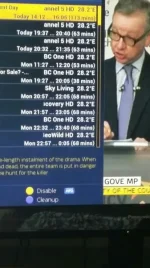
Im on Apollo 003 and on the timer list screen before the 28.2e used to overlap, now the actual channel name is cut out.
R
rossi2000
Guest
a proper screenshot please no phone grab.
Rahat786786
New member
- Joined
- Apr 8, 2012
- Messages
- 369
- Reaction score
- 0
- Points
- 0
This what he means I think, long channel names are cut off. Box probably needs extending
Yep, exactly what I meant.
- Status
- Not open for further replies.
Similar threads
R
- Replies
- 302
- Views
- 182K
R
