


Hi,
I'm wondering if someone could help me try and change a default setting within AutoTimer - The 'Only on Weekday: ??????' option?
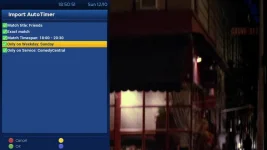
For example if I choose to record (as in this example) 'Friends' it then proceeds to give me the options as listed in picture but I wish for the 'Only on Weekday: Sunday' (in this example) to be unticked by default (ie check for matches on any day of the week) for all future recordings setup.
I've looked at default settings in recording/AutoTimer, etc and nothing is available, that I could see anyhow, for having this option unticked by default from now on.
I'm guessing I would need to change a .pyo file like 'AutoTimerImporter.pyo' within (at a guess) the directory:
/usr/lib/enigma2/python/Plugins/Extensions/AutoTimer
Any help would be appreciated.
Thanks in advance.
I'm wondering if someone could help me try and change a default setting within AutoTimer - The 'Only on Weekday: ??????' option?
For example if I choose to record (as in this example) 'Friends' it then proceeds to give me the options as listed in picture but I wish for the 'Only on Weekday: Sunday' (in this example) to be unticked by default (ie check for matches on any day of the week) for all future recordings setup.
I've looked at default settings in recording/AutoTimer, etc and nothing is available, that I could see anyhow, for having this option unticked by default from now on.
I'm guessing I would need to change a .pyo file like 'AutoTimerImporter.pyo' within (at a guess) the directory:
/usr/lib/enigma2/python/Plugins/Extensions/AutoTimer
Any help would be appreciated.
Thanks in advance.


