Superb quality and spec AB-Com PULSe 4K SE. Crazy offer! Only £99! FREE UK DELIVERY! 4K UHD, Enigma 2, Multiboot 4 images & more!...
Superb quality and spec AB-Com PULSe 4K Rev II Twin Satellite tuner only £149! FREE UK DELIVERY! 4K UHD, Enigma 2, SATA HDD facility, Multiboot 4 images & more!...

Some ideas to improve the Graphical EPG screen

markus625

ViX Beta Tester
Joined
Dec 8, 2011
Messages
1,104
Reaction score
23
Points
0
Age
56
Guys just throwing up some ideas that I think would improve the Graphical EPG screen.

1: When navigating the epg pressing the OK key would now either zap or zap and exit the epg, I propose a context menu popup with three or more options of Watch,Record,Add Auto Timer,
maybe other options like TVDB and TMDB, IMDB perhaps

2: Add an option to access recordings via the red button instead of the imdb function which is only good for movies really and not general tv programs, at the moment the only way of accessing recordings or pvr is through the dedicated pvr key.

3: Use either the blue or green key to change bouquets, the only way to do this within the guide is to use the dedicated TV key on the original remote but no way of doing this using a tv remote if your using the cec functionality which many do.

Was looking at doing a mockup using the above if you guys think the above suggestions would be good to implement.
 
1. in the menu settings you can change what the OK button does, zap or zap and exit, the context menu sounds a good idea. press blue for the context menu, and can move the addtimer/autotimers/imdb in there like you say. red button for recordings. stuff could be added to the list depending on what youve got installed. TMDB, TVDB etc.
 
Context-sensitive key binding set-ups might be a better way to handle this?

You can already set keys to handle the functions you want, but not in a context-sensitive way, only "globally".
 
1. in the menu settings you can change what the OK button does, zap or zap and exit, the context menu sounds a good idea. press blue for the context menu, and can move the addtimer/autotimers/imdb in there like you say. red button for recordings. stuff could be added to the list depending on what youve got installed. TMDB, TVDB etc.

I was actually saying press the ok button and a menu would pop up freeing up some of the coloured buttons for other things.
 
ahh right so press ok to call the context menu. im not sure about that one, ok should maybe be kept to just ok onto a channel but pressing another button like blue to bring up the context menu to choose other options, sounds abit better imo.
i like this idea but getting it implemented is another thing.
 
1: When navigating the epg pressing the OK key would now either zap or zap and exit the epg, I propose a context menu popup with three or more options of Watch,Record,Add Auto Timer, maybe other options like TVDB and TMDB, IMDB perhaps
I personally agree with rossi the ok button be left as it is but use another coloured button instead for context-sensitive options.

2: Add an option to access recordings via the red button instead of the imdb function which is only good for movies really and not general tv programs, at the moment the only way of accessing recordings or pvr is through the dedicated pvr key.
You can already change the assignment of buttons via menu settings as I've set, on my solo2, red button as PVR (as well as the dedicatated PVR button I have) and < > as channel up/down. I'm not sure if they work from within EPG listings though or if it's whilst watching TV (live) only!!!

If it's the latter then it would be nice to pick/choose what each coloured button from the EPG can do rather than having red for IMDB, etc. I do use, and like, the Blue for AutoTimer though.

I don't use IMDB but of course some may do.
 
Last edited:
I personally agree with rossi the ok button be left as it is but use another coloured button instead for context-sensitive options.

You can already change the assignment of buttons via menu settings as I've set, on my solo2, red button as PVR (as well as the dedicatated PVR button I have) and < > as channel up/down. I'm not sure if they work from within EPG listings though or if it's whilst watching TV (live) only!!!

If it's the latter then it would be nice to pick/choose what each coloured button from the EPG can do rather than having red for IMDB, etc. I do use, and like, the Blue for AutoTimer though.

I don't use IMDB but of course some may do.

ye i think those button assignments maybe for the infobar only. im not 100% on that though, i never use the function.
 
It would be a lot better if they would allow all epg buttons to be remapped to individual tasts, then People wouldn't have to use cooltvguide. I mean who uses IMDb search anyway? 3 different ways to set a timer?? Not needed in my opinion. Channel up & Down are a move natural and logic way to page up & down.
But we can only dream.


Sent by pressing the screen on 1 of my Apple devices, cuz that's how I roll.
 
That's one of the reasons using a TV-RC for an STB doesn't seem to be a good idea.
Get yourself a Harmony and you'll see a much better solution.

I whole heartily agree. I just for the first time in nearly two years tried to use the original Vu+ Ultimo remote and within ten minutes took the batteries out and put it back in the box in favor of my Harmony 600.
 
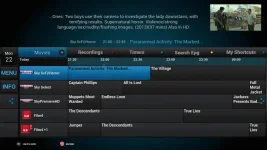
Heres something ive designed that would fit the bill, based on youview.
epg-bg.webp
 
Just depends what we want the colored buttons to do.
 
It would be a lot better if they would allow all epg buttons to be remapped to individual tasts, then People wouldn't have to use cooltvguide. I mean who uses IMDb search anyway? 3 different ways to set a timer?? Not needed in my opinion. Channel up & Down are a move natural and logic way to page up & down.
But we can only dream.
+1000 to that!
It would be fantastic if we could map the coloured buttons on the EPG to do different things! IMDB search is not going to be used by 90% of people, but page up/down or recordings is! which brings me to.....


Heres something ive designed that would fit the bill, based on youview.
View attachment 39445

How the heck did you remap those buttons? lol
 

OpenViX Feeds Status

Back
Top