Superb quality and spec AB-Com PULSe 4K SE. Crazy offer! Only £99! FREE UK DELIVERY! 4K UHD, Enigma 2, Multiboot 4 images & more!...
Superb quality and spec AB-Com PULSe 4K Rev II Twin Satellite tuner only £149! FREE UK DELIVERY! 4K UHD, Enigma 2, SATA HDD facility, Multiboot 4 images & more!...

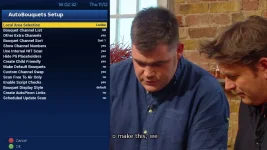
UKCvS AutoBouquets E2 by LraiZer BETA.

1_0_19_1B1D_802_2_11A0000_0_0_0.webp

Uploaded.

1_0_19_1B1D_802_2_11A0000_0_0_0 (1).webp

Image two.

1_0_19_1B1D_802_2_11A0000_0_0_0.webp

After I run the plugin. Those bouquets aren't empty either.
 
Last edited by a moderator:
Thanks.
You did not say that you were using Sort 1. I assumed you were using the default of "HD First", they are blank when you use that.

You are right they do show when using sort 1. If you want to use sort 1 with no adults, until issue in image is fixed, I suggest you edit the "custom_sort_1.txt" and remove the following lines from it:

816 to 835
861 to 910

Use Notepad++ or other linux compatible editor. This is different to windows notepad
 
Attached is the 13 Nov 2014 "test version". Source files are on Lraizer's home forum. This is the feeds from Apollo 98 so can be installed through plugin downloads menu. Package contains: mips32el ipk, sh4 reader and plugin folder for manual installation.

The hidden bouquets being shown are not a result of changes in the plugin. Test on Apollo 95 to confirm.

13-11-2014
User able to select between HD and SD regions, default is SD.
Amended symlink process to cater for numbering in plugin and Service Reference Picons
05-12-14
Removed Film4 HD by use of supplement file
Added SBO HD by use of supplement file

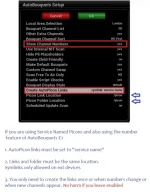
The thread is rather long, it my be beneficial for people to start a thread in the plugin support section. After reading the readme file. Attaching a picture of the settings page and any amended files being used (supplement, custom swap, custom sort) will go a long way in demonstrating exactly what has been configured.


One way to take a screenshot: Edit the following line so that IP address is the same as your receiver's. Paste the line in your web browser, you will get a screenshot. Right click, save it to PC and upload it to your post.
Code:
[SIZE=4][COLOR="#0000FF"]http://192.168.x.xx/grab?format=jpg[/COLOR][/SIZE]
 

Attachments

Last edited:
Is there anywhere that shows you what each bouquet display style looks like?

Sent from my SM-G900F using Tapatalk
 
Yes I have the same problem .. But I have seen that if you press channel 1 .. Just 1 is will take you to bbc 1 reg .
 
Hi, anyone use this on OpenATV image, doesnt seem to work as good as it does on Openpli or vix, example the swap doesnt work or even setting the bouquet style either ? anyway to it working like it does on other images ?

Thanks

I'm having the same problem with OpenATV v4.2 on my VU+ Zero and 13/11/14 version of AutoBouquets E2. Some of the configuration settings seem to get ignored. Does anyone have a fix for this on the OpenATV platform (other than just using ABM)? Does anyone know where the configuration settings are actually saved to?
 
I'm having the same problem with OpenATV v4.2 on my VU+ Zero and 13/11/14 version of AutoBouquets E2. Some of the configuration settings seem to get ignored. Does anyone have a fix for this on the OpenATV platform (other than just using ABM)? Does anyone know where the configuration settings are actually saved to?
Firstly, apologies for replying to my earlier post, but I can't edit it any longer.

I've done a bit of digging, and found that the autobouquets_e2.sh file generates the configuration parameters that are passed to the main AutoBouquets application. It looks as if the saved customised configuration data should be passed to this file (in the form of $1 .. $18), but for some reason this isn't happening consistently. I've therefore gone in and manually updated this file to reflect my preferences, and this seems to have 'fixed' it for me. Specifically, I've commented out the Autobouquets E2 (defaults) section as follows:

Code:
# Autobouquets E2 (default)
# if [ "$1" = "None" ] || [ "$1" = "" ]; then
#	DATA="4101"
#	REGION="07"
#	EXTRA="0"
#	CUSTOM_SORT="0"
#	NUMBERING="1"
#	UPDATE="true"
#	UPDATE_FLAG="1"
#	PLACEHOLDER_FLAG="0"
#	PARENTAL_CONTROL="1"
#	DEFAULT_BOUQUETS="true"
#	CUSTOM="0"
#	FTA_ONLY="2"
#	SCRIPTCHECKS="true"
#	STYLE="0"; STY="  - -  "
#	PICONLINK="1"
#	PICONFOLDER="3"
#	PICON_STYLE="0"
# fi

and replaced it with the following:

Code:
	EXTRA="1"
	CUSTOM_SORT="1"
	NUMBERING="0"
	UPDATE="true"
	UPDATE_FLAG="1"
	PLACEHOLDER_FLAG="1"
	PARENTAL_CONTROL="0"
	DEFAULT_BOUQUETS="true"
	CUSTOM="1"
	FTA_ONLY="2"
	SCRIPTCHECKS="true"
	STYLE="0"; STY="  - -  "
	PICONLINK="1"
	PICONFOLDER="3"
	PICON_STYLE="0"

Note that I've removed the conditional 'if' / 'fi' code, so these parameters are set unconditionally.

I hope this is useful to others that are using the OpenATV image, and will help the developer track down the specific issue.
 
I have enabled autopicon link option on my plugin & it has been working flawlessly with Rats picons, however the other day I have noted some of the picons are not showing up?My autopicon link is on the option of service name option & I have setup my bouquet for daily update.Any advice please?
 
I have enabled autopicon link option on my plugin & it has been working flawlessly with Rats picons, however the other day I have noted some of the picons are not showing up?My autopicon link is on the option of service name option & I have setup my bouquet for daily update.Any advice please?
I've noticed similar issues yesterday using picons by nephilim. When I checked the autobouquet log, I noticed that the log file hadn't been written to since approx 26/12. I've been away for a week, but my boxes were in standby and AutoBouquets should have updated daily. When I checked the picon folder I noticed that all the symlinks had disappeared for some reason. I deleted the whole folder, updated to the latest ViX 115 (I can't remember what version I was previously on) and manually re-ran the AutoBouquets plugin, and everything appears to be back to normal. I'll keep an eye on it over the next couple of days.
 
@MsKhan01
If you are using "Sevice name" you need to have SNPs. I very much doubt you have these. eg "bbconehd.png". If you have "282E_xxxx.png", you should use the old way of doing things and select "symlink :Service ref"
 
Folks, I am an amateur at this stuff and starting out so please bear with me. This AutoBouquets E2 by LraiZer appears to be something I definitely want to try on my Dreambox. I have downloaded the rar and FTP'ed the contents to the /tmp on the Dreambox. Is this the correct first step? when I run any of the there .ipk files I get errors. Sorry for the basic questions but I would appreciate a noddy guide on how to install on the DB. Thanks
 
@Shayfinn, you transfer the ipk to /tmp directory. You can then install by software managemenet of your image/by telnet.

Simplest command to use in telnet (Will install all ipks in there) is
Code:
opkg install /tmp/*.ipk
 
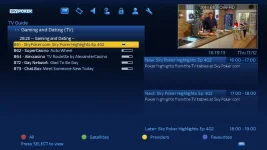
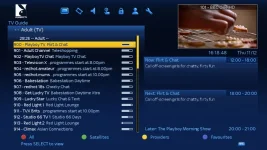
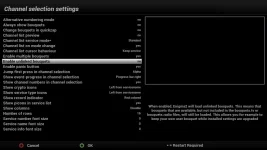
The cause of the adult and gaming bouquets showing up at top was due to the unlinked bouqets modification in August 2014.

From Apollo 132, the unlinked bouquets menu has been added. It was added to the PLI images a few days ago. It is set to "no" by default on OpenVix images so users should not have to do anything. Other images may have this as yes and title will be slightly different.

Menu > Setup > System > Channel selection settings> Enable unlinked bouquets

Ideally, plugin needs adapting so that the unwanted bouquets are hidden and not just omitted from bouquets.tv/radio or even have a .del suffix.
 

Attachments

  • unlinked bouquets (Vix).webp
    unlinked bouquets (Vix).webp
    29.1 KB · Views: 60
what would be my local area selection from the menu be if I am in Manchester?

I just found out its Granada

thanks
 
Last edited by a moderator:
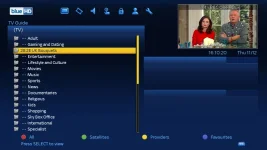
Is there anyway for me to remove the sectional bouquet "Lifestyle and Culture" as that isn't used anymore (in fact it's empty) and the channels I assume come under "Entertainment" section now?
 
Is there anyway for me to remove the sectional bouquet "Lifestyle and Culture" as that isn't used anymore (in fact it's empty) and the channels I assume come under "Entertainment" section now?
Lraizer is way from the forums. The plugin has not yet been adpated to the official bouquet changes. The source code is available if you want to have a bash at editing it. You will have to edit the CPP. Not sure what is required to make the reader file after edits.

I modified the sort files (1-3) to move the channels into the new official bouquets. You can reverse them if you want to add chanels into them.

HD first and Big first bouquet still place channel into L&C bouquets.
 
I've removed the entry via menu option and chosen not to re-create bouquets which has stopped it from re-creating the "Lifestyle" sectional bouquet.

Thanks all.
 

OpenViX Feeds Status

Back
Top