Superb quality and spec AB-Com PULSe 4K SE. Crazy offer! Only £99! FREE UK DELIVERY! 4K UHD, Enigma 2, Multiboot 4 images & more!...
Superb quality and spec AB-Com PULSe 4K Rev II Twin Satellite tuner only £149! FREE UK DELIVERY! 4K UHD, Enigma 2, SATA HDD facility, Multiboot 4 images & more!...

[VU+ Solo2] Solo 2 can't online update to apollo 150

  • Thread starter Thread starter mrxbox360
  • Start date Start date
M

mrxbox360

Guest
I've got 2x solo 2 boxes both running apollo v147 & today I'm getting the update notification showing in green but when i try to online update to v150 it say the feeds are down for maintenance, is this v150 flash by usb & restore only method.
 
Same here, also tried Telenet method but failed to update
 
I've got 2x solo 2 boxes both running apollo v147 & today I'm getting the update notification showing in green but when i try to online update to v150 it say the feeds are down for maintenance, is this v150 flash by usb & restore only method.

me too same problem
 
Images are updated to 150 but not sure feeds are updated yet so best leave it until tomorrow.
 
I have managed online update but am using a mutant hd2400.
 
I also have problem with TM twin oe .. on update from 147 - 150 via online update just gets stuck on booting had to revert back to 147 lukily saved to usb.
 
@Antwan, can you try and update by telnet and upload the logs please?
Which skin did you have in use?

init 4 && opkg update && opkg upgrade && init 6
 
Live update not working for me either on Solo 2

Good to see everyone back

cam
 
There's an issue with Solo2 feeds again, going to have to trash build and do a complete fresh build, will be 2-3 days before its completed.
 
couch flashing not working for image list is empty but when apollo 150 is flashed normally images list comes back. think there is a change in feeds.
 
Hi there ...

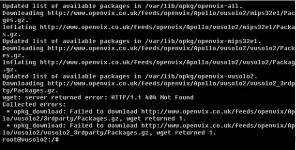
got the same error on my solo2 ...

Code:
root@vusolo2:~# init 4 && opkg update && opkg upgrade && init 6
Downloading http://www.openvix.co.uk/feeds/openvix/Apollo/vusolo2/3rdparty/Packages.gz.
wget: server returned error: HTTP/1.1 404 Not Found
Downloading http://www.openvix.co.uk/feeds/openvix/Apollo/vusolo2/all/Packages.gz.
Inflating http://www.openvix.co.uk/feeds/openvix/Apollo/vusolo2/all/Packages.gz.
Updated list of available packages in /var/lib/opkg/openvix-all.
Downloading http://www.openvix.co.uk/feeds/openvix/Apollo/vusolo2/mips32el/Packages.gz.
Inflating http://www.openvix.co.uk/feeds/openvix/Apollo/vusolo2/mips32el/Packages.gz.
Updated list of available packages in /var/lib/opkg/openvix-mips32el.
Downloading http://www.openvix.co.uk/feeds/openvix/Apollo/vusolo2/vusolo2/Packages.gz.
Inflating http://www.openvix.co.uk/feeds/openvix/Apollo/vusolo2/vusolo2/Packages.gz.
Updated list of available packages in /var/lib/opkg/openvix-vusolo2.
Downloading http://www.openvix.co.uk/feeds/openvix/Apollo/vusolo2/vusolo2_3rdparty/Packages.gz.
wget: server returned error: HTTP/1.1 404 Not Found
Collected errors:
 * opkg_download: Failed to download http://www.openvix.co.uk/feeds/openvix/Apollo/vusolo2/3rdparty/Packages.gz, wget returned 1.
 * opkg_download: Failed to download http://www.openvix.co.uk/feeds/openvix/Apollo/vusolo2/vusolo2_3rdparty/Packages.gz, wget returned 1.
But i'll wait till you tell us to update ;) Or can i flash the image over USB ?

CU No.Trace
 
hope the 151 works then for the solo2 as cant update image and got timer issues saying corrupt ive not long ago had to re flash my box and what a pain in the backiside that is thought these boxes were the best thing ever and got told the vix team image is the best so far neither are true
 
hope the 151 works then for the solo2 as cant update image and got timer issues saying corrupt ive not long ago had to re flash my box and what a pain in the backiside that is thought these boxes were the best thing ever and got told the vix team image is the best so far neither are true

You don't need the feeds to use the receiver, receiver can still be re-flashed and used :rolleyes: You're more than welcome to use another teams image if you're not happy :rolleyes:
 
update

hi Abu
never used telenet, managed to update this morning via usb I have never changed skins so using default ones. I unfortunately don't have logs enabled after issue with clock /crashing whilst in standby over night if you remember.
I guess this is not much help but thanks for your reply. will have a look at telenet if you could direct me to any tutorials.


@Antwan, can you try and update by telnet and upload the logs please?
Which skin did you have in use?

init 4 && opkg update && opkg upgrade && init 6
 
Hi guy, is this the reson am not seeing any plugins on my box then?

Thanks of any help

G
 

OpenViX Feeds Status

Back
Top