Superb quality and spec AB-Com PULSe 4K SE. Crazy offer! Only £99! FREE UK DELIVERY! 4K UHD, Enigma 2, Multiboot 4 images & more!...
Superb quality and spec AB-Com PULSe 4K Rev II Twin Satellite tuner only £149! FREE UK DELIVERY! 4K UHD, Enigma 2, SATA HDD facility, Multiboot 4 images & more!...

[TM-NANO-OE] newbie help on tuner settings

tempo321

New member
Joined
Apr 14, 2013
Messages
25
Reaction score
0
Points
0
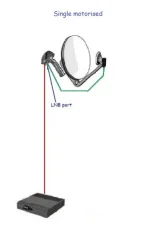
Hi all, I am a bit of a newbie here so please be patient with me, I have been reading the vix guide but I am a bit lost on setting the tuner of my technomate tm nano oe...... I have my nano-oe at the moment up and running very well for a single satellite with a simple configuration mode of the tuner. I would like now to move the box to another system that have a motorized dish with a single LNB. I am not a pro in this kind of things and at the moment the motorized dish is connected to a technomate tm5402hd with USALS. At the moment the Usals in my tm5402 are working fine for my needs (I only "?follow?" six sats and really use three-13-19-28), but on reading the vix guide I can't really find any info on how to set up usals on my tm-nano-oe...... Please can someone point me in the right direction, do I have to go for configuration mode simple or advance for set up the box with usals....
Many thanks
 
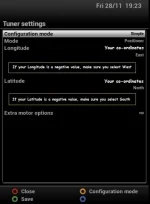
Find tuner configuration in the set up menu's of the nano.
configuration mode : simple
Mode: positioner
Enter longitude
Enter latitude
save & exit.
This works providing you have your dish mounted properly, otherwise its as useful as an ashtray on a motorbike!!!:thumbsup:

Suttsy.

Suttsy
 
Hope this helps
 

Attachments

  • positioner.webp
    positioner.webp
    14.8 KB · Views: 29
  • single motor.webp
    single motor.webp
    7.6 KB · Views: 15
Made teh pictures myself. Some of the pictures are in the Vix manual, page 13/14. Rob has done a great job on the manual.

I should really upload the other pictures in a tuner config thread.
 
HI I am from UK, which dish setting should i use and how to update new guide
 

OpenViX Feeds Status

Back
Top