Superb quality and spec AB-Com PULSe 4K SE. Crazy offer! Only £99! FREE UK DELIVERY! 4K UHD, Enigma 2, Multiboot 4 images & more!...
Superb quality and spec AB-Com PULSe 4K Rev II Twin Satellite tuner only £149! FREE UK DELIVERY! 4K UHD, Enigma 2, SATA HDD facility, Multiboot 4 images & more!...

Some ideas to improve the Graphical EPG screen

Just by looking at the code you pasted in, there are no indentations after the If statement.

Unless the original code does have intendation and just the pasted version does not
Sorted it now, thanks. I had removed it for the paste but the original code indentation wasn't right neither. I didn't realise python was fussy about indentation, I thought it was just because it's easier to read :)

Have you managed to get what was previously 1 and 3 keys to +- the time line.
Yes, now finally thanks to matt. I've attached it for you.

View attachment My modded epgselectionWithTimeLineOptions.rar
 
Last edited:
Thanks guys.

Matt

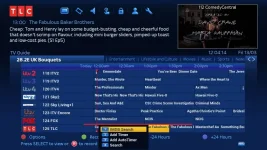
Did you look at post #170 the option dialog disappears off the screen if you are on the bottom epg row.

Is it not possible to dynamically position this instead of it being linked to a row.
 
Thanks guys.

Matt

Did you look at post #170 the option dialog disappears off the screen if you are on the bottom epg row.

Is it not possible to dynamically position this instead of it being linked to a row.

Ive tested this numerous times with the Blue HD skin and I have not encountered this problem even once.

Can you elaborate on what you mean by dynamically positioning the option box as I thought it was already dynamic (positions itself wherever the selected event is)
 
Can you elaborate on what you mean by dynamically positioning the option box as I thought it was already dynamic (positions itself wherever the selected event is)
That would be a problem, then, if the event that caused it was a button press on an item at the bottom of the screen, which is what the example image shows.

I once had to handle a similar issue in a Tcl/Tk application on Unix and had to consider how large the pop-up menu would be once it was popped up (which was findable) and ensure it didn't start lower down the screen than what would enable it all to be seen. And there was a similar problem on the right-hand edge (these were cascading menus), where if it didn't fit to the right I posted the next menu to the left.
 
I've been thinking. Why have a pop up menu? What happens when you press options? It brings up a box so you can press 1,2,3 or 4. Why not have red assigned to bring up bouquets, and have another row of buttons below the coloured buttons with 1, 2, 3, and 4 buttons there?


Sent by pressing the screen on 1 of my Apple devices, cuz that's how I roll..
 
Ive tested this numerous times with the Blue HD skin and I have not encountered this problem even once.

Can you elaborate on what you mean by dynamically positioning the option box as I thought it was already dynamic (positions itself wherever the selected event is)
It is fine on bluehd and the default vix night skin but markus uses 1080 skins.

Is it the variable posy that determines how far up/down screen it goes because i've tried reducing this figure (after it gets it from serviceref) and it crashed. As a test I was going to reduce by 100. Or does posy determine the position across the screen lol.
 
I think what im getting at is to get the popup menu to be in the same position no matter where you are in the epg table as differant skins position the table to where it fits in with the skin design.
For example position the popup menu 100,100 x and y coordinates.
Don't know if that's possible or for it to be controlled in the skin. Xml
 
on normal skins (well bluehd anyhow) the popup options menu is relative to event highlighted. The top of the popup box is always online with top of event highlighted. Not sure about 1080 skins.

Going by pic markus posted, it went off bottom of screen. I think this maybe because on bluehd skin, there is loads of space below last line of epg data so there is room to display popup box. On skin markus uses (and probably others), there isn't much space below compared to bluehd skin therefore bottom half of popup box is off screen if event highlighted is on last line of epg data.

If the top of the popup options box can be made less (vertical wise) than top of event highlighted this would mean popup box would be a little nearer the top of the screen and shouldn't be off screen if event highlighted is on last line of epg data.

Have I just confused everyone :confused:


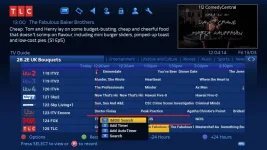
In a nutshell, pic below is current height of popup options box which matches the event highlighted (notice the thick red line)
Popupoptionsbox.webp


Whereas in this pic, the box is higher up the screen compared to event highlighted (again notice the two thick red lines)
Popupoptionsbox2.webp
(for record I've only altered pic to get popup box higher up screen as code I was using for posy it didn't like)
 
Last edited:
What's the difference between this popup menu and the menu that pops up when you press the record button, it doesn't reliy on the choicbox,for its positioning and font type etc.
 
I've been thinking about the possible mods with the popup menu and being able to jump to a channel by keying in numbers etc.

With all the possible options that you could fit into the menu and now loosing the ability to use numbers shortcuts to navigate the epg.
Would this be a better idea.

Instead of using the numbers keys to jump to a channel could another popup be used to enter the channel number leaving the number keys to there original functions.
We can keep the red button popup and green for recordings.
 
It maybe even possible (but I'm not good with python) to keep both to a certain degree.

If it was coded in a way that if only 1 digit is pressed and nothing else within say 2 seconds then it interprets this as an existing epg action rather than the new channel input to allow jumping to the channel number.
 
Can be done bbbuk, but it wont be great from a user perspective as some people are not great with remotes and can take more than 2 seconds for example. A better way could be to long press number keys for their original actions and leave the short press keys for the new search channel by number feature.
 
...but it wont be great from a user perspective as some people are not great with remotes and can take more than 2 seconds for example.
That's true, never thought of that.

A better way could be to long press number keys for their original actions and leave the short press keys for the new search channel by number feature.
That is better idea. When you get a chance could you look at that please?

Looking at the code, I'd guess that the order would need to be changed as a start so it looks for long presses first and then proceeds with elif (for normal presses) for the new search channel by number feature. I wouldn't, however, have an idea on how to distinguish between longpress and normal press.
 
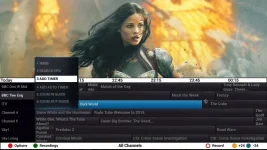
You know that i like to do these mockups of future possible skins, well i wanted to show you my invision incorporating a popup menu which is either absolutely positioned in one area or still linked to the epg row but instead of the popup starting downwards like in the first image but instead it goes up vertically as in my mockup.

I think with more control over the skin and the option dialog skin component we could design quite a lovely epg guide.
attachment.php


epg-mockup-with-menu.webp
 
@Markus625, I found out how to move the optionbox further up the screen. It's far from ideal coding-wise but serves as a start.

Find the following line in epgselection.py:
self.ChoiceBoxDialog.instance.move(ePoint(posy[0]-self.ChoiceBoxDialog.instance.size().width(),self.instance.position().y()+posy[1]))

You then need to add what i've highlighted in blue:
self.ChoiceBoxDialog.instance.move(ePoint(posy[0]-self.ChoiceBoxDialog.instance.size().width(),self.instance.position().y()+posy[1]-100))

It's not ideal but it serves as a starting point. If I get time later I will look into it further.
 
@bbbuk we to somehow work out if we can make the menu go up vertical instead of downwards like it does at the moment
 
@bbbuk we to somehow work out if we can make the menu go up vertical instead of downwards like it does at the moment
It does that's what that amendment does to that line.

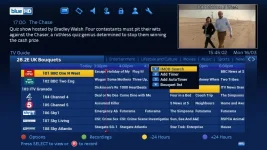
See screenshot...
Multioptions.webp

Like I said, it's a start and we can figure out a better position and better coding rather than using specific figures.
 
@markus625, use the below code instead of the one I mentioned earlier...

Code:
self.ChoiceBoxDialog.instance.move(ePoint(posy[0]-self.ChoiceBoxDialog.instance.size().width(),self.instance.position().y()+posy[1]-self.ChoiceBoxDialog.instance.size().height()))

This now does it correctly and uses the height of the Matt's multibox option.
 
Last edited:

OpenViX Feeds Status

Back
Top