Superb quality and spec AB-Com PULSe 4K SE. Crazy offer! Only £129! FREE UK DELIVERY! 4K UHD, Enigma 2, Multiboot 4 images & more!...
Superb quality and spec AB-Com PULSe 4K Rev II Twin Satellite tuner only £179! FREE UK DELIVERY! 4K UHD, Enigma 2, SATA HDD facility, Multiboot 4 images & more!...

[VU+ Duo2] GUI is "blurred" after manual update from 147 to 153

  • Thread starter Thread starter zYx
  • Start date Start date
I see.

I'm getting ready to downgrade, but is there any way to downgrade drivers only? Or should I flash to 147 and then to 156 without updating drivers?
I believe drivers are normally updated naturally when doing an online update.

What I would do is downgrade to build 147 (your backup is sufficient) and FTP to "/lib/modules/3.13.5/extra" ** and copy all your drivers from there to your laptop/pc.

Now do a clean/fresh usb flash to 157 (yes, 157 is out now) and complete initial install wizzard and before doing anything you will need to start a telnet session and type "init 4" and FTP the build 147 drivers you had previously saved to your laptop/pc to your VU (same location as I mentioned earlier) and type "init 6" into your telnet session to restart box.

Now before installing plugins or making changes to settings, see what blurring is like.

** this location of drivers is on my solo2. Not sure if they are exactly the same on your box but I suspect they are because you are using same kernel version as solo2.
 
Last edited:
Ok,

I managed to downgrade to 147 and the difference is huge!


I'm gonna try what you said when I decide to update, but why should I update if it f**ks up everything* for me? :p

I am using putty for things like that. I will try that when I have more time, but will it work?

* - crisp picture is everything for me :cool:
 
Last edited by a moderator:
When you do decide to update please remember to do a usb flash with no restore of settings to the latest build.

It's possible that VU haven't fully fixed the blurring problem they claim they have fixed in currently released drivers (won't be first time they release a fix to fix a fix :)).

If you're in no rush to update, then maybe wait until the new OE-A core has been adopted because a clean/fresh flash (with no restore of settings) will be required again so it will save you time especially if you have a complicated multisat type setup.

If you're leaving update for time being then I would suggest that when you finally do a clean usb flash, you check for blurring after initial installation wizzard (before customising it further and adding plugins, etc).

If blurring still exists, then put box to sleep (telnet "init 4") and FTP build 147 drivers you previously saved to your pc/laptop and restart box (telnet "init 6") and check again for blurring. If blurring has gone, then drivers are to blame but if blurring still exists then it's a further matter of looking at what it could be.
 
Last edited:
I'm gonna try what you said when I decide to update, but why should I update if it f**ks up everything* for me

I will try that when I have more time, but will it work?
:

Basically because it is in your interest to help us find out what is causing and that's what we want you to tell us.


Sent from my iPad Air using Tapatalk
 
Basically because it is in your interest to help us find out what is causing and that's what we want you to tell us.


Sent from my iPad Air using Tapatalk

That's what I wanted to hear :) I'll get this done at my nearest convenience.:cool: - I'm watching news at the mo :P

However, when @bbbuk said about the wizard, I have a feeling that the first time I noticed the blurred effect was when I saw the wizard. Changing to 1080p made it worse from what I recall. That was when I updated from 147 to 153.
 
Last edited by a moderator:
I got a problem with the box as it won't turn off. It reboots. I did have this problem on <147.

What command can I use in telnet to turn it off without being brutal :)
 
Last edited by a moderator:
I have performed a clean flash with 157. Same blur at first, so I copied the drivers from 147 and now the box will not boot. It stops at "double your expectation".

Could I've missed something?
 
Last edited by a moderator:
I have performed a clean flash with 157. Same blur at first, so I copied the drivers from 147 and now the box will not boot. It stops at "double your expectation".

Could I've missed something?
I wasn't expecting that. I've done similar things in past without a problem when I've been trying to determine if its a driver issue.

How many files did you copy to your box (6 or 4)?
 
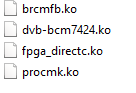
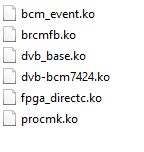
I copied 4 files from 147, but there was 6 files in 157:

147


157
 
Last edited by a moderator:
That's why. You've been using old fashioned drivers that only had 4 files.

Since the introduction of animated screens and xbmc, newer type drivers were needed (ie the 6).

I can tell you've been doing online updates for a while then and this hasn't been updating the drivers as build 147 has got the 6 drivers in it if you use original image for build 147.

To confirm this, I bet if you did a clean usb flash of build 147 from openvix website (rather than your own backup), you should find it has the 6 drivers in it.


UPDATE: A quick check reveals the old fashioned drivers were used upto and around build 131. I know that build 142 had newer type drivers. Have you been doing online updates maybe from as early as build 131?
 
Last edited:
That's why. You've been using old fashioned drivers that only had 4 files.

Since the introduction of animated screens and xbmc, newer type drivers were needed (ie the 6).

I can tell you've been doing online updates for a while then and this hasn't been updating the drivers as build 147 has got the 6 drivers in it if you use original image for build 147.

To confirm this, I bet if you did a clean usb flash of build 147 from openvix website (rather than your own backup), you should find it has the 6 drivers in it.

I've been updating online since I got it in Dec'14.

I can try flashing to 147 from usb, but what if everything will be "blurred"?

Any other ideas?
 
The problem now is not sure at what point the blurred started for you, if it is a driver-related issue.

I know build 142 had newer type drivers in it so some build before that will have been last of the old type drivers.

Can you do a fresh usb flash of build 142 (from openvix website) and see if blurring is noticed at that point?
 
Hi,

sorry about a delay in replying.

Ok so I just flashed to 142 from USB and the "blurring" issue is still present. In wizard 720p appears more clear than 1080p.

MyMetrix 1080p skin is not available for download, whereas before it was and now it makes me think whether when I applied myMetrix 1080p, the "true" 1080p GUI was enabled.

I went back to my 147 backup.
 
Could you do a fresh usb flash (without restoring of any settings) of latest release 165 and see if "blurring" is present during wizard?

If you still have this blurring thing, could you maybe try the latest openATV 4.2 and another image like BH 2.1.5 ?

If you still have this blurring thing on those other images and it's definitely not a TV or how it's connected (like faulty HDMI cable, etc) problem then it could be your box.
 
I copied MyMetrix_1080p skin from 147 to my hdd, then I flashed the box with 165 from USB, then I copied the skin manually back to /usr/share/enigma2/ and then I applied the skin and the GUI changed its size, like in 1080p mode, but it was still blurry.
So then, I tried installing openATV, but it didn't recognise the USB so it booted back to ViX 165, but this time, properly clear in 1080p.

Any ideas?

I'm staying at 165 at the moment, monitoring the situation and restoring my favourite settings.:thumbsup::cool:
 
The skins coding were changed in build 155 hence need for usb flash with no restore of settings until you know blurring is no longer there. There is a sticky post about it. Openvix have recommended not to restore any settings on build 155 onwards from an earlier build due to significant code changes which may cause problems.

You will have to manually add your skin and/or anything else but I suggest you try the default skin and see if blurring has stopped before adding skins/plugins. Maybe just add one skin/plugin at a time and see if blurring is present before adding any other plugins.
 
One reason people had to fresh flash 155 was a change to the skins. If you continue to add files from a previous build you will get issues.

The plugin/skin is on the feeds.
 
I am restoring all setting manually, in fact I already did and the picture is clear as it should for now. I don't have many plugins really. Less than 5 I think :p

How should I perform future updates to keep it good?
 
One reason people had to fresh flash 155 was a change to the skins. If you continue to add files from a previous build you will get issues.

The plugin/skin is on the feeds.

All I moved from 147 was the skin, but it did the trick. I mean, I think when I applied myMetrix1080p the very first time when I got my box, it changed the GUI to smaller sizes, and it was chrystal clear. It appears to be working fine at the moment.

I do hope you understand what the issue actually is (was) here.

I rebooted a few times and all is still ok.

I found mymetrix in feeds but it was in skins before and it was called as myMetrix_1080 and not just mymetrix.
 
Last edited by a moderator:
The skin names and/or the sections have changed. There is no longer a 1080 section but the skins are still available.

I personally do a usb flash with no restore of setting most times I flash and on my simple setup (just Sky 28.2), I don't have any of the issues other may report.

I copy over my autotimers and timers from /etc/enigma2 between flashes and everything else I setup manually and it doesn't take me as long now as I've gotten use to where things are, etc.

I have observed that most problems that appear rare (ie very, very few people suffer from them) are from those that have done online updates from previous builds (moreso the older builds) to current builds.

As you seem to have sorted it now, just keep an eye out and maybe make regular backups especially if adding any plugins, etc.
 

OpenViX Feeds Status

Back
Top