Superb quality and spec AB-Com PULSe 4K SE. Crazy offer! Only £99! FREE UK DELIVERY! 4K UHD, Enigma 2, Multiboot 4 images & more!...
Superb quality and spec AB-Com PULSe 4K Rev II Twin Satellite tuner only £149! FREE UK DELIVERY! 4K UHD, Enigma 2, SATA HDD facility, Multiboot 4 images & more!...

Some ideas to improve the Graphical EPG screen

I have suggested quite a number of times to use the help-button; that provides a fine overview on all available functions.
It turns out not all remotes have the 'help' button across the range of boxes you support from what people had posted on another thread regarding this mod.
 
Is that all that does, just list the.bouquets across the top? Does the contents change or anything as your scrolling.through bouquets with the < > buttons?
 
On my mutant I don't have a help button also.

Some of the things in using with matt, s code change is the green button to access the pvr recordings I've made from the epg as i use the tv remote with cec.
I also use the red pop-up menu to access recording options and the bouquet list.

I'm not too fused with the numbers keys to change channel within the epg as i find just opening the bouquet list just as easy and quick.
 
Is that all that does, just list the.bouquets across the top? Does the contents change or anything as your scrolling.through bouquets with the < > buttons?
The contents of the EPG change to match the bouquet selected.

So in my screenshot, it showed "All Channels" as that is the default bouquet but if I used < > buttons to select 'Movies' bouquet then just the movies are then listed in the GEPG.
 
Last edited:
if I used < > buttons to select 'Movies' bouquet then just the movies are then listed in the GEPG.
Is the title of the movies bouquet also highlighted in that case?
 
Is the title of the movies bouquet also highlighted in that case?
Probably easier if I took screen shots for you...

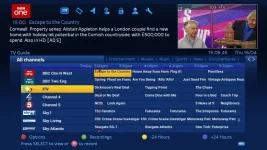
Default - "All Channels" (only because in ABM I have main bouquet enabled as well sectional ones)
MattModGEPGBouquet1.webp

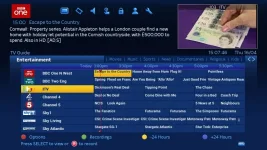
"Entertainment" bouquet
MattModGEPGBouquet2.webp

"Movies" bouquet
MattModGEPGBouquet3.webp
 
The Pop-up menu doesnt look to good in the skin im working on as you can see from the screengrab.
choicebox.webp
What controls the look and the text size etc.

I have the following code in the skin.

HTML:
	<screen name="ChoiceBox" position="0,0" size="520,130" zPosition="99">
		<widget name="text" position="0,0" size="520,0" font="menulist;24"/>
		<widget name="list" position="100,100" size="520,0" font="menulist;26" foregroundColor="white" enableWrapAround="1" selectionPixmap="testbuild/list-768x70.png"/>
		<applet type="onLayoutFinish">
self.autoResize()
		</applet>
	</screen>
		<screen name="OptionDialog" position="0,0" size="240,190" zPosition="5" flags="wfNoBorder">
		<widget name="text" position="0,0" size="0,0" font="menulist;22"/>
		<widget name="list" position="10,10" size="220,160" enableWrapAround="1" selectionPixmap="testbuild/list-768x70.png"/>
	</screen>
 
What controls the look and the text size etc.

I have the following code in the skin.
I'm guessing here (still learning) but I would look at font="menulist;XX"/> where xx maybe the font size.

As for the look is that not based on the "list-668x70.png" picture?
 
Last edited:
erm font size doesnt appear to be making any differance, I wonder if its a global statement thats controlling this, I am using bello skin as a base to work on this skin.

Ive allready commited out the
HTML:
 <alias name="ChoiceList" font="menulist" size="42" height="60" />
so i wonder if there something else controlling it in the skin.xml
 
Sorry, can't help. I thought what I put was correct because it would be the obvious way of specifying the text size right after the name of the font.

It maybe a global thing like you said.

I have just tried it on blue-hd and same as you didn't seem to make any change.
 
Well this needs to be sorted before we can even suggest it for the main image.
Really needs to be skinned regardless of global settings.
 
I think if you put in this statement on the skin.xml

HTML:
 <alias name="ChoiceList" font="menulist" size="42" height="60" />

Then this does increase the font size but it does effect other parts of the skin that's uses the choicelist as it's a global statement.
 
Can someone please tell me where I can get this skin with the boquets across the top of the epg please.
 
Can someone please tell me where I can get this skin with the boquets across the top of the epg please.
Last I heard, this mod wasn't making into image.

If you're referring to the sky look-a-like skin then you need see Rossi's BlueHD skin from plugin feeds (now listed as OpenVix BlueHD or something similar). However, you need to use Matt's mod files to see list of your bouquets.

If you want to manually add this as a mod then see Matt007's posts. You can get the files from post 118 and see where they go in post 75.

You can still use < and > even now to switch bouquets but unless you're using Matt's mod, you can't see the actual bouquets
 
Last edited:
@Markus, in a previous post of yours you quoted some code for possibly changing text size, etc...

In this code, have you tried specifying "center, center" (or "centre, centre") as the position of the red button pop-up? That maybe how you can centre the pop-up. Not certain, just a guess really tbh. I can't test now as box is in use.
 

OpenViX Feeds Status

Back
Top