Superb quality and spec AB-Com PULSe 4K SE. Crazy offer! Only £129! FREE UK DELIVERY! 4K UHD, Enigma 2, Multiboot 4 images & more!...
Superb quality and spec AB-Com PULSe 4K Rev II Twin Satellite tuner only £179! FREE UK DELIVERY! 4K UHD, Enigma 2, SATA HDD facility, Multiboot 4 images & more!...

[TM-NANO-2-SUPER] Timeout for tuner lock

  • Thread starter Thread starter strebord
  • Start date Start date
S

strebord

Guest
Hi,

I wonder if anyone can shed any light on an issue I've encountered today. Box has been running fine but it seems some of the sky sports channel frequencies have changed and were blank on my box so I've tried to re-scan ABM and keep getting the message "Timeout for tuner lock". I've tried re-flashing and also restoring a previous working image but every time I try and run abm I get the same message. I'm now wondering if this is likely to be a hardware issue.

Any ideas or suggestions gratefully received
 
What is your dish setup?
Do you have any dieseqc switches?
How many cables do you have going to your receiver?
Which tuner/s are they connected to?
What is each tuner configured as?
 
What is your dish setup?
Do you have any dieseqc switches?
How many cables do you have going to your receiver?
Which tuner/s are they connected to?
What is each tuner configured as?

I have a fixed dish pointing at the astra 28.2 sat
Not sure what dieseqc switches are so presume I have none
2 standard cables going into the box, one each into the 2 tuners
Both tuners configured the same:

Config mode - simple
Mode - single
Satellite - 28.2
Send diseqc - No

I've been running build 160 for a week or so with no problems after a fresh flash. Tried updating to build 166 tonight but got the same message and also tried re-installing a previous image from the box with the same outcome. My only other thing to try is another fresh install with no re-install of settings but other than that a bit stuck. I have tried plugging the box into my sat feeds in the bedroom but still getting the same error and have also plugged my 2nd box in downstairs and it is updating fine so not a dish or cable issue
 
I have a fixed dish pointing at the astra 28.2 sat
Not sure what dieseqc switches are so presume I have none
2 standard cables going into the box, one each into the 2 tuners
Both tuners configured the same:

Config mode - simple
Mode - single
Satellite - 28.2
Send diseqc - No

I've been running build 160 for a week or so with no problems after a fresh flash. Tried updating to build 166 tonight but got the same message and also tried re-installing a previous image from the box with the same outcome. My only other thing to try is another fresh install with no re-install of settings but other than that a bit stuck. I have tried plugging the box into my sat feeds in the bedroom but still getting the same error and have also plugged my 2nd box in downstairs and it is updating fine so not a dish or cable issue

I had this problem in the morning, you have to do a full automatic rescan. I did that and all the channels came back. My abm also kept on failing to scan today.
 
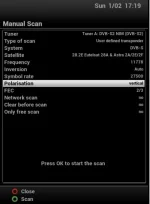
Can you perform a scan with both tuners (one at a time) as pictured please?
 

Attachments

  • ABM and CrossEPG 11778 scan.webp
    ABM and CrossEPG 11778 scan.webp
    14.6 KB · Views: 58
I had this problem in the morning, you have to do a full automatic rescan. I did that and all the channels came back. My abm also kept on failing to scan today.

I'll give that a try tomorrow. Did your abm work OK after the full rescan? I thought abm negated the need to do the auto scan? Is it an abm issue then?
 
I'll give that a try tomorrow. Did your abm work OK after the full rescan? I thought abm negated the need to do the auto scan? Is it an abm issue then?

I haven't ran abm yet but it's scheduled to run in the morning so I'll see if there are any errors in the logs in the morning. I'm not sure what the issue is as I've never had to do this before. I thought abm would take care of this but today it kept failing to scan. This is why I want to know what the difference is between abm and an auto full scan.
 
@avi68 please start your own thread to avoid confusion

@strebord
"Timeout for tuner lock" means exactly that. ABM and Cross EPG use the details I posted for 28.2. If a scan on both tuners functions correctly, then ABM should not be giving you that error. Your test will be checking for reception issues of that frequency.
 
@avi68 please start your own thread to avoid confusion

@strebord
"Timeout for tuner lock" means exactly that. ABM and Cross EPG use the details I posted for 28.2. If a scan on both tuners functions correctly, then ABM should not be giving you that error. Your test will be checking for reception issues of that frequency.

Ok sorry about that Abu.
 
I've run the manual scan as requested and it's only coming up with 9 channels on each tuner. I also did just a basic scan for WOS as I'd raised a query with them and that picked up 960+ channels on each tuner.

Not really sure what that means
 
Last edited by a moderator:
That means you can receive the frequency used.

Can you enable debug logs, restart receiver, repeat process you are having issue with. Then upload the log.

Logs are stored in /home/root/logs/
 
That means you can receive the frequency used.

Can you enable debug logs, restart receiver, repeat process you are having issue with. Then upload the log.

Logs are stored in /home/root/logs/

Will do. Sorry to appear dim but how do I upload the log and to where?
 
Attach log to your response.

Here is a guide showing one way of attaching items. There are other ways too.
http://www.world-of-satellite.com/showthread.php?44054-How-to-take-screen-shots-How-to-attach-files

Can you also have a look at the file called "settings", it is located in /etc/enigma2. Please paste the lines that start with to your post.
config.Nims

Here is my one as an example

Code:
config.Nims.1.diseqcA=282
config.Nims.0.diseqcA=282
config.Nims.3.multiType=2
config.Nims.3.cable.scan_sr_ext2=6952
config.Nims.3.cable.scan_sr_ext1=6887
config.Nims.3.cable.scan_type=steps
config.Nims.2.terrestrial=44
 
You had set your tuner as automatic diseqc.

Try the following please.
Ensure you have a linux compatible editor such as notepad++ installed.
Telnet the following command (guide in link if you need it)
Code:
init 4

Navigate to the settings file and edit it in the following manner:
Delete the tuner config lines that end with "= 3601"
eg
config.Nims.1.diseqcB=3601
config.Nims.1.diseqcC=3601
config.Nims.1.diseqcD=3601

Ensure file is transferred back
Restart receiver with telnet command
Code:
init 3

If you get stuck, you can upload your settings file here if you want me to have a look. Make sure there is no personal infomation in it.
 
You had set your tuner as automatic diseqc.

Try the following please.
Ensure you have a linux compatible editor such as notepad++ installed.
Telnet the following command (guide in link if you need it)
Code:
init 4

Navigate to the settings file and edit it in the following manner:
Delete the tuner config lines that end with "= 3601"
eg
config.Nims.1.diseqcB=3601
config.Nims.1.diseqcC=3601
config.Nims.1.diseqcD=3601

Ensure file is transferred back
Restart receiver with telnet command
Code:
init 3

If you get stuck, you can upload your settings file here if you want me to have a look. Make sure there is no personal infomation in it.

I've downloaded putty and opened up the black (telnet?) box, then typed in "init 4" at the prompt but nothing then happens. Should I get direct access to the box through that program or do I need to use my normal ftp program for that? I've tried doing that already but not getting the option to amend the file with notepad ++ and now filezilla isn't able to connect to the box at all.

I'm not sure how the tuner is set up as automatic diseqc? The only reference I can see to that is in the tuner config settings and that is set to "no" in both, plus, as I said, the box has been working perfectly for some time and this setting hasn't been changed.

Am I better doing a full reflash and not using previous settings? Would this likely solve the issue?
 

OpenViX Feeds Status

Back
Top