Superb quality and spec AB-Com PULSe 4K SE. Crazy offer! Only £129! FREE UK DELIVERY! 4K UHD, Enigma 2, Multiboot 4 images & more!...
Superb quality and spec AB-Com PULSe 4K Rev II Twin Satellite tuner only £179! FREE UK DELIVERY! 4K UHD, Enigma 2, SATA HDD facility, Multiboot 4 images & more!...

Newbie needs a little help from her friends

  • Thread starter Thread starter fourteen0407
  • Start date Start date
Status
Not open for further replies.
F

fourteen0407

Guest
Hi all, as mentioned i a very new beginner to the satellite box game and would appreciate any help at all with my issue.

i have been using the skybox f5 for about a year and some on this website suggested a vu solo 2 as an upgrade and i took that advice and bought one a few days ago from a well known on-line market place.

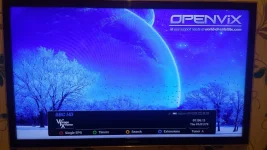
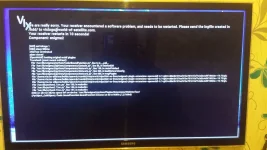
anyhoo, ive wired up the box and switched it on and i get the start up blue screen, below then the captions of bbc hd appear and then a black screen appears with writing (see in picture below), after a few seconds the box restarts and does this over and over again.

please can some one advice on what i need to do to get this working, i have not installed anything, and have not been able to get a hold of the seller after days of trying,

a step by step guide would be very helpful,

i have read that i had to upload an image file so i downloaded something called a blackhole folder and followed some instruction of copying the folder to a usb drive and then putting drive in the box and switching it and it will update the box and fix the problem but i tried but it did not work, same thing of restarting over and over again

thankyou all in advance.

Margaret

 

Attachments

  • 20150603_010607.webp
    20150603_010607.webp
    78.5 KB · Views: 36
  • 20150603_010612.webp
    20150603_010612.webp
    60.3 KB · Views: 37
  • 20150603_010616.webp
    20150603_010616.webp
    52.5 KB · Views: 46
We will need to clarify if its a genuine receiver or a clone receiver first. The bootloader as shown on the pictures are from an older image, so I'm sceptical as to why an older image was on your receiver as apposed to a more recent image if purchased only a few days ago? The reason I say that is because most clone receivers are unable to be flashed with the latest images.
Where did you buy from? Any noticeable stickers on the rear of the receiver, something like V2.0 or V3.0? How much did you pay if you don't mind me asking?


Sent from my iPhone using Tapatalk
 
wow thankyou for your quick response. ii have been reading this forum for some time to gather information about what box to buy, that is how i come across and read a post about someone recommending the vu solo 2. from there i done some more research including this very site and visiting the vu plus site where there is an actual guide to spot clones.

the guides gives info on what to look out for on the exterior packaging, the shell of the box and also inside and i have to say my box looks genuine,

there are no stickers about v.2 or v.3 at the rear, and the box was only purchased a few days ago and my grandson set it up for me and when i returned home i found this problem with the box, i asked him if he had done anything to the box but you can imagine what the answer was from a 16 year old.

with regards to downloading the image onto a 1gb usb stick, i have already tried that however the box does not boot up pass the black screen with the white writing for the box to start to read the usb, i plug it in, the light on the usb comes on, the box starts, gets pass the initial blue screen then the black screen and then restarts all over again.

i cannot get pass the black screen, even when i have put in a usb stick as it will not read it or go far enough to read it.
any assistance would be appreciated.
 
Hi, format your usb stick to fat32. Extract the contents of the image. I would recommend you use ViX Hades Build 011, miles better than blackhole imo. Latest image can be found here >> http://www.openvix.co.uk/index.php?dir=Vu+Solo2/
Flashing tutorials can be found here >> http://www.openvix.co.uk/index.php?dir=***Guides and Tutorials***/Flashing Guides/
When you insert the usb, make sure no other usb''s are present in the box, use the front usb port and turn the box off at the rear rocker switch, insert usb, turn receiver back on and when prompted press the power button on the front display screen of the Vu+ Solo2.
After a few minutes the receiver will reboot, at this point take the usb out.


Sent from my iPhone using Tapatalk
 
Hi all, you were absolutely right, andy, it was the usb stick so thankyou for that,

but ive got to a point that im stuck now, as some channels are open whilst others are no.

ive followed all the tutorials, downloaded vix image, used dcce, channel list also, managed to install plugins, inc sky blue skin, installed tspanel via dcce, downloaded bouquet then a guide was sent to me by the guy who provided me with gift on how to install the ccam.cfg file by logging into my box via my computer (fttp: then ip address), that all worked however i dont get all the channels open, some are open whilst channels like sly movies are not, i know the code works fine as i checked in again in my old f5 box and all channels work on there.

what am i doing wrong.

i followed all the gudies apart from the sections about how to change the satellite positions which i didnt think i need to do as im using a fixed sly dish.

just to summarise,

downloaded vix image from vix website and installed,
ran automatic bouquet maker which created channels
installed cccam.cfg file into box via ftp log into box
some channels work but most paid ones dont, just blank screen

as always, thankyou for any help
 
Hi all, you were absolutely right, andy, it was the usb stick so thankyou for that,

but ive got to a point that im stuck now, as some channels are open whilst others are no.

ive followed all the tutorials, downloaded vix image, used dcce, channel list also, managed to install plugins, inc sky blue skin, installed tspanel via dcce, downloaded bouquet then a guide was sent to me by the guy who provided me with gift on how to install the ccam.cfg file by logging into my box via my computer (fttp: then ip address), that all worked however i dont get all the channels open, some are open whilst channels like sly movies are not, i know the code works fine as i checked in again in my old f5 box and all channels work on there.

what am i doing wrong.

i followed all the gudies apart from the sections about how to change the satellite positions which i didnt think i need to do as im using a fixed sly dish.

just to summarise,

downloaded vix image from vix website and installed,
ran automatic bouquet maker which created channels
installed cccam.cfg file into box via ftp log into box
some channels work but most paid ones dont, just blank screen

as always, thankyou for any help

What you are doing wrong is posting on here regarding illegal card sharing.
 
Status
Not open for further replies.

OpenViX Feeds Status

Back
Top