Superb quality and spec AB-Com PULSe 4K SE. Crazy offer! Only £129! FREE UK DELIVERY! 4K UHD, Enigma 2, Multiboot 4 images & more!...
Superb quality and spec AB-Com PULSe 4K Rev II Twin Satellite tuner only £179! FREE UK DELIVERY! 4K UHD, Enigma 2, SATA HDD facility, Multiboot 4 images & more!...

[XP1000] Is timeshift supposed to work when the box is in (not deep) standby?

aido

New member
Joined
Mar 5, 2014
Messages
290
Reaction score
0
Points
0
Sorry if this is a repeat question but I've not been able to find a definitive answer.

Basically I've got a remote slave box (my old MaxDigital XP1000) set up at the other half's place using Remote Stream Converter to connect back to my master box (LX3).

I've enabled timeshift after 30 seconds but from what I can see it's still recording timeshift video even though the box is in standby (not deep standby). The red light on the front of the box is flashing and you can see that data is being allocated on the USB stick when running df.

Is this expected behaviour?

Basically I'm just trying to minimise data usage but if this is as designed (ie permanent timeshift really is supposed to work when the box is in standby and the clue was in the name) then I'll just disable timeshift as a workaround.

I found some threads asking similar but there was no definitive answer that I could see:
http://www.world-of-satellite.com/s...o-use-Permanent-Timeshift&highlight=timeshift

Thanks in advance :)
 
Pure guess but I wouldn't have thought so unless you're recording.

What settings do you have for timeshift?

UPDATE:

Just put box on standby and monitored hdd usage via the "df" (just df) command and couldn't see usage changing at all after about 5 minutes
 
Last edited:
Thanks mate - I've just tried again and at the moment I have it set to automatically start recording after one minute.

If I give it a minute it starts recording, but what I did earlier was turn the box off via the full OpenWebif power button at the top right.

It does turn the box off as the light goes red and there's no picture - but the flashing light continues and disk space is disappearing again suggesting it's still recording.

Likewise same problem if I turn off via the remote - it still records and when I power the box back up I can rewind through the time it's been off.

Not sure if powering the box off via OpenWebif is what triggers it?
 
Just checked again on my Solo2 which is using latest build 18 (which was a fresh flash with no restore of settings) and there was no change in my available space of my hdd when I put box on standby with remote.

Just to confirm, it does change If I turned box on and used "df" command I could see available space reducing and reducing.

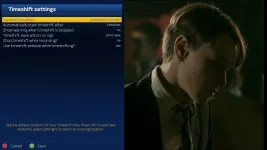
What settings do you have for your timeshift?

I have the following...

timeshiftsettings.webp
 
If you have it setup so you can stream, etc then that maybe the issue as maybe the box doesn't really go into standby when its setup for streaming, etc.

I don't have my box setup for anything like that.

To be sure you could either remove any kind of streaming setup you have (including any vpn type settings), or alternatively, backup image and flash fresh image and just setup timeshift as you have it now and bouquets and nothing else and see if available data is being reduced.
 
Streaming will still work while in standby mode, sounds like the tuner is still being used in your partners place.
 
Ah sorry guys it's the slave XP1000 box that this is happening on, not the master.

I've tested it out this morning and basically as soon as the box has been on a channel for a minute and starts recording you can turn it off and it will just carry on recording that event plus all subsequent events and the recording light just keeps on flashing.

Here's the config:

1_0_1_C418_81A_2_11A0000_0_0_0.webp

Maybe it's the RSC stuff that's confusing it - I'll try it on a proper sat tuner on the LX3 when I get home - I can't upgrade this XP1000 from build 12 at the moment due to the issues with the box locking up on reboot in the newer builds.
 
Drivers not closing a stream properly on standby so?
 
Drivers not closing a stream properly on standby so?
This happens on several boxes. eg when using the Xtrend 8&10k (but there are more) as client they will not close the stream when it is ended. This results in a tuner on the server box remaining occupied. Only way to overcome this is to put the client box in deep sleep.

There are also boxes doing this fine. eg you will have no such issue when using a Vu or a TM (but there are more) as client box.
 
There are also boxes doing this fine. eg you will have no such issue when using a Vu or a TM (but there are more) as client box.
Yes, same issue with GB here. Closing a stream doesn't free up the tuner.
 
Is there an easy way of seeing which tuners are occupied on the master please either through OpenWebIf / the OSD or command line?

Thanks for the replies all :)
 
Well I got home earlier and I did see that although the Remote XP1000 was turned off and not flashing the LED I could see a connection coming in on 8001/tcp via netstat.

I haven't been able to see the status of a tuner anywhere though - is there a way through the command line that you can see what the tuner is locked too at all please?
 
I have a duo2 and the used tuners can get shown on the LCD and also in the skin, So it must be in a file somewhere, I couldn't find where though :)
 
I get the tuner names lit up on the LCD and the skin but I haven't worked out a way to say what each tuner is actually doing, ie Tuner B is locked to channel X by Y or is streaming channel X to Z - maybe it's not possible to see it in that detail?
 

OpenViX Feeds Status

Back
Top