Superb quality and spec AB-Com PULSe 4K SE. Crazy offer! Only £129! FREE UK DELIVERY! 4K UHD, Enigma 2, Multiboot 4 images & more!...
Superb quality and spec AB-Com PULSe 4K Rev II Twin Satellite tuner only £179! FREE UK DELIVERY! 4K UHD, Enigma 2, SATA HDD facility, Multiboot 4 images & more!...

[VU+ Duo2] Recording rest of the program while timeshifting

  • Thread starter Thread starter Warlon
  • Start date Start date
W

Warlon

Guest
If I'm watching on timeshift and decide to record rest of the show, the timeshift -part of the program will not be included in the recording. So from my point of view a part of the program is missing. Is it possible to change this behaviour so that the recording would include the timeshift part also?
 
Welcome.

Which part is missing/What do you mean by timeshift part?
How/when are you starting timeshift?
 
He means the part already watched. He wants the whole programme recording from when it began or he changed to that channel I presume like sky+ does.
 
There has been a option within ViX to do just this for well over a year maybe even two years or more. although timeshift is not a feature I personally use so could not guide you through the process of setting it up etc.

p.s you cant just expect to be able to switch to a channel and receiver record from before that time, IE you cant switch to sky1 at 16:00 and expect to record from 15:50. you have to already be on the channel and have timeshift running from the time at which you want the recording to take place.
 
Last edited:
That's not what he is saying and I'm going to put my hard hat on over this now because when I have asked this question in the past I've had very duscoutious replies of "you can always fix it yourself!!!"
Basically if I watch a movie with time shift enabled then half way through I press record, vix gives you the option to save the entire movie to the hard disk, ie the part you have watched and the rest of the movie, but it doesn't work, it doesn't archive the bit you have watched correctly, he isn't asking for a time machine to magically store something that he hasn't watched or time shifted.
It is a feature I would really use and I have tried to use it but every time I have mentioned it doesn't work.... (Run for cover)
 
Basically if I watch a movie with time shift enabled then half way through I press record, vix gives you the option to save the entire movie to the hard disk, ie the part you have watched and the rest of the movie,

As I said the option is there and has been for a long time.

but it doesn't work.

Then create a bug report with debug logs etc.

Personally It's a feature I neither use nor follow so I have no idea if it works or not, if it does not bring it to the attention of the devs to look at it.
 
Basically if I watch a movie with time shift enabled then half way through I press record, vix gives you the option to save the entire movie to the hard disk, ie the part you have watched and the rest of the movie, but it doesn't work, it doesn't archive the bit you have watched correctly
It does though, it's a feature I use quite often.
Which box/image/build are you using? maybe has some driver issues?
 
It does work but it's an area of Vix that I believe causes a lot of confusion for users who have used Sky+ in the past.

This is how Sky+ works:
Let's say I am watching Sky1 from 8pm to 10pm. There are 2 programs on during that time, one from 8pm to 9pm (Matlock) and one from 9pm to 10pm (Murder She Wrote). At 9.15pm I hit pause to make a cuppa. At 9.20pm return to the TV and hit play. At 9.30pm I decide to record "Murder She Wrote" for my wife. So I hit record. At this point, all the timeshift buffer from 9pm to 9.30pm is automatically saved into "Recordings" and the rest of the program is automatically appended to the end of the "Murder She Wrote" recording file. If my wife was to join me at 9.45pm that same evening, it's possible to browse into "Recordings" and watch "Murder She Wrote" that started at 9pm from the beginning (even though it hasn't finished yet). The last 15 minutes of the program of is recorded as normal. With Sky+ in this scenario, it wouldn't be possible to record Matlock.

This is how Vix works:
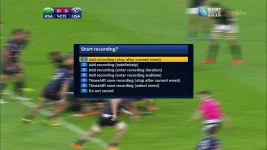
Take the same scenario again. Let's say I am watching Sky1 from 8pm to 10pm. There are 2 programs on during that time, one from 8pm to 9pm (Matlock) and one from 9pm to 10pm (Murder She Wrote). At 9.15pm I hit pause to make a cuppa. At 9.20pm return to the TV and hit play. At 9.30pm I decide to record "Murder She Wrote" for my wife. So I hit record (there is more than 1 way to record with Vix, so depending on how you record, your experience may vary). Now this is where Sky+ and Vix differ. The User Experience with Vix is not as "clean" as the Sky+ IMHO but the level of control makes up for this. After hitting record, I get presented with something like 6 or 7 options about what I want to record (I'm not in front of my TV so I don't have the exact list). Again, IMHO this is very confusing the first time you see this list!!! There is one option to save the current event and timeshift. This is normally what I want to do and is most similar to Sky+. If I take this option, the part of "Murder She Wrote" from 9pm to 9.20pm is still in the timeshift buffer - this will only get written to the recordings folder AFTER 10pm when the program is finished. So going back to the initial example, if my wife was to join me at 9.45pm that same evening, it's NOT possible to browse into "Recordings" and watch "Murder She Wrote". We'd have to wait until 10pm for "Murder She Wrote" to appear in recordings.
But there's more ... at 9.45pm if I hit record again and get shown the menu with 6 or 7 entries and I chose "Select Event", I can see it's also possible to record "Matlock". If I chose "Matlock", it immediately gets saved to disk and it's possible to watch in the "Recordings" immediately. This will work for several hours of timeshift on the same channel. This is where Vix is far superior to Sky+.
 
I will try again when I get home, I have tried a few times over the years and I always have the latest image on my duo2, the last time I tried was earlier in the year with HD mpeg2 and the bit that was printed to the hard disk from the buffer would not play correctly it was as if it didn't contain legitimate time code.
 
according to my experience it doesn't work, as i had expected it to work.
when i'm in timeshift, press the stop button, and am asked whether i want to save the timeshift and continue recording the program, i'd assume that the recording would continue seemlessly at the end of timeshift.
instead a new recording starts and i end up with 2 movie files, and at the end of the timeshift file i have a disruption and have to manually start playback of the 2nd file.
that's not nice. :-) and should be changed, i think.
 
I will try again when I get home, I have tried a few times over the years and I always have the latest image on my duo2, the last time I tried was earlier in the year with HD mpeg2 and the bit that was printed to the hard disk from the buffer would not play correctly it was as if it didn't contain legitimate time code.

Just tried this as had problems in past
Choose option 5 Timeshift save recording ( stop after current event )
At end of program got message saving, went to recordings and title of saved program there but no recording present, empty
Using Vix 3.2 build 003
 
well, as i said: i have 2 recordings after the event. the first one contains the timeshift part up and the second one the rest of the event.
and to my mind there should only be one containing everything.
 
Did you give it enough time + recording buffer time for the files to merge?
 
Did you give it enough time + recording buffer time for the files to merge?
well, i selected to stop timeshift and contiue to record program. so, timeshift stopped and returned to live tv. then i checked the recording list and saw 2 recordings.
i then started playback of the first recording and when that finished i had to start playback of the second recording.
so, what am i missing?
 
I've also got problems with this. As the OP, I would like similar behaviour to Sly+, but it doesn't work which ever option I try.

I'd like it to record from when i tune to the channel, but what actually gets recorded is from when you start the recording.

1_0_19_5104_80F_2_11A0000_0_0_0.webp
 
You can set timeshift to start automatically.

The theory and what happens in practice for some people.
Option 5 converts the current event to a recording after it ends. You must give it time to perform the conversion. Treat as timeshift until completed.
Option 6 allows you to select from the events that have been in the current timeshift operation. You must give it time to perform the conversion. Treat as timeshift until completed.

(There used to be a maximum length of timeshift)
 
well, when i use this option i want to switch to a different channel for a while and then switch back to the original channel and continue where i left.
but if i understand you correctly i have to wait until the end of the movie before it converts the timeshift piece and the recording?
that's not usable for me.
 
No, if you switch to another chanenl, you will be asked if you want to continue timeshift, subject to you having tuners available. Provided you have not changed the default of ask user what to do in such situations.
 
I've also got problems with this. As the OP, I would like similar behaviour to Sly+, but it doesn't work which ever option I try.

I'd like it to record from when i tune to the channel, but what actually gets recorded is from when you start the recording.

View attachment 45017

Without wanting to come across as a dick (not that I particularly care), if you want sky+ features use a sky+ receiver. No and I do mean NO E2 team will ever have the finances, or manpower that a global corporation such as BskyB does and to expect the multi-million £ features from such a platform on E2 based image is just insane.
 
well, when i use this option i want to switch to a different channel for a while and then switch back to the original channel and continue where i left.
but if i understand you correctly i have to wait until the end of the movie before it converts the timeshift piece and the recording?
that's not usable for me.


Then by all means show us how its done and code exactly the features you want instead of always moaning about the lack of functionality in ViX.
 

OpenViX Feeds Status

Back
Top