Superb quality and spec AB-Com PULSe 4K SE. Crazy offer! Only £99! FREE UK DELIVERY! 4K UHD, Enigma 2, Multiboot 4 images & more!...
Superb quality and spec AB-Com PULSe 4K Rev II Twin Satellite tuner only £149! FREE UK DELIVERY! 4K UHD, Enigma 2, SATA HDD facility, Multiboot 4 images & more!...

VU+ Solo 2 - VIX image Hades / VIX 3.2 - Crashing

  • Thread starter Thread starter scar0x
  • Start date Start date
Status
Not open for further replies.
S

scar0x

Guest
Hi All,

I need someone to help me on this. I have a VU+ Solo 2 - ( NOT A CLONE )

In the past I have managed to flash / update images without a problem. I have been using VIX images before Apollo etc.

Problem:

I was running Hades image on my VU+ Solo2 and decided its time to update to 3.2.

After flashing / restoring settings my VU solo 2 has been crashing. I will try and take a screen shot later on today.

After the crash i have to power reset the box and boot it. Then i notice that I cannot FTP to the box any longer. Items like CCAM plugins do not have info any longer?

I thought lets not restore - lets reflash and set it up fresh. That did not help. Again a crash.

So i went back to Hades last release - The box is still crashing.

Now could this be a plugin? or something saved on the harddrive (or Flash)? settings or something else of sort?

Any advise or suggestions should be welcome


Regards
 
The crashlog generated in /home/root/logs/ (by default) would be a lot easier to read than a screenshot.
 
Hi mate

What version of openvix are you using latest being 3.2.010
When you setup if for instants you had a set password on your previous image that will be lost so your have to reset this
you could try disconnect any usb stick or hard drive conected to the receiver
and one last check ...you are using the correct file solo2 and not solo silly as it seems it can happen download from here :-http://openvix.co.uk/index.php?dir=Vu%2BSolo2/ if you have downloaded from another site in the past
 
The crashlog generated in /home/root/logs/ (by default) would be a lot easier to read than a screenshot.

I will get to this later on this evening. Thanks for the advice. I will post it here
 
Hi mate

What version of openvix are you using latest being 3.2.010
When you setup if for instants you had a set password on your previous image that will be lost so your have to reset this
you could try disconnect any usb stick or hard drive conected to the receiver
and one last check ...you are using the correct file solo2 and not solo silly as it seems it can happen download from here :-http://openvix.co.uk/index.php?dir=Vu%2BSolo2/ if you have downloaded from another site in the past

Thanks for the support satmanbasil.

I am using 3.2.010 --> openvix-3.2.010.release-vusolo2_usb.zip

The file was downloaded from these forums ( link above ) in the forums menu.

I have only a harddisk connected ( internal ) to the Solo 2 box. I can try to Format it ? Not sure if that contains any info.

However, I think i will post the crash logs from the box here first.

Please do check back.
 
ok .I cannot connect to FTP on the box now. Fliezilla throws the following error:

Status: Connection established, waiting for welcome message...
Response: 500 OOPS: vsftpd: not found: directory given in 'secure_chroot_dir':/var/share/empty
Error: Critical error
Error: Could not connect to server

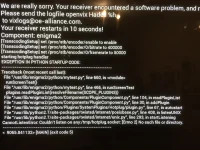
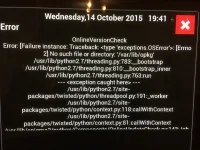
I cannot get the logs so i am attaching 2 screen shots. on what i can see.

IMG_0486.webpIMG_0489.webp
 
Flash from scratch via USB. Do not restore. Set everything up manually so you know what is being loaded. Load one item at a time and make sure everything is working at every step.
 
ok. I will start with 3.2.10 Now. Just going to download it again for VU+ SOLO2
 
scarOx Sadly that is exactly the problems / Error messages that I get on my GI LX2 running Vix 3.2.010. And believe me I have spent hours over three days re flashing using every configuration I could think of , and without success.
If you look on the forum in the GI Lx2 section you can read all about it.
 
Hi everybody.

Exactly same error with same error message and same consequences here with vu+ solo2.
Crash also shut down ftp and erases all plugins.
Crash seems to produce randomly and not tied to any user action.

Tried (with all usb disconnected and hdd fresh formated):

1) Get back to Apolo 166: same error at a random moment watching tv (no user action at this moment). This is very strange as it worked ok with this build in the past and there is no new or changed hardware.

2) Reinstalled last legacy Vu+ image (vuplus-image-vusolo2-20150924163227_usb.zip) in order to be sure it wasn't an hardware problem and to 'clear' flash: no crash.

3) Reinstalled openvix-3.2.010.release-vusolo2_usb.zip (always from this web) with my usual config: openVPN, cccam221(2.2.1-r5), driver dvb-usb-it913x(1.0-r2) and picons dirtysnp.100x60.transparent-black and it crashed again at random moment.

This is not a problem from version 3.2.010 as this crashes started some weeks ago with earlier 3.2.xxx versions (sorry I not remember exactly when).

Now I've started trying starting from a clean 3.2.010 version and reinstalling my setups and plugins step by step but as the error is random you never be sure if it works or not, so you have to wait a few hours after each try... and you are never sure.

Ok, so for now my conclusion is it seems to be a problem with picons as it crashed yesterday a few hours after installing them. From then, I've reinstalled all my setups and plugins BUT the picons and it works from late yesterday with no crash...

Hope this could help to solve this problem.
 
Ok boss... excuse me as I've found this thread and replied without looking too much.
Did you'll move this thread or can we continue here?
 
It is NOT a picons issue as this setup without any picons just crashed now.
I'll wait until problerms on 3.2.010 get solved.
 
No crashes for now (around 4 hours) with v. 3.2.013 (VuSolo2).
Thanks guys, very great job.
 
Sorry to say, but it finally crashed (v. 3.2.013) with again same error message.
One little difference is before this error message I've got another one for a few seconds but no time to read, just something to do with softcam.

Strangely, it run hours before crashing but after this first crash I reloaded some images made during the afternoon which crashed after very few minutes. Very strange.
 
Hi Sicilian, could you please move this thread to the right place, please.
Thank you.
 
Sorry to say, but it finally crashed (v. 3.2.013) with again same error message.
One little difference is before this error message I've got another one for a few seconds but no time to read, just something to do with softcam.

Strangely, it run hours before crashing but after this first crash I reloaded some images made during the afternoon which crashed after very few minutes. Very strange.

Which cam are you using?
 
Which cam are you using?

Hi judge, thanks for your help.

I use cccam221(2.2.1-r5).
I've used this cam for a long time without a problem. In fact, the 'big crash' I got as described by scar0x (no more ftp, nor telnet, no more plugins, etc. with the error message he reported) produced earlier this week with v. 3.2.010 and without any cam as I've tried lots of configs during days as I explain in my early posts.
 
I use cccam221(2.2.1-r5).
I've used this cam for a long time without a problem. In fact, the 'big crash' I got as described by scar0x (no more ftp, nor telnet, no more plugins, etc. with the error message he reported) produced earlier this week with v. 3.2.010 and without any cam as I've tried lots of configs during days as I explain in my early posts.

Maybe not a cam issue so. However cccam221 isn't suitable for current images on multi tuner boxes.
 
Status
Not open for further replies.

OpenViX Feeds Status

Back
Top