Superb quality and spec AB-Com PULSe 4K SE. Crazy offer! Only £129! FREE UK DELIVERY! 4K UHD, Enigma 2, Multiboot 4 images & more!...
Superb quality and spec AB-Com PULSe 4K Rev II Twin Satellite tuner only £179! FREE UK DELIVERY! 4K UHD, Enigma 2, SATA HDD facility, Multiboot 4 images & more!...

[MB Premium Twin HD] Crash setting timer from EPG Info box - and fix for it

birdman

Moderator
Joined
Sep 7, 2014
Messages
8,598
Reaction score
119
Points
63
Location
Hitchin, UK
If I go into the (graphical) EPG, select and event and press Info I get a pop-up box of information.
This includes an option to set a timer (green button).
Pressing that goes to the new timer screen, but saving that results in a crash:
Code:
Traceback (most recent call last):
  File "/usr/lib/enigma2/python/mytest.py", line 219, in processDelay
    callback(*retval)
  File "/usr/lib/enigma2/python/Screens/EventView.py", line 155, in finishedAdd
NameError: global name 'config' is not defined

Someone forgot to import config into the file.

The (tested) fix is just to add:

Code:
from Components.config import config

near the top of the Screens/EventView.py.
 
Just tried this, could not reproduce it. Tred it both on Sat and Terrestrial. Maybe I am checking the wrong screen. Can you post a screenhot of the Graphical EPG screen please?
 
Just tried this, could not reproduce it. Tred it both on Sat and Terrestrial. Maybe I am checking the wrong screen. Can you post a screenhot of the Graphical EPG screen please?
I'm not setting from the Graphical EPG - I'm setting from the Info box which pops-up from the EPG.

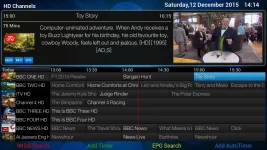
Go to the Graphical EPG and select a programme:

GraphicalEPG.webp

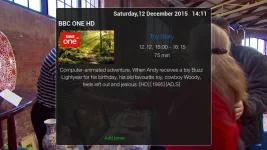
then press the Info button on your remote to get the Info box

Infobox.webp

which has an option to set a timer by pressing Green.

Press Green, get to the New Timer menu, then save the new timer. It will crash.

Alternatively just look at the code in Screens. Every other source file using config imports it, but EventView.py does not, even those it uses it (twice - on the same line).
 

OpenViX Feeds Status

Back
Top