Superb quality and spec AB-Com PULSe 4K SE. Crazy offer! Only £129! FREE UK DELIVERY! 4K UHD, Enigma 2, Multiboot 4 images & more!...
Superb quality and spec AB-Com PULSe 4K Rev II Twin Satellite tuner only £179! FREE UK DELIVERY! 4K UHD, Enigma 2, SATA HDD facility, Multiboot 4 images & more!...

[VU+ Solo2] Enigma 2 constantly crashing and broadband issue - solo2

  • Thread starter Thread starter Dannylfc
  • Start date Start date
D

Dannylfc

Guest
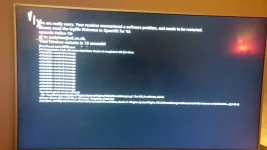
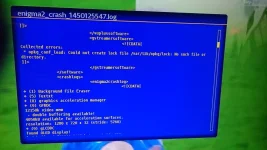
Enigma 2 keeps crashing on my VU solo 2. Keep getting error code "could not locate lock file var/lib/opkg/lock: no such file or directory.

As soon as the box crashes my broadband goes terrible. Both our phones constantly losing WiFi to the router while the routes keeps trying to reboot. As soon as I turn off the box WIFI goes back go normal.

The box has been reflashed using latest builds. Weird bit is the box didn't crash when I was with sky broadband, soon as I changed to BT. When solo is not turned on the broadband is perfect with wifi and ethernet to all devices.

Attached are picture of crash screen and crash log. Any ideas? Driving me crazy!
 

Attachments

  • DSC_0028.webp
    DSC_0028.webp
    46.2 KB · Views: 52
  • DSC_0029.webp
    DSC_0029.webp
    29.8 KB · Views: 49
Apologies. The pictures are very readable on my phone. I will get the exact build and image when I get home from work. A friend did the box for me so I'm not sure if it's cccam oscam or mgcamd
 
I can barely make out that the image is Helios, not 3.2

You would be better off flashing 3.2, build 030 and start over. This deletes all your setiings/files on receiver but not recordings.
 
That's a very old build. Fresh flash to 3.2.030
Also as Abu says - check if you are using mgcamd
 
Found out its using mgcamd with Helios 017. Apparantly box works perfect at his so must be a problem with ny Internet line dropping? I get 15 mbps, 1.4 upload and never noticed a problem using ps4, mobiles, laptop. Only when box is plugged in
 
You need to check mgcamd cfig file as this known to cause issues due to an error in the code which results in you DDOSing yourself.
 
Look in /usr/keys/mg_cfg, find and check the line L: and make sure it is set to L: { 00 } this disables logging which can cause issues on your LAN if it has been enabled without valid IP and log filename settings.
 
You will need to use an ftp programe such as Filezilla to remotely view your files. Check as above scroll down, you should see
# Log option, summ of:
# 00 off
# 01 network udp log
# 02 log to console
# 04 file, appended ! delete it by yourself, before it eat all your hdd
# + IP udp-port log-file-name
L: { 00 }

change to this if you see anything other than this on Line L
 
Can this be done on the box or does it have to be on s computer? All the files etc are at the blokes end. All I have is a box
 
Can this be done on the box or does it have to be on s computer? All the files etc are at the blokes end. All I have is a box

only pc use fiezilla to login to box and then go to the files as suggested in post 13
 
Just to be clear, the solution to your problem (if of course this is the solution) is not a box fault. It is a file that you, or someone on your behalf, has added.
 
some one on my behalf has added. He is convinced it is a problem with my internet, i'm not convinced. I have no files, just the box. The rest was done by him
 
The error code I keep getting in the crash log "could not locate lock file var/lib/opkg/lock: no such file or directory."

Does that indicate he has missed a file or added one that is causing this problem?

Is there anything else I can do at my end? I downloaded Firezilla but as I don't have the files on my laptop it is useless
 
some one on my behalf has added. He is convinced it is a problem with my internet, i'm not convinced. I have no files, just the box. The rest was done by him
I had similar issues and if you are using mgcamd then the mg_cf file is not setup correctly. it kept knocking my internet off.
 
The error code I keep getting in the crash log "could not locate lock file var/lib/opkg/lock: no such file or directory."

Does that indicate he has missed a file or added one that is causing this problem?

Is there anything else I can do at my end? I downloaded Firezilla but as I don't have the files on my laptop it is useless


if you are using mgcamd look on this forum there one knocking about and you can use it, or change it to how you want.
 

OpenViX Feeds Status

Back
Top