Superb quality and spec AB-Com PULSe 4K SE. Crazy offer! Only £99! FREE UK DELIVERY! 4K UHD, Enigma 2, Multiboot 4 images & more!...
Superb quality and spec AB-Com PULSe 4K Rev II Twin Satellite tuner only £149! FREE UK DELIVERY! 4K UHD, Enigma 2, SATA HDD facility, Multiboot 4 images & more!...

[TM-TWIN-OE] TivuSat CAM not decoding

  • Thread starter Thread starter mmc
  • Start date Start date
M

mmc

Guest
Technomate TM-Twin-OE
ViX 3.2 030

Brand new receiver with new pre-activated TivuSat Card & CAM.
Dish pointing at Astra 19 & Hotbird 13.
Satellites have been scanned and channels stored. FTA channels working fine but TivuSat channels not decoding - i just get a black screen.

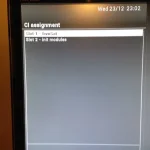
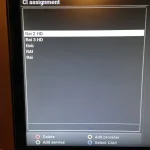
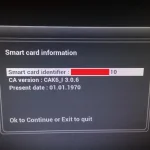
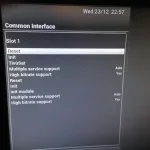
The CAM is inserted, installed and card detected (see screenshots). Have also assigned the relevant channels/providers from the hotbird 13 list to the TivuSat CAM - yet the channels, eg RAI 1 HD, RAI 2 HD, RAI 3 HD, Italia 1, Rete 4 etc are not working

What am i doing wrong? :confused:
 

Attachments

  • IMG_5115.webp
    IMG_5115.webp
    20.9 KB · Views: 18
  • IMG_5116.webp
    IMG_5116.webp
    21.2 KB · Views: 17
  • IMG_5118.webp
    IMG_5118.webp
    20.6 KB · Views: 15
  • IMG_5119.webp
    IMG_5119.webp
    36.5 KB · Views: 16
Do you need to set the correct date in your box and restart instead of default 1970?
If that doesn't work try disabling High Bit Rate.
 
P.s. I used to have a Technomate enigma2 box and the time and date was constantly out, I had to change time settings to update from network every hour rather than from stream.
 
Thanks for your suggestions.

The box already has the correct date/time - i'm not sure what the 1970 date being shown on the card settings screen relates to... activation date? expiry date?

But anyway i've tried the suggestions of changing the time settings to fetch from internet every half hour and disabled high bit rate and still no decoding. I wondering if the card hasn't been activated correctly.
 
Hi, its from World of Sat - order 28518.

Looking at the order i've just noticed that the card number sent doesn't match the card number shown on the order.

The CAM's serial number is correct though.
 
No need to use the CAM in the TM-Twin-OE, drivers in TM-Twin most likely not compatible.

Install CCcam 2.2.1 or above from the plugins feeds.

Put card in card reader.

FTP a blank CCcam.cfg file to /etc.

Start CCcam > blue button > softcam manager.

You may need to reboot for the card to be recognised by CCcam.
 
No need to use the CAM in the TM-Twin-OE, drivers in TM-Twin most likely not compatible.

Install CCcam 2.2.1 or above from the plugins feeds.

Put card in card reader.

FTP a blank CCcam.cfg file to /etc.

Start CCcam > blue button > softcam manager.

You may need to reboot for the card to be recognised by CCcam.

Thanks, followed those instructions and after a bit of fiddling I got it working! :)
 

OpenViX Feeds Status

Back
Top