Superb quality and spec AB-Com PULSe 4K SE. Crazy offer! Only £129! FREE UK DELIVERY! 4K UHD, Enigma 2, Multiboot 4 images & more!...
Superb quality and spec AB-Com PULSe 4K Rev II Twin Satellite tuner only £179! FREE UK DELIVERY! 4K UHD, Enigma 2, SATA HDD facility, Multiboot 4 images & more!...

Transcoding with mutant hd2400

s1m0nw

Forum Supporter
Donated Member
Joined
Feb 12, 2012
Messages
599
Reaction score
2
Points
18
Hey guys

I have recently took an upgrade from vm on my broadband speed which now gets me 10mb upload speed.

So I am having a play around with streaming settings, I can only get it to work using standard stream but not transcoded.

The way I am connecting to box is via my vpn built into my router.

If I use the xtrend app change port to 8002 it wont work unless its on 8001.

Transcoding app on the box doesnt give me to ability to change port number.

Any ideas??

Sent from my SM-G900F using Tapatalk
 
Anyone have any suggestions?

Sent from my SM-T550 using Tapatalk
 
Right got the chance to test transcoding... but it still didnt work. Works okish stardard streaming.

Is there anything I could be doing wrong

Sent from my SM-G900F using Tapatalk
 
Right got the chance to test transcoding... but it still didnt work. Works okish stardard streaming.

Is there anything I could be doing wrong

Sent from my SM-G900F using Tapatalk

How are you testing exactly? I've just checked via PC and webif, all fine. Also tried using Blackbox on iPhone, again working fine.
 
Both webif and trend trancoding app. I also forward 8002 and 8001.

Sent from my SM-G900F using Tapatalk
 
Hi, what's the update on this? Did you manage to transcode and watch outside of home network? I think I'm having similar problem as the stream doesn't look like transcoded.
 
Nope didnt manage it. Only works when streaming non-transcoded streams

Sent from my SM-G900F using Tapatalk
 
Thanks for update. I was tempted to upgrade my solo2 as there's one in classified but need transcoding to function properly.
 
I've tested again using VLC media info. Transcoding works fine using webif on PC (outside home network) but for some reasons not working with android app (Dreamdroid).
 
Can anyone share their settings? I've been playing almost 2hrs now and android app fails to transcode the stream. Transcoding via openwebif on another desktop, laptop is fine.
 
i found the xtrend app works best for the mutant, worked fine for me transcoding externally.
 
Cheers Rossi. Already tried and not working. It does work but goes off within 1 min. My observation with xtrend app is that the transcode setting on xtrend app takes over from the setting of box. Also if it's normal or not but transcode settings on openwebif is different than on plugin setting. I've also tried with OpenATV image and same thing failing to transcode in app. I'll try with more settings later in evening using openwebif transcode icon but ATM IMO it's transcoding in just one setting regardless any changes to transcode settings either from openwebif or plugin.

Bad thing is I already agreed to swap my solo2 with this box thinking I've got nice upgrade on bargain :rolleyes:.
 
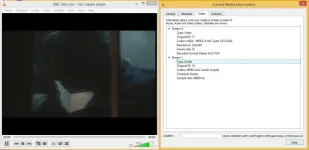
1) Using via Open Webif transcoded stream. Trancode bitrate and resolution matches with plugin settings.

transcode1.webp

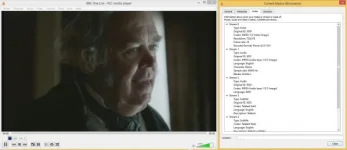
2) Again using Webif original stream

OriginalStream.webp

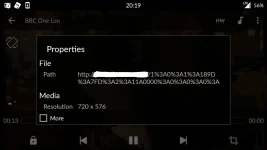
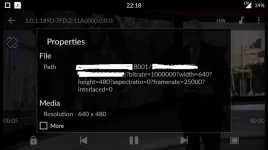
3) Screenshot from android phone using MX player on mobile connection. Resolution remains unchanged.

Screenshot_2016-01-07-20-19-16.webp
 
*&@%£!@ finally managed to watch transcoded stream on phone. Not the easiest way but at least it's working and video quality is very impressive.
 
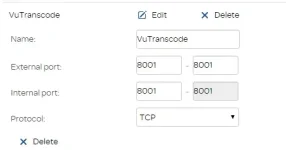
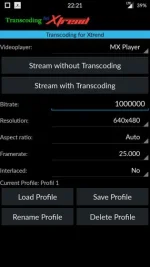
Finally success!!!!!!:thumbsup:. Only apps working for transcoded stream on android is "Transcoding for Xtrend". If you've got port forwarding to 8001 with different external port number, need to change back to 8001. Eg mine was set external port: 6010 Internal Port: 8001. After change it is External port: 8001 Internal port: 8001. Then it's usual bits on xtrend app. I actually liking the the app as it allows for "on the fly" bitrate change.
port.webp

Screenshot_2016-01-07-22-21-42.webp
xtrend2.webp
 
Finally success!!!!!![emoji106]. Only apps working for transcoded stream on android is "Transcoding for Xtrend". If you've got port forwarding to 8001 with different external port number, need to change back to 8001. Eg mine was set external port: 6010 Internal Port: 8001. After change it is External port: 8001 Internal port: 8001. Then it's usual bits on xtrend app. I actually liking the the app as it allows for "on the fly" bitrate change.
View attachment 46414

View attachment 46415
View attachment 46416
Hi mate

Congrats on getting it working, I gave up.

Can I ask on the picture vu transcode is that the transcoding app thats on your box?

Thanks

Sent from my SM-G900F using Tapatalk
 
sorry for late reply as not getting all notifications and was on holiday too. The pic with "vu transcode" is the router setting for port forwarding.
 
Sorry for hijacking your thread!

What's the best way to stream from my Mutant to an iPhone or iPad?

I can't seem to find the Xtrend app - is it Android only?
 

OpenViX Feeds Status

Back
Top