Superb quality and spec AB-Com PULSe 4K SE. Crazy offer! Only £129! FREE UK DELIVERY! 4K UHD, Enigma 2, Multiboot 4 images & more!...
Superb quality and spec AB-Com PULSe 4K Rev II Twin Satellite tuner only £179! FREE UK DELIVERY! 4K UHD, Enigma 2, SATA HDD facility, Multiboot 4 images & more!...

[VU+ Duo2] New remote control suggestions

'Power menu' is not hardcoded to 'long-power'. To give you an example: I have 'long-power' assigned to 'deep sleep' via 'Button setup'.
But you're right that the complete 'power menu' cannot be assigned to a button, only dedicated power commands.

But back to your issue: the 'power off activity' of a Harmony will never send a 'long-power' command; it sends a normal power toggle. I wonder why you would like a long-power then? IMHO you'd better go to the menu and do what you want to do directly before powering-off the activity, or assign power-toggle via button setup to what you want to do. Or create an additional button for power (if your Harmony allows you to do that; not sure about that).
And coming to that: what exactly is it you want to achieve?
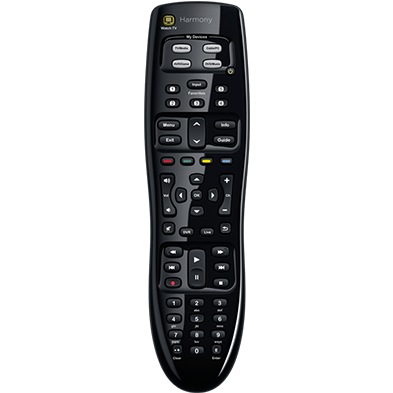
 
I just wanted the same functionality for the power button than the original remote has. But with the 350 I have to use another way.
 
1- But you still haven't told us what 'power button' you mean. If it's the all power off button (to end an activity like watching TV) it will indeed be the 'power-toggle' that's being sent. But then you can still set the function of that button in 'Button setup' (although I fail to see what you would want to achieve with that).

And 'the same functionality for the power button as the original remote has' is rather vague, as it doesn't tell me what exactly you want to achieve. Again: you can crete a new button with the function 'power' and assign any function to it via 'Button setup'.
 
1- But you still haven't told us what 'power button' you mean. If it's the all power off button (to end an activity like watching TV) it will indeed be the 'power-toggle' that's being sent. But then you can still set the function of that button in 'Button setup' (although I fail to see what you would want to achieve with that).

Sorry I don't know why it's so hard to explain this. The power button is the one in this picture (the small one at the top part, just right of the 4 light-colored buttons with the power symbol):
harmony-350-control-sm-promo.png


That button, by default sends the "power toggle" command. And that's fine as a command but as you cannot send a long signal by just keeping the button pressed (to get shutdown menu) you have to map that "power toggle" command to some other button. This is the limitation of the remote. So the power button in the 350 cannot be configured to function like in the original VU+ remote.
 
It's not difficult: you just never told.
So again: that's the 'all power off' button, that cannot be assigned to any button. But why would you?
But the 'powertoggle' that it sends can be set via 'Button Setup' if you really want to do it something else.
And also again: you can assign any other RC-button (a button you don't use) to 'power-long' and use ButtonSetup to assign a function to it.

PS: In the next ViX build (4.1.011) you will find that the power-menu can also be assigned. I added that especially for you :)
 
And also again: you can assign any other RC-button (a button you don't use) to 'power-long' and use ButtonSetup to assign a function to it.
I use the "E" button. Long press works ok.
 
So again: that's the 'all power off' button, that cannot be assigned to any button. But why would you?

Sorry I don't understand. What can't I assign to any button? I haven't found any all-off functions in the remote except if it's the Watch TV button in the top left corner that powers all of the devices on. Maybe it powers them off as well? I don't use that button at all.

And also again: you can assign any other RC-button (a button you don't use) to 'power-long' and use ButtonSetup to assign a function to it.

This is the way to do it yes. I only need to assign a "power toggle" to a button and then press the button long enough for the menu to appear. Also Logitech Support added a command for me that sends a power toggle command for 3 seconds with a single press and release of a button.

PS: In the next ViX build (4.1.011) you will find that the power-menu can also be assigned. I added that especially for you :)

Ha, thanks Rob! Very much appreciated. I haven't upgraded yet but want to avoid the EPG crash so will do it soon.
 
Yep I know. That's why I will probably wait for it before upgrading from 008.
 

OpenViX Feeds Status

Back
Top