Superb quality and spec AB-Com PULSe 4K SE. Crazy offer! Only £129! FREE UK DELIVERY! 4K UHD, Enigma 2, Multiboot 4 images & more!...
Superb quality and spec AB-Com PULSe 4K Rev II Twin Satellite tuner only £179! FREE UK DELIVERY! 4K UHD, Enigma 2, SATA HDD facility, Multiboot 4 images & more!...

[ET8500] Setting up Skin Position

They are all the same. When you are in System, scroll up to User Interface.


Sent from my iPhone using Tapatalk
 
I will take a picture and upload... But it defintaly is not there. I used to use it all the time on ET9000 so know where it is and how to use, but it deffo isnt here on my ET8500
 
I don't see the "target" on my ET10K, and I'm pretty sure the only time I have seen it is when reflashing (without restoring settings??)
 
I don't see the "target" on my ET10K, and I'm pretty sure the only time I have seen it is when reflashing (without restoring settings??)

Thats correct,because you short out the wizard when you do a settings restore.
Without the settings restore you get the user setup, lan setup do you want to scan. etc
 
i got that page when i was setting up my new ET8500 but as soon as you get your channels - picon's and every thing else set up you loose it just like twol explained :eek:
 
Well... Done it under "controlled tests".

Setup, Skin Setup, Position Setup ---- when given the choice to more left right, up/dpwn etc, there is no target. In fact screen behind goes black...

Then if you push exit go back one step to the menue, and the select positioner setup the target comes up behind the screen - so no TV pic, but the target.

Then when you press exit, exit exit to get back to teh TV the Target is still on the screen when the TV picture should be there.

I then have to move channel up and down to get the TV pic back.

Done this a couple of times now, and each time same result. Anyone else found this bug- if indeed it is a bug.

Can I upload a video - if so I will?

James.
 
Yep, i have almost the same issue..... So bug.:)

Went to position setup .. no position screen
Exit/menu ....... black screen
Go back into settings .. have position screen
Menu exit ... still position screen
Have to change channel.

I am running at the latest Vix Dev code level as at Friday. So not fixed by Dev code.
 
Well you learn something new every day! Just changed my Samsung picture size from 16:9 to 'screen fit' and my solo 2 position setup to defaults and it's perfect.
 
Same here... I have changed most of the TVs to have this overscan thing off...
 
Yep, i have almost the same issue..... So bug.:)
Not really. At least not as I understand it.

1- When in the First Install Wizard you get th ementioned background. This is required, as at that stage there is no live-service available.
2- When doing this later, via the menu, when the system is completely up & running, the situation is different. Now there is a live service (or at least: that should be the case), so that's the background now. Further more the exact results depend very much on the skin used. e.g.:
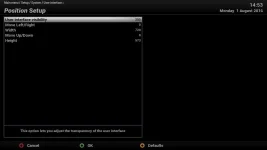
2a- When using the default skin (ViX-HD-Night) you get the following picture:

PSU 01.webp

That looks like a black picture (no background, but see what happens when you turn down the value in the first line: the live service comes up in the background, and now you can perfectly scale the OSD (doesn't show in a screenie, so I can't show you from here).
So you can indeed make all the OSD settings here: size & opacity.

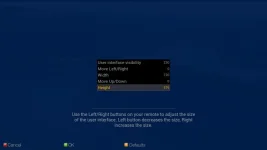
2b- When using Magic-FHD you get a completely different picture:

PSU 02.webp

Doesn't show on the screenie either, but in reality you see the live service through the blueish screen.
And so it will be different for other skins as well.
 
When on my setup I go into the screen position I lose the tv picture and the screen goes black. Press exit, and then go back into it and hte cross hairs target comes up. When you then press exit to go all the way back to the TV the TV picture doesnt come back on. You have to move channel up and down to get it back.
 
When on my setup I go into the screen position I lose the tv picture and the screen goes black. Press exit, and then go back into it and hte cross hairs target comes up. When you then press exit to go all the way back to the TV the TV picture doesnt come back on. You have to move channel up and down to get it back.
On which box, which image(version) and which skin?
 
Yep, that sin has an issue. Triggered by this thread I've just reported it.
So for the time being, as OSD-size setup is a once-only job, please use ViX-HD or Magic-FHD.
 
Hello all, new poster here. My box exhibits similar behaviour : -

Menu -> Setup -> System - User interface -> Position setup gives the blue screen with the coordinate selection menu. If I then exit from the blue screen, the User interface menu is re-displayed on a black background and further exits back through the menus results in a black background. The picture can be restored by channel up/channel down key presses.
 
Not really. At least not as I understand it.

1- When in the First Install Wizard you get th ementioned background. This is required, as at that stage there is no live-service available.
2- When doing this later, via the menu, when the system is completely up & running, the situation is different. Now there is a live service (or at least: that should be the case), so that's the background now. Further more the exact results depend very much on the skin used. e.g.:
2a- When using the default skin (ViX-HD-Night) you get the following picture:

View attachment 49229

That looks like a black picture (no background, but see what happens when you turn down the value in the first line: the live service comes up in the background, and now you can perfectly scale the OSD (doesn't show in a screenie, so I can't show you from here).
So you can indeed make all the OSD settings here: size & opacity.

2b- When using Magic-FHD you get a completely different picture:

View attachment 49230

Doesn't show on the screenie either, but in reality you see the live service through the blueish screen.
And so it will be different for other skins as well.
Thanks Rob, that is really helpful information.
However, although you would usually go through the wizard setup, if like Flyingpig, you do end up at this setup stage is there someway of adding a little bit more information as to how to proceed? Its not exactly self explanatory, especially if it's different with each Skin.
 
information as to how to proceed? Its not exactly self explanatory, especially if it's different with each Skin.
Well, in fact the 2 examples I showed (ViX-HD & Magic-FHD) behave the same.
It's a number of other screens (like YouViX, or more in general screens that use a PiG-screen for OSD-setup) that don't work as they should.
 
Well, in fact the 2 examples I showed (ViX-HD & Magic-FHD) behave the same.
It's a number of other screens (like YouViX, or more in general screens that use a PiG-screen for OSD-setup) that don't work as they should.

You mean the ones you have been updating :):):)
 

OpenViX Feeds Status

Back
Top