
Andy_Hazza
Moderator
They are all the same. When you are in System, scroll up to User Interface.
Sent from my iPhone using Tapatalk
Sent from my iPhone using Tapatalk


I don't see the "target" on my ET10K, and I'm pretty sure the only time I have seen it is when reflashing (without restoring settings??)


And now enjoy HD for the very first timeWell you learn something new every day! Just changed my Samsung picture size from 16:9 to 'screen fit' and my solo 2 position setup to defaults and it's perfect.
Not really. At least not as I understand it.Yep, i have almost the same issue..... So bug.
On which box, which image(version) and which skin?When on my setup I go into the screen position I lose the tv picture and the screen goes black. Press exit, and then go back into it and hte cross hairs target comes up. When you then press exit to go all the way back to the TV the TV picture doesnt come back on. You have to move channel up and down to get it back.

Thanks Rob, that is really helpful information.Not really. At least not as I understand it.
1- When in the First Install Wizard you get th ementioned background. This is required, as at that stage there is no live-service available.
2- When doing this later, via the menu, when the system is completely up & running, the situation is different. Now there is a live service (or at least: that should be the case), so that's the background now. Further more the exact results depend very much on the skin used. e.g.:
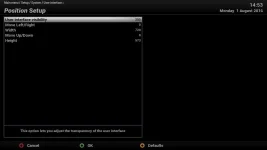
2a- When using the default skin (ViX-HD-Night) you get the following picture:
View attachment 49229
That looks like a black picture (no background, but see what happens when you turn down the value in the first line: the live service comes up in the background, and now you can perfectly scale the OSD (doesn't show in a screenie, so I can't show you from here).
So you can indeed make all the OSD settings here: size & opacity.
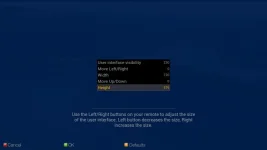
2b- When using Magic-FHD you get a completely different picture:
View attachment 49230
Doesn't show on the screenie either, but in reality you see the live service through the blueish screen.
And so it will be different for other skins as well.
Well, in fact the 2 examples I showed (ViX-HD & Magic-FHD) behave the same.information as to how to proceed? Its not exactly self explanatory, especially if it's different with each Skin.
Well, in fact the 2 examples I showed (ViX-HD & Magic-FHD) behave the same.
It's a number of other screens (like YouViX, or more in general screens that use a PiG-screen for OSD-setup) that don't work as they should.


