Superb quality and spec AB-Com PULSe 4K SE. Crazy offer! Only £129! FREE UK DELIVERY! 4K UHD, Enigma 2, Multiboot 4 images & more!...
Superb quality and spec AB-Com PULSe 4K Rev II Twin Satellite tuner only £179! FREE UK DELIVERY! 4K UHD, Enigma 2, SATA HDD facility, Multiboot 4 images & more!...

[VU+ Duo2] Vix with Vu Duo2

  • Thread starter Thread starter frank machin
  • Start date Start date
F

frank machin

Guest
Hi
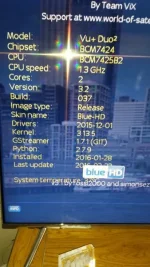
sorry to bother people but how do i know what version of Vix i have on my Duo? and is it updated automatically by internet or do i have to manually do it?

cheers all
 
Menu - information - about.

No it is not updated automatically, you will however be notified with a green flashing orb in the info bar when a update is available unless you disable that feature. The choice wether to update or not will always reside with you.
 
20160912_170730.webp20160912_170742.webp

Cheers mate....this is what the about screens show Larry G.. i looked at the software updater too and that just said ''error contact W.O.S. if it persists''
 
so i need to install this.................. openvix-4.2.005.release-vuduo2_usb via USB?

sorry about the idiotic questions chaps. i am trying to learn this stuff..so i do not need to ask in the future

this is what i intend to do

Preparation.
1. Format a USB stick to FAT32.
2. Download the image of your choice and extract it to your desktop.
3. Open the folder you extracted to your desktop, in this case named openvix-
3.0.xxxvuduo2_usb, you will see another folder named vuplus, this is your image file. Copy
the entire vuplus folder directly to the USB stick.
Flashing the Receiver.
– Fully power the receiver down via the rocker switch at the rear of the receiver.
– Make sure no USB devices are plugged into the receiver at this point.
– Insert the USB stick containing the image files into one of the USB ports on the receiver.
– Power the receiver on from the rear rocker switch and await instructions.
– As your Duo2 starts to power up you should see a prompt on the receivers display asking
you to press the power button, at this point you need to press the power button which is
located behind the flap on the front of the receiver.
 
Last edited by a moderator:
so i need to install this.................. openvix-4.2.005.release-vuduo2_usb via USB?

sorry about the idiotic questions chaps. i am trying to learn this stuff..so i do not need to ask in the future

this is what i intend to do

Preparation.
1. Format a USB stick to FAT32.
2. Download the image of your choice and extract it to your desktop.
3. Open the folder you extracted to your desktop, in this case named openvix-
3.0.xxxvuduo2_usb, you will see another folder named vuplus, this is your image file. Copy
the entire vuplus folder directly to the USB stick.
Flashing the Receiver.
– Fully power the receiver down via the rocker switch at the rear of the receiver.
– Make sure no USB devices are plugged into the receiver at this point.
– Insert the USB stick containing the image files into one of the USB ports on the receiver.
– Power the receiver on from the rear rocker switch and await instructions.
– As your Duo2 starts to power up you should see a prompt on the receivers display asking
you to press the power button, at this point you need to press the power button which is
located behind the flap on the front of the receiver.


Yes thats pretty much word for word from my flashing tutorial. Although I would recommend you first backup the existing image before proceeding.
 
Thanks Larry...is there much of a difference between 3.2 and 4.0? will i notice anything it?
 
Thanks Larry...is there much of a difference between 3.2 and 4.0? will i notice anything it?

To be honest mate I don't run either of those builds. I still run older builds (hades and older) on all but one of my boxes but there won't be any real difference. ViX has pretty much been the same GUI wise for the past four or five years.
 
last question hopefully can you point me to a link about how to backup the image please

cheers
 
Blue button - ViX - image manager (this makes a full image backup) backup manager makes a settings and plugins backup. Make sure you save the backup to a internal hard disc or a USB storage device before you reflash so you don't loose it.
 
Hi Larry
i installed the new vix using image manager..but now i have no sky channels what has gone wrong?
 
...as far as I'm aware, cline talk breaks the forum rules.
 

OpenViX Feeds Status

Back
Top