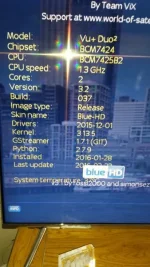
so i need to install this.................. openvix-4.2.005.release-vuduo2_usb via USB?
sorry about the idiotic questions chaps. i am trying to learn this stuff..so i do not need to ask in the future
this is what i intend to do
Preparation.
1. Format a USB stick to FAT32.
2. Download the image of your choice and extract it to your desktop.
3. Open the folder you extracted to your desktop, in this case named openvix-
3.0.xxxvuduo2_usb, you will see another folder named vuplus, this is your image file. Copy
the entire vuplus folder directly to the USB stick.
Flashing the Receiver.
– Fully power the receiver down via the rocker switch at the rear of the receiver.
– Make sure no USB devices are plugged into the receiver at this point.
– Insert the USB stick containing the image files into one of the USB ports on the receiver.
– Power the receiver on from the rear rocker switch and await instructions.
– As your Duo2 starts to power up you should see a prompt on the receivers display asking
you to press the power button, at this point you need to press the power button which is
located behind the flap on the front of the receiver.