Superb quality and spec AB-Com PULSe 4K SE. Crazy offer! Only £129! FREE UK DELIVERY! 4K UHD, Enigma 2, Multiboot 4 images & more!...
Superb quality and spec AB-Com PULSe 4K Rev II Twin Satellite tuner only £179! FREE UK DELIVERY! 4K UHD, Enigma 2, SATA HDD facility, Multiboot 4 images & more!...

[MB Premium Ultra] No Picture when connecting Amazon Fire to HDMI-In

imish

New member
Joined
Sep 4, 2013
Messages
622
Reaction score
0
Points
0
Bought a new Amazon Fire Stick - works fine when connected directly to the TV when testing, however as I don't have any free HDMI ports on the TV I planned to connect it to the HDMI-IN port on the STB. When I do, I see video for 2 secs and then blank.

am I not doing something right?

support appreciated.

thanks
 
Connected another device into the HDMI-in port and still no video - don't see any settings in the menu to toggle.

any ideas?
 
I don't know which other device you tried but I'm pretty sure Amazon Fire sticks need direct synch to the TV, or they switch to standby, meaning unless the box has true pass through mode it won't work.
I tried a AFTV stick through a hdmi adapter that specifically has pin 8 disabled and could not get a picture no matter what I tried.
 
Connected another device into the HDMI-in port and still no video - don't see any settings in the menu to toggle.

any ideas?

I just tried my firestick in my Extrend 10k box - result blank screen

Maybe ... or maybe not
Code:
http://www.world-of-satellite.com/archive/index.php/t-49600.html

http://www.ebay.co.uk/gds/Understanding-HDMI-and-HDCP-/10000000177911445/g.html
 
I don't know about the FTV stick as both mine now reside with relatives but my two FTV Boxes are used with HDMI switches and they work fine.

There was a issue with them when at first about 18 months to 2 years ago. I would not get a picture if I switched to them and they were already powered on but they did work if I switched to them and powered them on after, that was resolved a long time ago though with a software update on the boxes.
 
I don't know which other device you tried but I'm pretty sure Amazon Fire sticks need direct synch to the TV, or they switch to standby, meaning unless the box has true pass through mode it won't work.
I tried a AFTV stick through a hdmi adapter that specifically has pin 8 disabled and could not get a picture no matter what I tried.

Other device was a cctv dvr.

Interesting post - What's the fix?


Sent from my iPhone using Tapatalk
 
...my Fire tv is connected to an hdmi switch and works fine, very neet infact.
 
...my Fire tv is connected to an hdmi switch and works fine, very neet infact.

But is it a fire tv or Fire tv stick, I have Fire tv and Fire tv 2, here and they both work through my amp or switches, but I never ever got fire sticks to work unless connected directly to TV.
 
Amazon setup instructions for a stick says...
Avoid connecting Fire TV Stick to your TV through an unpowered HDMI hub or switch, as this can affect the device's power consumption.
which suggests that it should work with a powered switch.

(Mine's not a stick.)
 
Its a Fire TV Stick. Works perfectly when connected directly to the TV.

Neither Fire TV or CCTV DVR work when connected to the HDMI-IN on the STB.

any settings other than the HDMI-IN Toggle using the blue button menu?
 
For info:

Firestick connected directly to the HDMI input of my Extrend 10K = black screen

Firestick routed through a powered HDMI splitter and then into the Extrend HDMI port = works perfectly

Code:
http://www.ebay.co.uk/itm/131327456247?_trksid=p2060353.m2749.l2649&ssPageName=STRK%3AMEBIDX%3AIT
Ordered Sunday pm from this supplier, delivered Tuesday am.

Notes: The unit needs power. It comes with a USB power cord but no mains adapter. I obtained the power by plugging in the power lead to one of the spare USB ports on the back of my Extrend 10K box. A extra HDMI lead will also be required.

The power consumption is quoted at 10W maximum but with the firestick as a input and only one output used my USB power meter says 0.3A @ 5V = 1.5W

I have an different (cheaper) HDMI splitter on order and will report again when that arrives
 
Last edited:
For info:

Firestick connected directly to the HDMI input of my Extrend 10K = black screen

Firestick routed through a powered HDMI splitter and then into the Extrend HDMI port = works perfectly

Code:
http://www.ebay.co.uk/itm/131327456247?_trksid=p2060353.m2749.l2649&ssPageName=STRK%3AMEBIDX%3AIT
Ordered Sunday pm from this supplier, delivered Tuesday am.

Notes: The unit needs power. It comes with a USB power cord but no mains adapter. I obtained the power by plugging in the power lead to one of the spare USB ports on the back of my Extrend 10K box. A extra HDMI lead will also be required.

The power consumption is quoted at 10W maximum but with the firestick as a input and only one output used my USB power meter says 0.3A @ 5V = 1.5W

I have an different (cheaper) HDMI splitter on order and will report again when that arrives

Thanks - this looks like the solution.
 
For info:

Firestick connected directly to the HDMI input of my Extrend 10K = black screen

Firestick routed through a powered HDMI splitter and then into the Extrend HDMI port = works perfectly

Code:
http://www.ebay.co.uk/itm/131327456247?_trksid=p2060353.m2749.l2649&ssPageName=STRK%3AMEBIDX%3AIT
Ordered Sunday pm from this supplier, delivered Tuesday am.

Notes: The unit needs power. It comes with a USB power cord but no mains adapter. I obtained the power by plugging in the power lead to one of the spare USB ports on the back of my Extrend 10K box. A extra HDMI lead will also be required.

The power consumption is quoted at 10W maximum but with the firestick as a input and only one output used my USB power meter says 0.3A @ 5V = 1.5W

I have an different (cheaper) HDMI splitter on order and will report again when that arrives


Update:
And what didn't work is the cheap un-powered splitter
Code:
http://www.ebay.co.uk/itm/172318014603?_trksid=p2060353.m2749.l2649&ssPageName=STRK%3AMEBIDX%3AIT
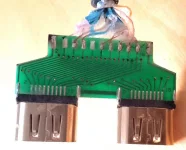
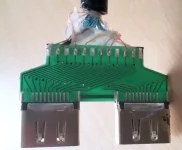
Probably not surprising as it's likely to be just a piece of wire.
 
Update:
And what didn't work is the cheap un-powered splitter
Code:
http://www.ebay.co.uk/itm/172318014603?_trksid=p2060353.m2749.l2649&ssPageName=STRK%3AMEBIDX%3AIT
Probably not surprising as it's likely to be just a piece of wire.


After dismantling - no semiconductors - just a circuit board routing (some) wires to two output connectors

splitter1.webpsplitter2.webp
 
For info:

Firestick connected directly to the HDMI input of my Extrend 10K = black screen

Firestick routed through a powered HDMI splitter and then into the Extrend HDMI port = works perfectly

Code:
http://www.ebay.co.uk/itm/131327456247?_trksid=p2060353.m2749.l2649&ssPageName=STRK%3AMEBIDX%3AIT
Ordered Sunday pm from this supplier, delivered Tuesday am.

Notes: The unit needs power. It comes with a USB power cord but no mains adapter. I obtained the power by plugging in the power lead to one of the spare USB ports on the back of my Extrend 10K box. A extra HDMI lead will also be required.

The power consumption is quoted at 10W maximum but with the firestick as a input and only one output used my USB power meter says 0.3A @ 5V = 1.5W

I have an different (cheaper) HDMI splitter on order and will report again when that arrives

This worked. Tried both my amazon fire tv stick and my cctv dvr and they show fine via hdmi in - through this powered splitter.

Would someone explain in layman's terms as to why the hdmi in port doesn't work without a powered splitter?


Sent from my iPhone using Tapatalk
 
Would someone explain in layman's terms as to why the hdmi in port doesn't work without a powered splitter?

Code:
http://www.howtogeek.com/208917/htg-explains-how-hdcp-breaks-your-hdtv-and-how-to-fix-it/
 

OpenViX Feeds Status

Back
Top