Superb quality and spec AB-Com PULSe 4K SE. Crazy offer! Only £129! FREE UK DELIVERY! 4K UHD, Enigma 2, Multiboot 4 images & more!...
Superb quality and spec AB-Com PULSe 4K Rev II Twin Satellite tuner only £179! FREE UK DELIVERY! 4K UHD, Enigma 2, SATA HDD facility, Multiboot 4 images & more!...

Open Webif Question

  • Thread starter Thread starter BRAVEHEART
  • Start date Start date
B

BRAVEHEART

Guest
This question is with regards to the Open Webif interface that is accessed on the windows computer when your computer is connected to the VU box Via the same internet router that is also connected to VU box, in this case right now via an ethernet cable although I have another computer that accesses openWebif and the same box wirelessly too.

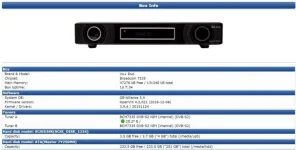
I am wondering if this is just a sheer coincidence of never noticing this before or if its maybe because I didn't use OpenVix until more recent times (using Version openvix-4.2.021) (See Attachment).

Question :, the two tuners are connected correctly on the box with both LNB feeds (if that makes a difference ?), When the VU box is switched on in the living room I can also see that its switched on in the Open Webif interface too on the computer.

Now, I can honestly say that I have never noticed this until now, if I switch the VU box off in the living room using the computers Open Webif interface to do so then yes it switches the VU box off obviously, but that's no good, I want to be able to maybe watch another channel from the VU on the computer and the wife wants to watch a movie or another channel, so I can't figure out how this is done.

Please try and remember that since I bought the box back in late 2010 I think it was, I only ever used one feed/one tuner as the wife was happy to view a freesat box which used the other sat feed, so this is all quite new to me in respect of what I have just explained.

The box is set up 100% perfectly as far as I am concerned, I had help when switching to OpenVix as I was unsure of using it and someone basically took me through it step by step etc.

But, I am almost positive that the previous image I used didn't have this same type of thing going on, I can't be 100% sure but I am just sure I can remember when using openpli that I was able to see the box was off in Open webif on my computer while the actual VU box was physically on in the living room, as I say, I can't be 100% sure though, so I could be wrong and this may be nothing more than something that I have just noticed after all these years, seems strange.

Plus the fact, how the heck can I pick one channel on the computer while the wife watches another, thats another one thats confusing me :confused:

MY VU+DUO BOX FLASH INFO 6TH DEC 2012.webp
 
If you put the receiver into "deep standby", it cannot be used.

If you put it in "standby" or it is "on", you can stream from it.

Plus the fact, how the heck can I pick one channel on the computer while the wife watches another, thats another one thats confusing me
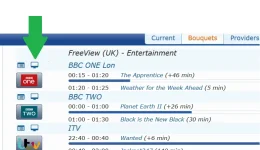
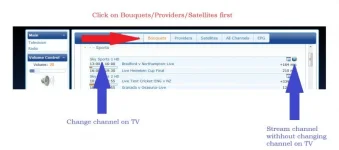
If you click on the channel name, you change the channel on the receiver
If you click on the little computer icon, you begin streaming without affecting main picture from the receiver.

I use VLC on my PC as the default media player.
 
If you put the receiver into "deep standby", it cannot be used.
If you put it in "standby" or it is "on", you can stream from it.
If you click on the channel name, you change the channel on the receiver
If you click on the little computer icon, you begin streaming without affecting main picture from the receiver.
I use VLC on my PC as the default media player.

Thanks abu baniaz

I use VLC too, Snap :) EDIT : just checked, its defo VLC I use for viewing with open webif.
I can stream from the VU to the computer, that is not a problem, never has been, and when the wife isnt watching the
VU box and its on standby then I can still stream to the PC, that isnt the problem mate, its just like I described above.
ohh, and its never in deep standby mode either mate.

If I change a channel using open webif on my computer then it changes in the living room too, and vice versa, if the
box changes channel in the living room it changes on open webif on the computer too, how come ?

I know what you mean with clicking on the little computer icon on the computer screen in open webif.
EDIT: hmmm, wait, maybe I aint using VLC player for Viewing more I think about it now, do you see the open
webif in VLC player mate ?
Either way, Open webif has the little computer icon thing your talking about anyway, I dont know if this is different in
VLC player though, is it ?

All I have is the open webif screen, thats all.
EDIT : just checked, its defo VLC I use for viewing with open webif.
Surely like for example just now she is watching another channel and I want to watch another channel on the
computer, surely I must be able to do that ?

Isn't that what these boxes are all about, you can watch two channels on different sources, in my case on the computer and
also the living room tv at same time while she watches something else, or am I getting mixed up with watch one and record another ? even at that I still cant figure that part out.

And what about how I can see the box is on in open webif on my computer, I am sure with the old openpli image the wife could have the VU box on in
the living room watching something and on the open webif on my computer in the other room I could see that the open webif reported the box as being
off, as I say, I could be wrong, I am not 100%.
 
Last edited by a moderator:
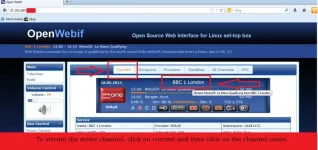
If you click on a channel name, you will change the channel on the TV. Don't click on the the channel name. As I said before, click on the computer logo.
stream.webp


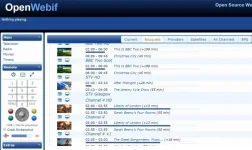
The old openwebinterface used to look like this

stream other.webp

stream current.webp

You have two tuners, you can record/stream/watch/from two transponders. If you try to access a service on a third one, it won't work.
 
Last edited:
If I change a channel using open webif on my computer then it changes in the living room too, and vice versa, if the box changes channel in the living room it changes on open webif on the computer too, how come?
Because you've changed channel....
So, as Abu says, don't change channel.
Just stream the one which you want to watch.
 
Thanks abu baniaz, I will need to try this out tomorrow as shes away to bed ages ago and the VU box is in the other room, so it saves me going back and forth if she can tell me what is happening.

I also did notice that Open Webif has been updated now too, looks much much better I am happy to say :)

I never click on the channel name, I have always clicked on the little computer screen icon that you show in your photo, what then happens is it asks me to save a file which I always save to desktop, for example, its called 'stream (3).m3u', so I save that file and click on it to play the channel, only takes like a second anyway, no big deal.

But, thats the way its always been since as far back as I can remember, and I am almost 90% sure earlier that when I was doing that it was also changing the channel on the VU box in the living room too because I was wanting to watch one thing and she wanted to watch another, so I just gave in and let her watch whatever she wanted and I gave up.

Hmmmm :confused:

p.s
as you can see its the the new edition of openwebif I have in the attached photo.

openwebif new.webp
 
Last edited by a moderator:
Forget openwebif for now, we'll get back to it later. Can you record one channel and watch another?
 
Maybe we are all getting mixed up because of my original first post of my thread here as it is kinda confusing, I dunno man, I am still :confused: though, hmmm, but hey, I have the greatest of respect for any of you guys that can and do try help, so don't think that I don't appreciate it, I do very much :thumbsup: (its just me that's obviously AGAIN doing something wrong).
 
Forget openwebif for now, we'll get back to it later. Can you record one channel and watch another?

I can't test the recording feature yet mate as I have not yet backed up my full image etc which should be done a.s.a.p and will be, the backup image file is saved to the main hard drive on the VU so I will need to get a FULL COPY of that including Everything should anything go wrong, so I don't even want to touch recording yet just in case I some how record over that file (dont want to risk it as its all set up perfect), I hope and am sure you understand.

When I do back the backup the Entire Full Image including every single thing as it is now, I will be doing it directly from the VU box to the computer here (ethernet cable to computer) and then saving the file to various backup drives including usb stick etc, hopefully I can get all that into the normal "vuplus" flashing file so that its directly flashable via usb.
 
Last edited by a moderator:
Post a picture of your tuner configuration for tuner a

Post a picture of your tuner configuration for tuner b
 
Have you got zap before stream enabled?
If so turn it off.
 
If you click on a channel name, you will change the channel on the TV. Don't click on the the channel name. As I said before, click on the computer logo.
View attachment 51796


The old openwebinterface used to look like this

View attachment 51794

View attachment 51795

You have two tuners, you can record/stream/watch/from two transponders. If you try to access a service on a third one, it won't work.


yes, it works mate as you said, I tried tonight as I was able to ask her to tell me whats happening on the main tv while I watched another channel on the computer :)

Cheers mate ;)

I guess all the years that went by just using one single feed in one tuner stopped me doing this, so this is MUCH better now :thumbsup: and I guess that's why I was getting confused with this, easy mistake to make when your not used to these things, learn something new everyday as they say :)
 
Glad you got it sorted, no need to upset the wife so close to Christmas. :thumbsup:
The zap before stream i mentioned , if you are streaming and it is enabled it will change the box to that channel, it should generally be left off, i think, i don't know it's nearly here, just need some snow.
 
Last edited:
Glad you got it sorted, no need to upset the wife so close to Christmas. :thumbsup:
The zap before stream i mentioned , if you are streaming and it is enabled it will change the box to that channel, it should generally be left off, i think, i don't know it's nearly here, just need some snow.

so should this zap thing defo be on or off I wonder ?

Where do I find it on the menu either way ?
 
It should be off.

Thanks mate, but just for the sake of looking and checking, where is it in the menu please, or any other forum user if birdman isn't around, cheers ??

Also, noticed somethinsg else happening that is very strange to me, while she is watching a tv channel on the VU box in the living room and I am on the computer and I maybe dont even have the Open Web interface open, she shouts to me a lot that "she is not able to turn the volume up and down" and the tv remote control has no effect over the tv as it should do.

So I then pull up Open Webif on the computer screen and turn the open webif volume up from there and it allows me to control the volume on the tv, that's good and fine but surely there is a way to lock the volume on Open Webif to for example 90% and that's it, its then locked and everybody is happy ? If not then that is going to be a heck of a pain in the neck very much so.

I know for a fact that cannot be right as that has never happened in my life before with boxes.

So as well as the question with regards to "Zap", what would be the answer to this volume control one, could anyone
tell me please, thanks ????? :confused:
 
Last edited by a moderator:
Thanks mate, but just for the sake of looking and checking, where is it in the menu please, or any other forum user if birdman isn't around, cheers ??
It's an option on OpenWeb IF. Open that, go into Settings and you'll see it.
 
Also, noticed somethinsg else happening that is very strange to me, while she is watching a tv channel on the VU box in the living room and I am on the computer and I maybe dont even have the Open Web interface open, she shouts to me a lot that "she is not able to turn the volume up and down" and the tv remote control has no effect over the tv as it should do.

So I then pull up Open Webif on the computer screen and turn the open webif volume up from there and it allows me to control the volume on the tv, that's good and fine but surely there is a way to lock the volume on Open Webif to for example 90% and that's it, its then locked and everybody is happy ? If not then that is going to be a heck of a pain in the neck very much so.

I know for a fact that cannot be right as that has never happened in my life before with boxes.

anyone ?
 
We'll need a description of your set-up.

...while she is watching a tv channel on the VU box in the living room and I am on the computer and I maybe dont even have the Open Web interface open, she shouts to me a lot that "she is not able to turn the volume up and down" and the tv remote control has no effect over the tv as it should do.
When she says that she is "not able to turn the volume up and down" does that mean:

  • pressing VolUp/Down has no noticeable effect at all
  • it does have an effect, but there is a report on the TV that the volume is fixed
  • the TV reports a volume change, but there is no actual volume change.
Do you have external speakers connected to your TV and, if so, how are they connected. Does the TV volume control normally work for them.

So I then pull up Open Webif on the computer screen and turn the open webif volume up from there and it allows me to control the volume on the tv, that's good and fine but surely there is a way to lock the volume on Open Webif to for example 90% and that's it, its then locked and everybody is happy
You're probably not, but you shouldn't use the OpenWeb IF volume control to control the volume for you on your PC - you should use the volume control in whatever you are using to view (or the PC volume itself).
 

OpenViX Feeds Status

Back
Top