Superb quality and spec AB-Com PULSe 4K SE. Crazy offer! Only £129! FREE UK DELIVERY! 4K UHD, Enigma 2, Multiboot 4 images & more!...
Superb quality and spec AB-Com PULSe 4K Rev II Twin Satellite tuner only £179! FREE UK DELIVERY! 4K UHD, Enigma 2, SATA HDD facility, Multiboot 4 images & more!...

[VU+ Ultimo4K] What Outstanding Issues Do you Want Sorted in Image?

Nitemare

Member
Joined
May 16, 2012
Messages
93
Reaction score
0
Points
6
Location
Northern Ireland
Currently using VIX 4.2.028 image for Ultimo 4K ...

Whilst I'm pleased to have an image for my new Ultimo there are a few items STILL outstanding to make it the way I'd like ...

1. Support for the VU+ USB Turbo Tuner (S) ... so I can access my FreeView Channels (UK)

2. Support for my Logitech K400 wireless keyboard so I can use the Chromium Browser with ease (rather than fumbling with the remote control unit) ... :)

3. Autoresolution plugin issue with 720p signals resolved ... (hopefully ongoing with thanks to Birdman) :thumbsup:

All of these issues are working with another Image for the Ultimo 4K (but I prefer the VIX/OBH OE-Alliance set-ups)

I DO appreciate a lot of work goes into the images (and skins) by a group of VERY talented people on here (and elsewhere) and I'm always very grateful for their hard work!!

Maybe others can list their wants/needs? ... so that the images produced are best possible under the limitations of the box itself ...

Thanks ... :)
 
Ref 1), are you sure the USB turbo tuner is not working? Have you installed the drivers via plugin feeds?

Not working (drivers installed) ...

When I connect my VU+ Turbo TUNER (S) the following is happening ...

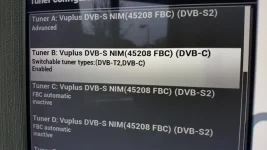
In Tuner Configuration - TUNER B (which is of course the my DVB-S/S2 NIM 45208 FBC) is now seen as a DVB-C NIM 45208 FBC tuner!!) which I don't have ...

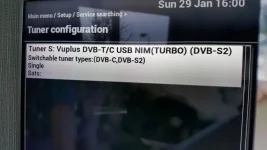
TUNER S is as DVB-T/C USB NIM (TURBO) but states DVB-S2

So I've lost TUNER B (second Motorised cable) and I've no access to set-up the VU TURBO in TUNER S ... it offers options as if it was a DVB-S/S2 tuner (simple, advanced, loop though, etc ...)

see pics ...

20170129_160038.webp

20170129_160025.webp
 
3. Autoresolution plugin issue with 720p signals resolved ... (hopefully ongoing with thanks to Birdman)

I can confirm this evening that thanks to Birdman this issue is resolved ... :)

http://www.world-of-satellite.com/showthread.php?55020-Autoresolution&p=437521#post437521 (post #79 has the amended py file to fix)

Now ... if Sicillian can get the Tuners issue sorted

... and the drivers for my Logitech KR400 are sorted to use Chromium with ease ... I'll be VERY happy with my Ultimo set-up ... :thumbsup:

Thanks to all who take the time to make these things happen ... :)
 
USB keyboard issue has been reported for all Vu boxes a long time ago. Only works in factory based images. USB keyboard works fine for other brands so nothing to do with OpenViX.
 
USB keyboard issue has been reported for all Vu boxes a long time ago. Only works in factory based images. USB keyboard works fine for other brands so nothing to do with OpenViX.

Yes I've read that before .... not criticizing VIX Image on this ... its more an observation that I'm hoping can be ratified for oe based images ... fingers crossed!
 
Cheers Sicillian ...

Note that this isn't an issue with another Image for Ultimo 4K ... (VTi) ??? but is it structured differently???

Thanks.


try to avoid comparing factory based Vu images with ours.
of course 99% of stuff works on those.
 
try to avoid comparing factory based Vu images with ours.
of course 99% of stuff works on those.

just an observation ... I'm of course realising that there is a difference between factory based images and others ... (learning which are which ... )

Cheers.
 
Hi
On my Gigablue Quad Plus using latest VIX image (4.2.028): with very few settings changed from default.

My Power Timer to go to Deep Standby from stand by is no longer working. I have deleted/rebuilt it but it still doesn't work. It is set for 10min, but just doesn't go into Deep Standby. If I manually put it into Deep Standby, the box wakens up from Deep Standby to record but then doesn't go back to Deep Standby. The last image it was working on OK was 021 I think.

When using skip forward keys, quite often, it jumps but into a 'paused' mode with frozen picture and no sound. This has been present in all images. This can extend to further jumps forward from the frozen condition - but, not always. There was one occasion when it jumped into the paused condition, but the sound continued.
 
My Power Timer to go to Deep Standby from stand by is no longer working. I have deleted/rebuilt it but it still doesn't work. It is set for 10min, but just doesn't go into Deep Standby.
Could you post a copy of your timers.xml file from /etc/engma2?


There was one occasion when it jumped into the paused condition, but the sound continued.
My box occasionally jumps to a state where there is no audio, but the video continues. If that happens I just press back+forward again. Not a fix, but a quick and simple workaround.
 
Could you post a copy of your timers.xml file from /etc/engma2?


My box occasionally jumps to a state where there is no audio, but the video continues. If that happens I just press back+forward again. Not a fix, but a quick and simple workaround.

Hi
I can manage to 'fix' the skip issue by doing as you say.

Here is my Timers.xml (site doesn't apear to allow .xml attachments, so changed to .txt)
 

Attachments

Hello,

Would it be possible to simplify VPN usage within Vix? I started trying to use a guide i found on here but it got far too technical for me (changing pieces of code etc.), is there any way you could add some form of app as with android operating systems (OpenVPN) to allow me to use my box through my existing vpn service?
 

OpenViX Feeds Status

Back
Top