Superb quality and spec AB-Com PULSe 4K SE. Crazy offer! Only £129! FREE UK DELIVERY! 4K UHD, Enigma 2, Multiboot 4 images & more!...
Superb quality and spec AB-Com PULSe 4K Rev II Twin Satellite tuner only £179! FREE UK DELIVERY! 4K UHD, Enigma 2, SATA HDD facility, Multiboot 4 images & more!...

Unicable II config for Inverto IDLU-32UL40-UNB00-0PP (broken Vu drivers)

shortheath

Forum Supporter
Donated Member
Joined
May 25, 2015
Messages
22
Reaction score
0
Points
0
Age
83
I thought this might help you! I have just managed to record channels simultaneously. Here is my setup. I am running OpenVix 4.2 build 16
on Vu+ Solo 4k Dual FBC tuner

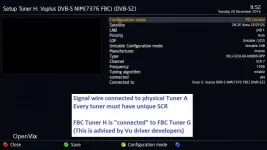
One FBC-tuner = Unicable LNB connection on Tuner A + 6 connected to A.

Code:
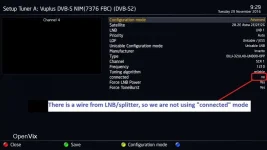
Tuner A

config mode advanced
Satellite 28.2e
LNB Lnb1
priority auto
LOF Unicable /Jess
Unicable config mode Unicable LNB
Manufacture Inverto
Type IDLU-32UL40-UNB00-0PP
CHANNEL scr 1
Freq 1210
connected no
DiSEqC mode none
Force LNB power Yes
Force Tone Burst Yes
Code:
Tuner B

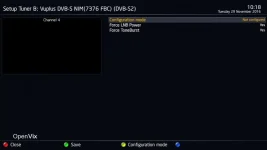
config mode Not configured
Force LNB power Yes
Force Tone Burst Yes
Code:
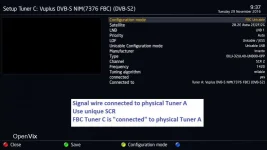
Tuner C

config mode advance
Satellite 28.2e
LNB Lnb1
priority auto
LOF Unicable /Jess
Unicable config mode Unicable LNB
Manufacture Inverto
Type IDLU-32UL40-UNB00-0PP
CHANNEL scr 2
Freq 1420
connected Yes
connected to Tuner A
DiSEqC mode none
Code:
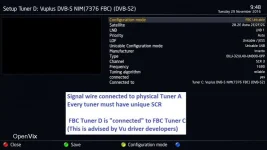
Tuner D

config mode advanced
Satellite 28.2e
LNB Lnb1
priority auto
LOF Unicable /Jess
Manufacture Inverto
Type IDLU-32UL40-UNB00-0PP
CHANNEL scr 3
Freq 1680
connected Yes
connected to Tuner C
DiSEqC mode none
Code:
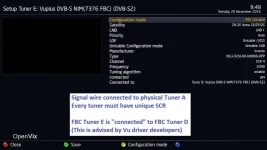
Tuner E

config mode advanced
Satellite 28.2e
LNB Lnb1
priority auto
LOF Unicable /Jess
Manufacture Inverto
Type IDLU-32UL40-UNB00-0PP
CHANNEL scr 4
Freq 2040
connected Yes
connected to Tuner D
DiSEqC mode none
Code:
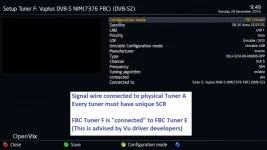
Tuner F

config mode advanced
Satellite 28.2e
LNB Lnb1
priority auto
LOF Unicable /Jess
Manufacture Inverto
Type IDLU-32UL40-UNB00-0PP
CHANNEL scr 5
Freq 984
connected Yes
connected to Tuner E
DiSEqC mode none
Code:
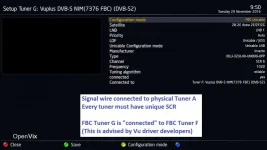
Tuner G

config mode advanced
Satellite 28.2e
LNB Lnb1
priority auto
LOF Unicable /Jess
Manufacture Inverto
Type IDLU-32UL40-UNB00-0PP
CHANNEL scr 6
Freq 1020
connected Yes
connected to Tuner F
DiSEqC mode none
Code:
Tuner H

config mode advanced
Satellite 28.2e
LNB Lnb1
priority auto
LOF Unicable /Jess
Manufacture Inverto
Type IDLU-32UL40-UNB00-0PP
CHANNEL scr 7
Freq 1056
connected Yes
connected to Tuner G
DiSEqC mode none

Ron
 
Last edited by a moderator:
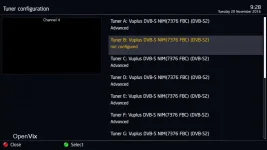
Some screenshots for the above
 

Attachments

  • 01_1 Tuners.webp
    01_1 Tuners.webp
    24.8 KB · Views: 107
  • 01_2 Physical Tuner B.webp
    01_2 Physical Tuner B.webp
    11.7 KB · Views: 80
  • 02_Physical Tuner A.webp
    02_Physical Tuner A.webp
    25.7 KB · Views: 95
  • 03_FBC Tuner C.webp
    03_FBC Tuner C.webp
    27.5 KB · Views: 82
  • 04_FBC Tuner D.webp
    04_FBC Tuner D.webp
    30.4 KB · Views: 63
  • 05_FBC Tuner E.webp
    05_FBC Tuner E.webp
    30.9 KB · Views: 69
  • 06_FBC Tuner F.webp
    06_FBC Tuner F.webp
    30.6 KB · Views: 69
  • 07_FBC Tuner G.webp
    07_FBC Tuner G.webp
    30.6 KB · Views: 81
  • 08_FBC Tuner H.webp
    08_FBC Tuner H.webp
    30.9 KB · Views: 109
Hi I am having a few problems configuring my solo4K tuners I am running latest vix and have Inverto 32UL40 Jess2 LNB I had all 8 tuners running on previous Vix 4.0 but decided to update yesterday to 4.2.021

Now I can record only 3 separate tuners ACD then get a failed tune when going to Tuner E

Seems really odd and tried all I know even leaving powered off for a while. My tuner set up is same as pics in this thread but am now stuck

Appreciate any guidance.....

Thanks
 
Uploading your settings file may be simplest/best thing to do. You will find it in /etc/enigma2/ Zip it before attaching it to post.
 
Thanks but think its sorted SCR4 for some reason didnt work moved it to another channel and all 7 run fine now just tested with all tuners active recording from each and all is now good

Thanks for coming back so quickly though I thought I was going mad :-) Appreciate it
 
Tuner Fail when Recording Starts

I am having a few problems configuring my solo4K tuners I am running openVix 4.2 Build 23 and have Inverto 32UL40 Jess2 LNB II - all 8 tuners running perfectly, decided to update to 4.2.024.

As soon as a timed recorder starts the "viewed" channel begins to get tuner failed.

Have tried software upgrades and usb upgrades (with and without settings restore) to Builds 24,25,26, and 28 since same problem!!!

Any ideas on how to get latest build working properly

Fixes
-----

Restore and carry on using build 23 image - (no problems)

Run OpenBh 0.6 Build 27 - (no problems)
 
Last edited:
Nothing wrong in the image. Must be a setting wrong. Have you got force lnb power and force tone to yes?
 
I am having a few problems configuring my solo4K tuners I am running openVix 4.2 Build 23 and have Inverto 32UL40 Jess2 LNB II - all 8 tuners running perfectly, decided to update to 4.2.024.

As soon as a timed recorder starts the "viewed" channel begins to get tuner failed.

Have tried software upgrades and usb upgrades (with and without settings restore) to Builds 24,25,26, and 28 since same problem!!!

Any ideas on how to get latest build working properly

Fixes
-----

Restore and carry on using build 23 image - (no problems)

Run OpenBh 0.6 Build 27 - (no problems)

If you have both "Force LNB Power" & "Force ToneBurst" set to Yes, these now need to be set to No.


Sent from my iPhone using Tapatalk
 
Nothing wrong in the image. Must be a setting wrong. Have you got force lnb power and force tone to yes?

They are both set to Yes
Just done "Software update"- Build 23 to 28 Problem back straight away
 
Working fine here on latest ViX image. I have 5 recordings on different transponders while watching another.


Sent from my iPhone using Tapatalk
 
If you have both "Force LNB Power" & "Force ToneBurst" set to Yes, these now need to be set to No.


Sent from my iPhone using Tapatalk

"Force LNB Power" & "Force ToneBurst" set to Yes or No makes no difference to the problem.
Do you know where in root the tuner settings are stored so that we could possibly compare them?
 
uncofigure tunerB

Nothing wrong in the image. Must be a setting wrong. Have you got force lnb power and force tone to yes?

I noticed on the screen shots above that Tuner B was unconfigured.

I have unconfigured tuner B and changed tuner C to connect to tuner A and it seems to have sorted the problem out.

Does this make sense to you? (Everything worked perfectly while running build 23 with B configured)
 
The unicable code changed. Old configs will not work.

You have to set your tuners again
 
I noticed on the screen shots above that Tuner B was unconfigured.

Hello,
sorry for digging up an oldish post but I have just been setting up my ultimo4k with FBC sat and cable tuners and yesterday a new Unicable II - same model as described here. One cable from lnb to FBC Sat tuner. It seems to be working ok but not fully tested I did have a few box freezes when changing tuner config. Can someone please advise why the recommendation is to leave tuner b unconfigured ? or/and point me to the most recent FBC/Unicable II tuner setup guide. Thanks.
 
Tuner B is ideal for a Motorised Dish setup or you can put a feed from another 28.2 Dish etc.


Sent from my iPhone using Tapatalk
 
Tuner B is ideal for a Motorised Dish setup or you can put a feed from another 28.2 Dish etc.


Sent from my iPhone using Tapatalk

Thanks for your time.

I have one cable going to the top tuner connection in the fbc tuner, is tuner B the other connection ? I assumed one cable in would be virtually spilt amongst the other 7 tuners. So if I have nothing connected to the lower connection should tuner B be set as not configured?
 
Thats correct, set Tuner B to not configured if nothing is connected to it.


Sent from my iPhone using Tapatalk
 
I've just installed a GT-Sat GT-S3DCSS24 SCR/dCSS Single Cable Unicable II LNB SCR24 with 3x Legacy Outputs.
Is it necessary to have each virtual tuner connected to the one immediately preceding it or is that just for Vu+ boxes?
Initially I had them all connected to Tuner A with different SCR's and it seemed to work alright on a Giga UHD Quad 4K and then I saw the configuration in post #1.
 
I've just installed a GT-Sat GT-S3DCSS24 SCR/dCSS Single Cable Unicable II LNB SCR24 with 3x Legacy Outputs.
Is it necessary to have each virtual tuner connected to the one immediately preceding it or is that just for Vu+ boxes?
Initially I had them all connected to Tuner A with different SCR's and it seemed to work alright on a Giga UHD Quad 4K and then I saw the configuration in post #1.
This thread was started more than a year ago when FBC was a relatively new concept. At the time there were driver problems with the VuSolo4K. This was the configuration suggested by Vu, but it did not cure the problem. Subsequently new drivers have been produced that don't require this config (which didn't cure the problem anyway).

My current setup on the Solo4K is just link all parasitic tuners to tuner A, which is the tuner that has the physical connection from the satellite dish.
 

OpenViX Feeds Status

Back
Top