N
NeRd666
Guest
Is any way of getting vpn to work with purevpn service? i have ca.crt and wdc.key file but none of the others mentioned in guide 


Is any way of getting vpn to work with purevpn service? i have ca.crt and wdc.key file but none of the others mentioned in guide
Not sure why this won't work. I've followed the instructions as best I can but the openvpn on the box is showing Current Status 'stopped', no idea how to get it running. Tried the green button to start it but nothing happens.
Anyone else had this.
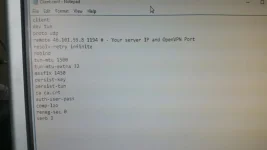
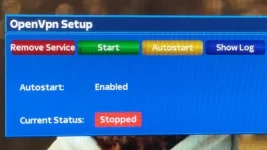

Sorry to ask the same question. I am using Openvix 5 on Duo2. I have OpenVpn set on my box .I have a VPN provider Digibit, they have sent me the following ca.crt, openvpn config files and I have my user and pass word.* I have tried using Telnet via the Vu+ Control Centre, but it say options error: In CMD-LINE. Can I use FileZilla. I have enclosed 2 Pics 1 is the config file set up. Any advice.
p1234567
abcdefghauth-nocache
auth-user-pass /etc/openvpn/login.txtca /etc/openvpn/ca.crtFor those struggling to set up openvpn on their VU+ box, this guide may be useful.
1. goto the client support pages of private internet access site and download the OpenVPN Configuration Files (Default)
2. from the zip file we need ca.crt crl.pem and any ovpn file
3. edit the name of the ovpn file to client.conf.
4. open the client.conf and modify the line "auth-user-pass" so it reads "auth-user-pass password.conf" (without the quotes)
5. create a password.conf file
6. go to Private Internet Access site and log into your control panel. Generate a PPTP/L2TP/SOCKS Username and Password using the button within the control panel and add the info to the password.conf file so the username and password are on separate lines.
7. place all 4 files (ca.crt, crl.pem, client.conf, password.conf) into the openvpn folder on your box (etc/openvpn)
8. reboot your vu+
9. start the service from the settings - network - openvpn
10. ssh to your vu+ and check the ip with this command wget -qO- http://ipecho.net/plain;echo
This should do the trick.

