Superb quality and spec AB-Com PULSe 4K SE. Crazy offer! Only £129! FREE UK DELIVERY! 4K UHD, Enigma 2, Multiboot 4 images & more!...
Superb quality and spec AB-Com PULSe 4K Rev II Twin Satellite tuner only £179! FREE UK DELIVERY! 4K UHD, Enigma 2, SATA HDD facility, Multiboot 4 images & more!...

[VU+ Solo2] VPN Using Private Internet Access

  • Thread starter Thread starter ukoberon
  • Start date Start date
Is any way of getting vpn to work with purevpn service? i have ca.crt and wdc.key file but none of the others mentioned in guide :confused:
 
Is any way of getting vpn to work with purevpn service? i have ca.crt and wdc.key file but none of the others mentioned in guide :confused:

sorry but I gave up, worked great with 4 but God knows what's changed in 5, I'm sure a techie will figure it out
 
did anyone get this working with purevpn, i've asked for help on pure's website but they direct me to linux set up, :confused:
 
cannot find openvpn folder in etc? also when I download the config files there is no .pem to find?
 
could anyone work out this error log for me?
Sun May 7 16:02:34 2017 WARNING: file '/etc/openvpn/login.txt' is group or others accessible
Sun May 7 16:02:34 2017 OpenVPN 2.4.0 mipsel-oe-linux-gnu [SSL (OpenSSL)] [LZO] [LZ4] [EPOLL] [MH/PKTINFO] [AEAD] built on Feb 18 2017
Sun May 7 16:02:34 2017 library versions: OpenSSL 1.0.2j 26 Sep 2016, LZO 2.09
Sun May 7 16:02:34 2017 TCP/UDP: Preserving recently used remote address: [AF_INET]31.24.226.146:1198
Sun May 7 16:02:34 2017 UDP link local: (not bound)
Sun May 7 16:02:34 2017 UDP link remote: [AF_INET]31.24.226.146:1198
Sun May 7 16:02:35 2017 WARNING: 'link-mtu' is used inconsistently, local='link-mtu 1558', remote='link-mtu 1542'
Sun May 7 16:02:35 2017 WARNING: 'cipher' is used inconsistently, local='cipher AES-128-CBC', remote='cipher BF-CBC'
Sun May 7 16:02:35 2017 [88ef1324f4e677348e5e16cd65243580] Peer Connection Initiated with [AF_INET]31.24.226.146:1198
Sun May 7 16:02:36 2017 AUTH: Received control message: AUTH_FAILED
Sun May 7 16:02:36 2017 SIGTERM[soft,auth-failure] received, process exiting

thanks
 
I cant get openvpn to work im using Private Internet access wit con figs altered as example on page 1 para 2. hers log file i get which looks like its working but no internet access while its running on Vu+Duo 2 Vix 5.0.014

Sun Jun 4 17:04:25 2017 WARNING: file 'password.txt' is group or others accessible
Sun Jun 4 17:04:25 2017 OpenVPN 2.4.0 mipsel-oe-linux-gnu [SSL (OpenSSL)] [LZO] [LZ4] [EPOLL] [MH/PKTINFO] [AEAD] built on Feb 10 2017
Sun Jun 4 17:04:25 2017 library versions: OpenSSL 1.0.2j 26 Sep 2016, LZO 2.09
Sun Jun 4 17:04:25 2017 TCP/UDP: Preserving recently used remote address: [AF_INET]104.238.169.15:1198
Sun Jun 4 17:04:25 2017 UDP link local: (not bound)
Sun Jun 4 17:04:25 2017 UDP link remote: [AF_INET]104.238.169.15:1198
Sun Jun 4 17:04:26 2017 WARNING: 'link-mtu' is used inconsistently, local='link-mtu 1558', remote='link-mtu 1542'
Sun Jun 4 17:04:26 2017 WARNING: 'cipher' is used inconsistently, local='cipher AES-128-CBC', remote='cipher BF-CBC'
Sun Jun 4 17:04:26 2017 [dc7b0d700e89c11c167d8f4bef807d97] Peer Connection Initiated with [AF_INET]104.238.169.15:1198
Sun Jun 4 17:04:32 2017 TUN/TAP device tun0 opened
Sun Jun 4 17:04:32 2017 do_ifconfig, tt->did_ifconfig_ipv6_setup=0
Sun Jun 4 17:04:32 2017 /sbin/ip link set dev tun0 up mtu 1500
Sun Jun 4 17:04:32 2017 /sbin/ip addr add dev tun0 local 10.71.10.6 peer 10.71.10.5
Sun Jun 4 17:04:32 2017 Initialization Sequence Completed

Can someone check this log to see if they can help me. thanks sinky
 
Not sure why this won't work. I've followed the instructions as best I can but the openvpn on the box is showing Current Status 'stopped', no idea how to get it running. Tried the green button to start it but nothing happens.

Anyone else had this.
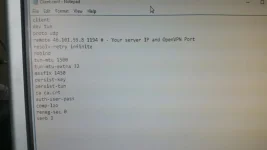
 
Not sure why this won't work. I've followed the instructions as best I can but the openvpn on the box is showing Current Status 'stopped', no idea how to get it running. Tried the green button to start it but nothing happens.

Anyone else had this.
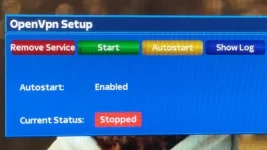
I've tried all sorts (over the last month) with nordvpn. The closest i came was to get an error message in the log .
This could be the first thing i give up on.
 
Any help, where can I find this OpenVPN Configuration Files to download.
 
Sorry to ask the same question. I am using Openvix 5 on Duo2. I have OpenVpn set on my box .I have a VPN provider Digibit, they have sent me the following ca.crt, openvpn config files and I have my user and pass word.* I have tried using Telnet via the Vu+ Control Centre, but it say options error: In CMD-LINE. Can I use FileZilla. I have enclosed 2 Pics 1 is the config file set up. Any advice.20170725_171812_resized.webp20170726_155752_1501137779850_resized.webp
 
Sorry to ask the same question. I am using Openvix 5 on Duo2. I have OpenVpn set on my box .I have a VPN provider Digibit, they have sent me the following ca.crt, openvpn config files and I have my user and pass word.* I have tried using Telnet via the Vu+ Control Centre, but it say options error: In CMD-LINE. Can I use FileZilla. I have enclosed 2 Pics 1 is the config file set up. Any advice.

Make a file called login.txt with you username and login on seprate lines, eg:

Code:
p1234567
abcdefgh


Edit the .conf file to include the following instead of just auth-user-pass:

Code:
auth-nocache
auth-user-pass /etc/openvpn/login.txt

Change the ca ca.crt to the following:

Code:
ca /etc/openvpn/ca.crt

Hopefully this should solve it for you... First problem was, it wasn't being able to login. Secondly, it might not have been able to find the certificate properly...
 
Use any FTP Program ie Filezillar
Log onto your box go to folder etc and make a new folder called openvpn in it etc/openvpn

You will need these files
ca.rsa.2048.crt
crl.rsa.2048.pem
client.conf
password.txt

copy these four files
into the openvpn folder - restart box - go to system / network / openvpn and start it

You should be able to d/l the files from your vpn provider and make the password file with a text editor
Suggest notepad ++ for this.

open new notepad file and type

username
password

save as password.txt
 
Last edited:
Thanks for reply. where do I find these 4 files.
ca.rsa.2048.crt
crl.rsa.2048.pem
client.conf
password.txt
 
Files are here modify xxxx part
xxxxs://helpdesk.privateinternetaccess.com/hc/en-us/articles/218984968-What-is-the-difference-between-the-OpenVPN-config-files-on-your-website-

Copy from post 2

1. goto the client support pages of private internet access site and download the OpenVPN Configuration Files (Default)

2. from the zip file we need ca.crt crl.pem and any ovpn file

3. edit the name of the ovpn file to client.conf.

4. open the client.conf and modify the line "auth-user-pass" so it reads "auth-user-pass password.conf" (without the quotes)

5. create a password.conf file

6. go to Private Internet Access site and log into your control panel. Generate a PPTP/L2TP/SOCKS Username and Password using the button within the control panel and add the info to the password.conf file so the username and password are on separate lines.

7. place all 4 files (ca.crt, crl.pem, client.conf, password.conf) into the openvpn folder on your box (etc/openvpn)

If you have not got the etc / openvpn folder make one yourself.
Use FTP program like Filezillar

Start OpenVPN in setup - Network - Openvpn
 
Last edited:
Setup Docs for IPVanish if anyone is interested

xxxxs://www.tech2guides.co.uk/how-to-setup-vpn-on-enigma2-openatv/
 
Thanks for reply. I have the ca.crt, client.conf, and password.conf. What is the crl.pem.
 
Hi Guys, has anyone tried using Ivacy instead of PIA, I have downloaded the Linix zip from their support site but I only have ca.crt, ca - Copy.crt, Wdc.key files and numerous opvn files prefixed with TCP & UDP and Country names. I have paid for 24 months Ivacy so I would really like to get it working on my Solo2. Any help and advice will be greatly appreciated............:confused:
 
is there a firewall in the vix image?
I've set up a client vpn using pia & openvpn client the vpn works fine on the vu+ box
however i am trying to use the vu+ solo2 as a vpn gateway, in other words use the vu+ local ip as a gateway to route other traffic trough the vpn from other devices.
I've opened a upd port on the router poiting to the vu+
i assume the vpn client will need to bridge the network somehow to allow traffic to pass through the vpn.
config:-
client
dev tun
proto udp
remote uk-london.privateinternetaccess.com 1198
resolv-retry infinite
nobind
persist-key
persist-tun
cipher aes-128-cbc
auth sha1
tls-client
remote-cert-tls server
auth-user-pass /etc/openvpn/password.txt
auth-nocache
comp-lzo
verb 1
reneg-sec 0
crl-verify crl.rsa.2048.pem
ca ca.rsa.2048.crt
disable-occ
 
For those struggling to set up openvpn on their VU+ box, this guide may be useful.

1. goto the client support pages of private internet access site and download the OpenVPN Configuration Files (Default)

2. from the zip file we need ca.crt crl.pem and any ovpn file

3. edit the name of the ovpn file to client.conf.

4. open the client.conf and modify the line "auth-user-pass" so it reads "auth-user-pass password.conf" (without the quotes)

5. create a password.conf file

6. go to Private Internet Access site and log into your control panel. Generate a PPTP/L2TP/SOCKS Username and Password using the button within the control panel and add the info to the password.conf file so the username and password are on separate lines.

7. place all 4 files (ca.crt, crl.pem, client.conf, password.conf) into the openvpn folder on your box (etc/openvpn)

8. reboot your vu+

9. start the service from the settings - network - openvpn

10. ssh to your vu+ and check the ip with this command wget -qO- http://ipecho.net/plain;echo

This should do the trick.

Hi there,
I seem to be stuck on instruction 7 regarding "openvpn folder".
I don't seem to have "openvpn" folder in etc/ of my receiver( TECHNOMATE SOLO SE), do I need to create this folder and upload to etc/ ?
 

OpenViX Feeds Status

Back
Top