Superb quality and spec AB-Com PULSe 4K SE. Crazy offer! Only £129! FREE UK DELIVERY! 4K UHD, Enigma 2, Multiboot 4 images & more!...
Superb quality and spec AB-Com PULSe 4K Rev II Twin Satellite tuner only £179! FREE UK DELIVERY! 4K UHD, Enigma 2, SATA HDD facility, Multiboot 4 images & more!...

OS Mega front display gone strange since update

  • Thread starter Thread starter Deleted member 91482
  • Start date Start date
D

Deleted member 91482

Guest
My front display on my OS Mega has gone a bit strange since I updated to 5.0.008 yesterday.

It used to display "ITV London H" and Now displays "ITV Lond" with a small HD icon and a small Dolby digital icon above it. Don't remember these icons ever being there before.

And when on standby it used to display the date and time, now it displays "26 Mar 2"

It's as if the right hand part of the display is not showing anything now.

I've had a look at the settings and turned the box on and off again but still the same.

Anyone else have this issue.

Thanks.
 
In the front panel settings, you can change the date options.

Which was the last image that was fine?
 
I seem to remember the previous version was fine 5.0.007 but thinking about it now it also coincides with the British summer time clock going forward one hour. So maybe that's what caused it.

I have never had to look in those settings before as the display was always fine.
 
My front display on my OS Mega has gone a bit strange since I updated to 5.0.008 yesterday.

It used to display "ITV London H" and Now displays "ITV Lond" with a small HD icon and a small Dolby digital icon above it. Don't remember these icons ever being there before.

And when on standby it used to display the date and time, now it displays "26 Mar 2"

It's as if the right hand part of the display is not showing anything now.

I've had a look at the settings and turned the box on and off again but still the same.

Anyone else have this issue.

Thanks.

Yes, I can confirm I am experiencing the same situation as you.
I think I was on version 5.006 but can't recall because there seems to be a daily update at the moment!

It's not causing any functional problem with the box.
 
Restored back to 5.0.007 and it's back to normal again now.

So it did relate to 5.0.008.
 
Just had a look at mine, got exactly same problem as you

Sent from mobile using Tapatalk
 
There was a driver commit on 24/03/17 dealing with the front display. AFAIK, nothing else in image has changed in this regard.
 
Thanks for reporting the issue to Edision.

I tried the re-released 5.0.008 and the latest 5.0.009 versions just for test and the displays still goes strange as above.

So I'm having to stay on 5.0.007 for now.

Also god knows what happened when I put 5.0.009 on because my sky free to air channels where suddenly all in Arabic :D
 
Last edited by a moderator:
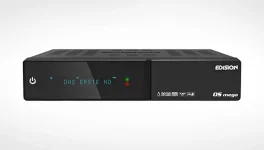
Another question along the lines of the OS Mega Display that you all may be able to help with? You will see from Edision site a picture below of the OS Mega showing both a "green" and "red" light to the right. I assumed the red is for a recording, but it does not light when I record or when there is an active webif session. I have also yet to see the green.

Can you confirm what they are for, and if their functionality is impacted by this current driver issue please? Nothing in the brief manual contained in the box. Thanks

osmega-start.webp
 
Only half the width of my Osmega seems to be in use and it does not matter which image I use on it. Driver issue or something similar I suspect, none of the right side of the screen seems to be available
 
Only half the width of my Osmega seems to be in use and it does not matter which image I use on it. Driver issue or something similar I suspect, none of the right side of the screen seems to be available

Gotcha - thanks. For info when the driver is fixed can somebody indicate the function of the "Green" indicator, and confirm the "Red" indicator is recording? Thanks
 
You will see from Edision site a picture below of the OS Mega showing both a "green" and "red" light to the right. I assumed the red is for a recording, but it does not light when I record or when there is an active webif session. I have also yet to see the green.

Can you confirm what they are for, and if their functionality is impacted by this current driver issue please? Nothing in the brief manual contained in the box. Thanks

View attachment 53534

Have restored to 5.0.007 and agree get full VFD display. I see a "blinking" tiny green identifier for each press of the remote, BUT nothing that is RED for recording or any other function? The picture in "quote" is from Edision site, so assume I am missing something? Please explain Green and Red in display, Thanks
 
Have restored to 5.0.007 and agree get full VFD display. I see a "blinking" tiny green identifier for each press of the remote, BUT nothing that is RED for recording or any other function? The picture in "quote" is from Edision site, so assume I am missing something? Please explain Green and Red in display, Thanks

For those interested: Flashing Green in display is receiving remote control command and Red in display per earlier picture indicates Deep Standby Power mode.

It is intended that Recording is indicated as follows:

os mega record.webp

I think it will all be clear after the driver fix is released
 

OpenViX Feeds Status

Back
Top