Superb quality and spec AB-Com PULSe 4K SE. Crazy offer! Only £99! FREE UK DELIVERY! 4K UHD, Enigma 2, Multiboot 4 images & more!...
Superb quality and spec AB-Com PULSe 4K Rev II Twin Satellite tuner only £149! FREE UK DELIVERY! 4K UHD, Enigma 2, SATA HDD facility, Multiboot 4 images & more!...

OS MEGA Bouguet Setting in ABM for Terrestrial Tuners

You do realise the same Abu is helping you now?

Well @Judge, that is kind of unnecessary really don't you think!

Also, don't understand what you want to do that can't be done.

I thought the purpose of this forum was to discuss new ideas and bring new thoughts - I have taken a lot of time to write my thoughts, and provide screen shots using ABM standard functionality.

As Abu suggests, have you tried using a favourites.xml or custom mix?

For many people what ABM does out of the Box maintaining standard numbering in the first bouquet is enough. IMHO favourites is a single "bucket" that does not contain sections. For many many users of ViX, editing and changing LCN's etc. in "sat_282_freesat.xml" for example
(/usr/lib/enigma2/python/Plugins/SystemPlugins/AutoBouquetsMaker/providers) is something they don't want to tackle.

Thanks!
 
So put simply, you just want a blank header with the provider name before each provider's bouquets?

Yes, thanks that is a great idea, and using the Autobouquet E2 model by LraiZer referred earlier, a small indent for the sections contained under the header might also be visually helpful - Thanks for sticking with me to a logical conclusion and for the many many times we conversed in the past.
 
It seems to me if i understand his posts right, the ABM enhancement request he wants to propose, is to change a current 'prefix bouquet with provider' option with a multiple selection style option that mimics a similar bouquets 'Style' option as is currently in AB. The default style in AB has the category bouquets indented with a prefix of " -- " in the favourites list with a first bouquet not indented to clearly distinguish that the following category sub bouquets belong to 28.2e. If you change to 'Style 2' for example in AB, there is no longer any indentation in favourites list. It seems like he wants to be able to select a style option that instead of prefixing every bouquet belonging to 28.2e with 28.2e, instead simply adds a 28.2e marker at beginning of writing the 28.2e bouquets followed by indented sub category bouquets so to show they belong to the 28.2e marker, as is a similar style setup to the default settings in AB.
 
It seems to me if i understand his posts right
Therein lies the difficulty.

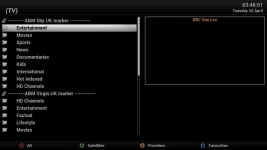
We actually had a similar request that was fulfilled for the setup screen, the options were shifted for each provider. I think it is a good idea. Better than adding prefix to name.

EDIT: screenshot attached
 

Attachments

  • indent wip.webp
    indent wip.webp
    15.2 KB · Views: 20
Last edited:
I've added a styleable option similar to Abu's screen grab.
 
Last edited:
It seems to me if i understand his posts right, the ABM enhancement request he wants to propose, is to change a current 'prefix bouquet with provider' option with a multiple selection style option that mimics a similar bouquets 'Style' option as is currently in AB. The default style in AB has the category bouquets indented with a prefix of " -- " in the favourites list with a first bouquet not indented to clearly distinguish that the following category sub bouquets belong to 28.2e. If you change to 'Style 2' for example in AB, there is no longer any indentation in favourites list. It seems like he wants to be able to select a style option that instead of prefixing every bouquet belonging to 28.2e with 28.2e, instead simply adds a 28.2e marker at beginning of writing the 28.2e bouquets followed by indented sub category bouquets so to show they belong to the 28.2e marker, as is a similar style setup to the default settings in AB.

Indeed you are 100% correct @LraiZer; that would be a wonderful solution. I had been using "empty custom bouquets" as alternative and for a "header" as identified by @Abu Baniaz; at some point a few years back I picked this idea up on the forum.

Anyway according to @Abu Baniz this would be difficult, however it seems @Huevos has added a
"styleable option similar to Abu's screen grab
which I very much look forward to seeing.

I am not sure of the origin of the screen shot provided by @Abu Baniaz when he referred
We actually had a similar request that was fulfilled for the setup screen, the options were shifted for each provider. I think it is a good idea. Better than adding prefix to name.
as I have never seen this in ABM, perhaps it was dropped.

Anyway THANKS ALL so much for working through this with me (especially @Abu Baniaz for sticking with me, @LraiZer for his AB and clarity, and @Huevos for a solution. Finally apologies that me terminology was a little off the mark!
 
Installing ABM on ViX from github

I've added a styleable option similar to Abu's screen grab.

I see ABM is available on github, If someone has time, how do you take a cloned package from github and install on the ViX build? I would like to try the "mod" @Huevos made, Many Thanks Team
 
Grab the 4 affected .py files from github. Place them in correct directory on the receiver. Restart the GUI. Delete the files. Run ABM.

plugin.py -> /usr/lib/enigma2/python/Plugins/SystemPlugins/AutoBouquetsMaker/plugin.py
setup.py -> /usr/lib/enigma2/python/Plugins/SystemPlugins/AutoBouquetsMaker/setup.py
providerconfig.py -> /usr/lib/enigma2/python/Plugins/SystemPlugins/AutoBouquetsMaker/scanner/providerconfig.py
bouquetswriter.py -> /usr/lib/enigma2/python/Plugins/SystemPlugins/AutoBouquetsMaker/scanner/bouquetswriter.py
 
Grab the 4 affected .py files from github. Place them in correct directory on the receiver. Restart the GUI. Delete the files. Run ABM.

plugin.py -> /usr/lib/enigma2/python/Plugins/SystemPlugins/AutoBouquetsMaker/plugin.py
setup.py -> /usr/lib/enigma2/python/Plugins/SystemPlugins/AutoBouquetsMaker/setup.py
providerconfig.py -> /usr/lib/enigma2/python/Plugins/SystemPlugins/AutoBouquetsMaker/scanner/providerconfig.py
bouquetswriter.py -> /usr/lib/enigma2/python/Plugins/SystemPlugins/AutoBouquetsMaker/scanner/bouquetswriter.py

BRILLIANT @Huevos - great feature, especially now ABM support so many services - THANKS!!!

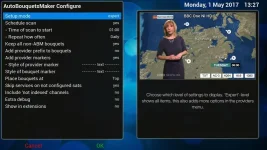
Very small item showed up in testing, when enabling the feature in ABM Configuration Menu, a second "style of provider marker" entry is inserted in the menu structure - see attached screenshot. NOTE: this "second menu line item" is not present before you select "yes" for this new feature.

BBC One NI HD-152017-1332.webp

!!THANKS!!
 
BRILLIANT @Huevos - great feature, especially now ABM support so many services - THANKS!!!

Very small item showed up in testing, when enabling the feature in ABM Configuration Menu, a second "Style of provider marker"

Apologies @Huevos I should have been clearer, the second "menu item" is actually "Style of bouquet marker", but no matter what configuration changes I select, I cannot seem to see any visual attribute changes with the "Style of bouquet marker", whereas the "Style of provider marker" inserts the "provider" as configured, and shown in your original post? !!Thanks again!!

Perhaps the "bouquet" style functionality is along the lines referred above by LraiZer

The default style in AB has the category bouquets indented with a prefix of " -- " in the favourites list with a first bouquet not indented to clearly distinguish that the following category sub bouquets belong to 28.2e. If you change to 'Style 2' for example in AB, there is no longer any indentation in favourites list. It seems like he wants to be able to select a style option that instead of prefixing every bouquet belonging to 28.2e with 28.2e, instead simply adds a 28.2e marker at beginning of writing the 28.2e bouquets followed by indented sub category bouquets so to show they belong to the 28.2e marker, as is a similar style setup to the default settings in AB.

That would be absolutely GREAT. Please advise if you have the time.
 
Last edited:
Bouquet marker is insde channel lists.

Understood, thanks BUT I am not seeing with my manual build? Perhaps I need an additional Python Script? Anyway, thanks for everything @Huevos, probably best I wait until "official" release and report. I really appreciate the changes you have made. !!Thanks!!
 
Bouquet marker is insde channel lists.

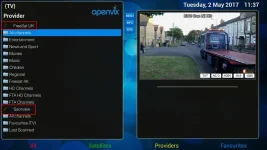
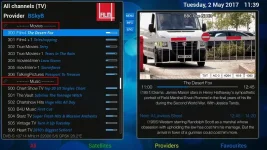
For those interested @Huevos with input from @abu baniaz has made some commits to ABM on Github to include "user styleable optional marker" for both ABM sections AND bouquets - please see example screenshots below which can be set in ABM configuration menu:

BBC One NI HD-252017-1111a.webp
Sections Stylable Marker

BBC One NI HD-252017-1150a.webp
Bouquets Styleable Marker

!!Thanks!! - IMHO it really does help break-up the sections and bouquets, reducing clutter and making more readable and user friendly
 
Sky, Virgin and Freesat channels start at 101.
1-100 are blanks.
There is empty space so you can put things there.

Freeview, starts at 1.
There is no empty space.
You cannot put something into nothing.

I was wondering about numbering!!

Not sure how many TV channels feature on FreeView, but SaorView has 8, and as @abu baniaz quite rightly says starts at 1 - thanks for the detail explanations earlier in this post.

Given SoarView and FreeView channels start at 1 and FreeSat at start at 101, I am wondering if there is value in ABM preserving the "actual" bouquet channel number if SaorView or FreeView is the first bouquet in the provider order? Currently with SaorView "FIRST" (and only a 'main bouquet' generated), and FreeSat second in the provider order, the numbering for FreeSat bouquet starts at 1001 (if I recall correctly - or it might be 1101?)

Perhaps it is a little too pedantic of an idea that would work for "SaorView", however the available number space may not be enough for FreeView if all additional sections are generated. Thanks anyway - just wondering about numbering!
 
Yes it is do-able with Saorview. You need a CustomMix file for Saorview. Combine Sky and Saorview. Sky and Saorview numbers would both be correct. If you need more info, ask.
 
Yes it is do-able with Saorview. You need a CustomMix file for Saorview. Combine Sky and Saorview. Sky and Saorview numbers would both be correct. If you need more info, ask.

Thanks @Huevos, I did find the following very detailed instructions here, however it looks very detailed and daunting! Am I being over cautious, and do you think a simple CustomMix file would achieve SaorView numbered correctly followed by FreeSat? Perhaps you have a link to simpler instructions?

I guess I would look for the "new" user styleable label for "SaorView", followed by a SaorView Main bouquet section only, then UK FreeSat Stylable Label, followed by each of the sections (without main) numbered correctly. I hope that makes sense?
 
Last edited:
Yes it is do-able with Saorview. You need a CustomMix file for Saorview. Combine Sky and Saorview. Sky and Saorview numbers would both be correct. If you need more info, ask.

Thanks @Huevos, reference
If you need more info, ask
- I do!!

So creating a sat_282_sky_uk_CustomMix.xml on path /usr/lib/enigma2/python/Plugins/SystemPlugins/AutoBouquetsMaker/custom that works as it says on the tin is straight forward; below is the contents of a test version I have created:

<custommix>
<inserts>
<insert provider="terrestrial_ie_saorview_PSB1" source="1" target="1"></insert> <!-- RTE 1 HD -->
<insert provider="terrestrial_ie_saorview_PSB1" source="2" target="2"></insert> <!-- RTE 2 HD -->
</inserts>
<deletes>
</deletes>
</custommix>

In order to "insert" them with the preferred numbering I have to go to the ABM providers folder and edit sat_282_sky_uk.xml - the <sections> paragraph in one of either of the two ways as follows for the provider:

<section number="1">SaorView</section>
<section number="101">Entertainment</section>

or alternatively

<section number="1">Entertainment</section>

The first method creates a SaorView Section above Entertainment, the second version opens up the numbering space for the existing "Entertainment" section

The problem I see here is that the "providers" xml file is updated almost nightly at the moment, so how do I get the "section" edits in the providers .xml to stick?

That about summarises the problem, comments / instructions welcome - I can't find anything on a "custom providers" file?
 
Thanks @Huevos, reference - I do!!


The problem I see here is that the "providers" xml file is updated almost nightly at the moment, so how do I get the "section" edits in the providers .xml to stick?

That about summarises the problem, comments / instructions welcome - I can't find anything on a "custom providers" file?

So what I have done...

1. Created a clone of the standard providers file located in usr\lib\enigma2\python\Plugins\SystemPlugins\AutoBouquetsMaker\providers (file name sat_282_sky_uk_sv.xml), and made two amendments - search file for AMMENDED comment; the new Bouquet is entitled Sky UK & SaorView. Essentially I did this to prevent ABM updates overwriting the 'custom' section.
2. Created a CustomMix file located in usr\lib\enigma2\python\Plugins\SystemPlugins\AutoBouquetsMaker\custom (file name sat_282_sky_uk_sv_CustomMix.xml - named according to the Bouquet in 1. above)
3. Run ABM and select the "Sky UK & SaorView" Bouquet (I create FTA only), next select SaorView for ABM generation (as you must generate for 'integration' use in the new Bouquet). You can choose to keep SaorView as a separate listing, OR answer 'No' to creating all sections - user preference
4. Do ABM Scan
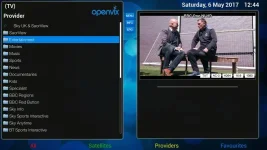
BBC One NI HD-652017-1242.webp
Additional SaorView Section (Note - if you read previous post or below, you can amend the providers file to include SaorView channels in Entertainment section)
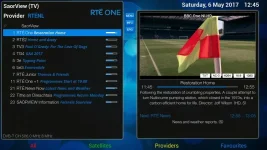
BBC One NI HD-652017-127.webp
SaorView Numbering (and other sections numbering preserved, i.e. BBC 1 is 101, BBC 2 is 102, UTV is 103 etc.)

View attachment sat_282_sky_uk_sv_CustomMix.xml.txt
View attachment sat_282_sky_uk_sv.xml.txt

Note the .xml files have been re-named to .txt to upload.
I use the extended ViX backup feature to select and back-up these custom files
As channel line up's change on SaorView or Sky UK (I create FTA only), then the attached may need updating - the mods can easily be seen by using an editor like Notepad++. Should you wish the SaorView line-up to appear in "Entertainment" section (with numbering preserved), then see 'AMMENDED' comment in provider file, but essentially start 'Entertainment' section numbering from 1 instead of 101

If anyone does know how to create 'custom sections' for use in the providers file, please do let me know, as it would mean the standard providers file could be used.

That's it! - I hope it helps a few folks in Ireland.
 
In order to "insert" them with the preferred numbering I have to go to the ABM providers folder and edit sat_282_sky_uk.xml - the <sections> paragraph in one of either of the two ways as follows for the provider:

<section number="1">SaorView</section>
<section number="101">Entertainment</section>

or alternatively

<section number="1">Entertainment</section>

The first method creates a SaorView Section above Entertainment, the second version opens up the numbering space for the existing "Entertainment" section

Code:
<custommix>
	<inserts>
		<insert provider="terrestrial_ie_saorview_PSB1" source="1" target="1"></insert> <!-- RTE 1 HD -->
		<insert provider="terrestrial_ie_saorview_PSB1" source="2" target="2"></insert> <!-- RTE 2 HD -->
	</inserts>
	<sections>
		<section number="1">Saorview</section>
	</sections>
</custommix>

No need to edit provider file.
 
Code:
<custommix>
	<inserts>
		<insert provider="terrestrial_ie_saorview_PSB1" source="1" target="1"></insert> <!-- RTE 1 HD -->
		<insert provider="terrestrial_ie_saorview_PSB1" source="2" target="2"></insert> <!-- RTE 2 HD -->
	</inserts>
	<sections>
		<section number="1">Saorview</section>
	</sections>
</custommix>

No need to edit provider file.

Brilliant - thanks very much @Huevos!! Much better and cleaner solution.

So this is the code recommended by @Huevos for CustomMix file sat_282_sky_uk_CustomMix.xml The result is tested and exactly the same as screenshots posted in post #38


Code:
<custommix>
	<inserts>
		<insert provider="terrestrial_ie_saorview_PSB1" source="1" target="1"></insert> <!-- RTE 1 HD -->
		<insert provider="terrestrial_ie_saorview_PSB1" source="2" target="2"></insert> <!-- RTE 2 HD -->
		<insert provider="terrestrial_ie_saorview_PSB1" source="3" target="3"></insert> <!-- TV3 -->
		<insert provider="terrestrial_ie_saorview_PSB1" source="4" target="4"></insert> <!-- TG4 -->
		<insert provider="terrestrial_ie_saorview_PSB1" source="5" target="5"></insert> <!-- 3e -->
		<insert provider="terrestrial_ie_saorview_PSB1" source="6" target="6"></insert> <!-- be3 -->
		<insert provider="terrestrial_ie_saorview_PSB1" source="7" target="7"></insert> <!-- RTE Junior -->
		<insert provider="terrestrial_ie_saorview_PSB1" source="11" target="11"></insert> <!-- RTE One +1 -->
		<insert provider="terrestrial_ie_saorview_PSB1" source="21" target="21"></insert> <!-- RTE News Now -->
		<insert provider="terrestrial_ie_saorview_PSB1" source="22" target="22"></insert> <!-- Tithe an Oireachtais -->
		<insert provider="terrestrial_ie_saorview_PSB1" source="23" target="23"></insert> <!-- SAORVIEW Information -->
	</inserts>
	<sections>
		<section number="1">SaorView</section>
	</sections>
	<deletes>
	</deletes>
</custommix>
 
Last edited:

OpenViX Feeds Status

Back
Top