Superb quality and spec AB-Com PULSe 4K SE. Crazy offer! Only £129! FREE UK DELIVERY! 4K UHD, Enigma 2, Multiboot 4 images & more!...
Superb quality and spec AB-Com PULSe 4K Rev II Twin Satellite tuner only £179! FREE UK DELIVERY! 4K UHD, Enigma 2, SATA HDD facility, Multiboot 4 images & more!...

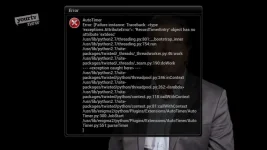
[ViX_Misc] After upgrading to 5.0.016 AutoTimer fails

As a side note, the way I test .py files is as follows:
Rename the original.pyo file with a .bak
Transfer .py file and restart
A new.pyo file will be created
I delete the.py file straight away to avoid issues with updates etc

If new file works, well and good. If there is a crash/problem, we can delete the new .pyo and revert the rename so that we use teh original file. A restart is required.

Thanks - I followed your instructions to the letter :)

The error still occurs with the new file :(
 

Attachments

[STRIKE]Please try the attached file. Don't forget to backup original.

Goes in
/usr/lib/enigma2/python/Plugins/Extensions/AutoTimer[/STRIKE]

Please ignore. has issue
 
Last edited:
I have two Gigablue Quads. On updating both, one Quad showed this issue but the other didn't. I've just gone through 15 autotimers disabling as I go and I narrowed the issue to MTV Just tattoo of us. I deleted that autotimer. Using graphical multi EPG I went to the show and pressed record, then autotimer, and it worked. I deleted this. Went to graphical multi EPG, found the show, pressed blue button but didn't change any of the options in Import timer and it worked. I deleted this. Went to graphical multi EPG, found the show, pressed blue button, but enabled Require Description to be unique, and storage location and it failed. This may be the common fault? Changing from default settings?

Sent from my Mi Max using Tapatalk
 
All my autotimers have defaults changed globally using "edit new timer defaults", and no problems.
 
Sorry. All go in same location.

/usr/lib/enigma2/python/Plugins/Extensions/AutoTimer
 
There have been a few changes. Test files for the willing.

couch flashed from 13 to 16
restored settings/plugins from 13 backup
renamed all the files with the same name as those in the zip file
transferred all the new files
restarted box

Seems to work :) No error message and timer dialog coming up as expected indicting new programs found and timer added.
 
Last edited:
There have been a few changes. Test files for the willing.
These files have corrected the issue for me.

All my autotimers have defaults changed globally using "edit new timer defaults", and no problems.
Maybe because they are changed in that directory they become your Defaults? Changing an individual AT is different? I don't know the answer but good to have the fix - thanks Abu.
 
Last edited:
I can confirm that the test files correct the issue. However, AutoTimer seems to be very slow and taking a lot of resources now. At least that's how it feels.
 
As AT runs in the background how are you coming to that conclusion.
 
The box was very unresponsive and constantly rotated VIX when AutoTimer was running. As I said, I do not have any evidence for that like cpu percentages from top--just an impression.
 
The box was very unresponsive and constantly rotated VIX when AutoTimer was running. As I said, I do not have any evidence for that like cpu percentages from top--just an impression.

I've not seen this with the new files on my Extrend 10K but in the past when my box has got sluggish an off/on at the mains (having first put the box into deep standby and leaving 30 seconds between off and on) has restored faster operation of the box.
 
There have been a few changes. Test files for the willing.

For the record, I downloaded the 5.0.016 packet and couch flashed yesterday, restored settings and ftp'd the files from "Autotimer files.zip" sent on Thursday to /usr/lib/enigma2/python/Plugins/Extensions/AutoTimer after renaming the corresponding *.pyo files to *.pyo.bak. There was no setup.xml earlier, so that file went in without any renaming.
So far it works without any trouble. I'll report if I notice some problem.
(Last week I had online-updated from 014 to 015 and then to 016 without flashing, when I saw the error message. I don't know wheter or not that matters in this case.)
 
Added the files to edision os mega and it solved my autotimer issues in 16
 

OpenViX Feeds Status

Back
Top