Superb quality and spec AB-Com PULSe 4K SE. Crazy offer! Only £99! FREE UK DELIVERY! 4K UHD, Enigma 2, Multiboot 4 images & more!...
Superb quality and spec AB-Com PULSe 4K Rev II Twin Satellite tuner only £149! FREE UK DELIVERY! 4K UHD, Enigma 2, SATA HDD facility, Multiboot 4 images & more!...

[ET10x00] Auto timer problem (not obeying filters)

adm

Forum Supporter
Donated Member
Joined
Sep 9, 2014
Messages
1,767
Reaction score
18
Points
38
Location
Southend on Sea, UK
I've been having problems setting up an auto-timer on a UK Freesat Channel (BBC One HD) for some time on various Vix 5.x.x versions but I thought I'd wait to see what would happen with a couch flash of 5.0.017 with no restores and setting everything up from scratch. Channel scanning for UK Freesat/Freeview is by way of ABM and auto-timer set from scratch. Although I wrote the symptoms of the possible bug for 5.0.13 EXACTLY the same is happening with a clean install of 5.0.17. (Also the same problem with a flash to 5.0.16 with a settings restore from 5.0.13)

Auto timer problem

If from the graphical EPG I select a program on BBC One HD (Dr Who) to set an auto-timer it doesn't work as expected. If I select the same program as a one off timer there are no problems so possibly indicating that the box can corectly identify BBC One HD and can start a recording at the correct time on that channel.

Background:
Box has 4 tuners. 2 off satellite used only for UK Freesat channels including BBC One HD and BBC One London SD, 2 off terrestrial tuners used only for UK Freeview channels including HD and SD versions of BBC1.

Problem:
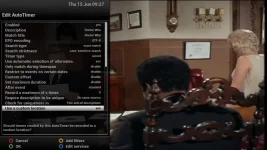
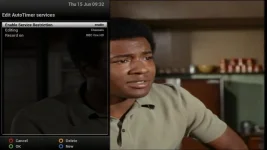
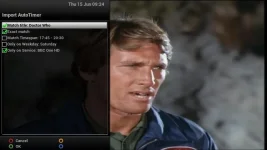
Find "Dr Who" on BBC One HD in the EPG and select "Add auto Timer" and then untick "Match timespan" as the timing differs week to week, untick "0nly on Weekday Saturday" and keep "Only on Service BBC1 HD". (screenshot 1),

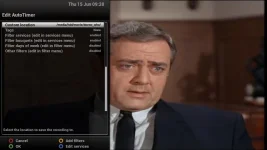
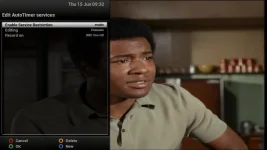
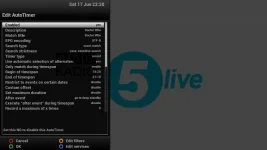
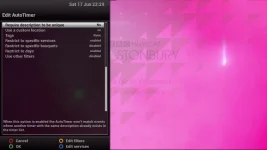
The auto timer configuration is as screenshot 2 and 3

The channel filter is set to restrict to channel BBC1 HD (screenshot 4).
The bouquets filter is set to restrict to alan_freesat (screenshot 5). This is my sub-set of the Freesat channels but it doesn't make any difference if I select the all channel freesat bouquet as generated by ABM.

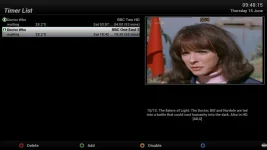
On saving the autotimer two timers are set. One on BBC One London which is the SD channel (the program is broadcst at the same time on SD and HD) and a repeat ffom the previous weeks episode with signing for the deaf, with a different dscription. on BBC Two HD.

There is no timer set for BBC One HD even though identifying the program in the EPG on the HD channel was the starting point for the autotimer.

The instruction in autotimer to only consider BBC One HD has been ignored and alternatives on other channels have been found.


In the distant past there was a auto-timer for the same program that may have had filters for more than one channel. Could the box be holding on to old auto-timer information and re-applying it in the background if an auto-timer of the same name is re-created?
 

Attachments

  • Screenshot1.webp
    Screenshot1.webp
    22.8 KB · Views: 23
  • Screenshot2.webp
    Screenshot2.webp
    40 KB · Views: 22
  • Screenshot3.webp
    Screenshot3.webp
    24.4 KB · Views: 21
  • Screenshot4.webp
    Screenshot4.webp
    19.6 KB · Views: 18
  • Screenshot6.webp
    Screenshot6.webp
    20.6 KB · Views: 19
Sorry, original post messing screenshot 5
 

Attachments

  • Screenshot5.webp
    Screenshot5.webp
    19.6 KB · Views: 16
I've never had a problem with Dr Who.......
 

Attachments

  • 1.webp
    1.webp
    22.2 KB · Views: 18
  • 2.webp
    2.webp
    20.9 KB · Views: 19
@adm - I reported a similar if not identical problem here http://www.world-of-satellite.com/showthread.php?53867-Autotimer-ITV-HD-quirk . No solution was offered at the time.

However, I have noticed something else which may have a bearing on your (and my) problem. Occasionally a new timer is not set when it should be. I have found that there is an unreported clash and if I disable one or two of the timers that are clashing, I am then able to add the new timer. It seems that the bug resulting in the misreporting of the clash is preventing any new timers being added.

Have a look through your timer list and the graphical EPG and disable a timer or two where you have some overlaps - no harm done - you should be able to add them back UNLESS they are clashing and not reported as so.

I have always been in too much of a hurry to properly evidence and report this bug and also I am on an elderly image so I will wait until I am up-to-date image-wise before watching for the bug again - it may already have been fixed.
 
Last edited:
@adm - further to my last post, the unreported clashes were not coincident with the new timer that could not be set. As soon as I had resolved the unreported clash I was able to add the new timer. As I said before, look elsewhere in the schedule for timer overlaps and see if you can disable and then enable them in the timer list, if you get a problem then try and add your new timer, otherwise the problem is elsewhere.
 
I'm finding the same - the clashes prevent adding new timers automatically.
If I add a manual event then I'm first prompted to edit the clashing timers, then I'm allowed to add the event.
No matter what I try I'm unable to add clashing timers as disabled to happen.
Autotimer will change the adjusted timers back to their original settings then decline to add new timers as et data changes (presenting on a new day).

Working out the right autotimer to disable then allows autotimer to add new timers- all a bit difficult when away on holiday!

(Currently using .17 but happens on earlier firmwares too)

Sent from my Nexus 7 using Tapatalk
 
I'm finding the same - the clashes prevent adding new timers automatically.
If I add a manual event then I'm first prompted to edit the clashing timers, then I'm allowed to add the event.
No matter what I try I'm unable to add clashing timers as disabled to happen.
Autotimer will change the adjusted timers back to their original settings then decline to add new timers as et data changes (presenting on a new day).

Working out the right autotimer to disable then allows autotimer to add new timers- all a bit difficult when away on holiday!

(Currently using .17 but happens on earlier firmwares too)

Sent from my Nexus 7 using Tapatalk


I don't believe this is a clashing problem that I'm seeing.
This is a complete clean install with no other auto-timers and no timers previously being set.
The timer is actually being set but on the wrong channel. A second timer is also being set but again on a second wrong channel. It seems that the filters are being ignored.
 
Do you have the same issue if alternates are still disabled?

Yes.

The screen shots are from an earlier image and I did try alternatives on and off. On my clean install of 5.0.17 the option was never set to yes/on.


Further investigation on my new image.

I have both BBC One HD and BBC One (London) SD in my bouquet.


i) I set a new auto-timer for program I never watch (hence never been set before) for only BBC One HD and only from one bouquet. This worked as expected and found 7 occurrences on BBC One HD.

ii) I then deleted the auto-timer and all the timers it had set and rebooted the box by setting deep standby and then turning off at the mains in case information was being stored in RAM.

iii) I requested a new timer for the same program but didn't restrict the channel or bouquet. This found 42 occurrences on at least 6 channels. The program is a long running daytime program, broadcast each day, and repeated endlessly on the lesser channels as time fillers.

iv) I then deleted the auto-timer and all the timers it had set and rebooted the box by setting deep standby and then turning off at the mains.

v) I set an auto-timer in exactly the same way as in i) and this is where it goes wrong. It found 7 occurrences on the program on BBC One (London) SD and NOT BBC One HD that the filters were set for.

To me it looks like that if an auto-timer has existed before, has been deleted and then re-created with different information (but the same name) the filter information becomes corrupt, possibly from information in its previous incarnation. This may explain the problems I'm seeing and perhaps the unexplained clashes that other are seeing.

For me the Dr Who auto-timer has been created on my box at different times in the past and very probably with different channel and bouquet settings. During this time I have performed USB upgrades, with restore, USB upgrades without restore and couch flashes, both with and without restore. If old information is being retained it suggests maybe its on hard disk or USB drive that I haven't never cleared since owning the box. Could a new install of an image automatically be picking up something from a backup even though no request to recover settings/plug-ins has been requested?
 
Last edited:
I don't believe this is a clashing problem that I'm seeing.
This is a complete clean install with no other auto-timers and no timers previously being set.
The timer is actually being set but on the wrong channel. A second timer is also being set but again on a second wrong channel. It seems that the filters are being ignored.

OK, then this is the same as my earlier problem last October, my auto timer would not set a timer on the ITV HD channel so I added ITV SD into the bouquet and the auto timer immediately set the timer on the ITV SD channel. I did not resolve the issue as to why the ITV HD channel was being ignored at the time and it has not happened since as far as I know.
 
To me it looks like that if an auto-timer has existed before, has been deleted and then re-created with different information (but the same name) the filter information becomes corrupt, possibly from information in its previous incarnation. This may explain the problems I'm seeing and perhaps the unexplained clashes that other are seeing.
That seems unlikely.
The only information about AutoTimers is kept in the /etc/enigma2/autotimer.xml file, and if you delete an AT it completely disappears from that file - and that file is a write-out of what is in memory.
 
There is a pull request from prl001 that could be relevant. I don't understand it, so have not merged it.
 
That seems unlikely.
The only information about AutoTimers is kept in the /etc/enigma2/autotimer.xml file, and if you delete an AT it completely disappears from that file - and that file is a write-out of what is in memory.

Deleted all autotimers and can confirm that the /etc/enigma2/autotimer.xml contains no references to Dr Who. The timers.xml also shows no timers

Removed power from box to make sure that a transfer from RAM to file wasn't taking place. Both /etc/enigma2/autotimer.xml and timers.xml contain no information about auto/timers, as expected.

Set autotimer for Dr who only on BBC One HD and only from one bouquet.

The autotimer still finds 2 instances of Dr Who on the wrong channels

/etc/enigma2/autotimer.xml
Code:
<?xml version="1.0"?>
-<autotimer version="8"><defaults avoidDuplicateDescription="1"> </defaults>-<timer avoidDuplicateDescription="1" searchType="exact" location="/media/hdd/movie/doctor_who/" enabled="yes" match="Doctor Who" name="Doctor Who"><serviceref>1:0:19:1B1D:802:2:11A0000:0:0:0:</serviceref>
<!-- BBC One HD -->
<bouquet>1:7:1:0:0:0:0:0:0:0:FROM BOUQUET "userbouquet.fav_freesat__tv_.tv" ORDER BY bouquet</bouquet>
<!-- fav_freesat (TV) -->
</timer></autotimer>

timers.
Code:
<?xml version="1.0"?>
-<timers>-<timer disabled="0" isAutoTimer="1" record_ecm="0" descramble="1" always_zap="0" justplay="0" tags="" location="/media/hdd/movie/doctor_who/" eit="56597" afterevent="auto" description="10/12. The Eaters of Light: A hunt for the lost Ninth Roman Legion leads the Doctor, Bill and Nardole into the middle of an ancient battle that could cast humanity into the dark forever. [AD,S,SL]" name="Doctor Who" rename_repeat="1" repeated="0" serviceref="1:0:19:1B1C:802:2:11A0000:0:0:0:" end="1498272600" begin="1498269420"><log time="1497799817" code="500">[AutoTimer] Try to add new timer based on AutoTimer Doctor Who.</log><log time="1497799817" code="509">[AutoTimer] Timer start on: Sat Jun 24 02:57:00 2017</log></timer>-<timer disabled="0" isAutoTimer="1" record_ecm="0" descramble="1" always_zap="0" justplay="0" tags="" location="/media/hdd/movie/doctor_who/" eit="58657" afterevent="auto" description="11/12. World Enough and Time: A huge spaceship trapped in the gravity well of a black hole, teeming with impossible lifeforms, harbours one of the Doctor's most feared enemies. Also in HD. [AD,S]" name="Doctor Who" rename_repeat="1" repeated="0" serviceref="1:0:1:189D:7FD:2:11A0000:0:0:0:" end="1498329300" begin="1498326120"><log time="1497799817" code="500">[AutoTimer] Try to add new timer based on AutoTimer Doctor Who.</log><log time="1497799817" code="509">[AutoTimer] Timer start on: Sat Jun 24 18:42:00 2017</log></timer></timers>

The autotimer seems to be asking for the correct filters but the timers are being set on other criteria (ignoring one or more of the filters).
 
If you restrict to service but not restrict bouquet, is the problem still there?

The problem goes away with just restricting to service and the program is correctly set as a single timer from the bouquet/EPG from which the auto-timer is launched - BBC One HD Satellite (and NOT BBC one London SD Satellite , BBC two HD Satellite, BBC one HD terrestrial nor BBC one SD terrestrial).

As posted earlier I also tried setting the auto-timer from the ABM generated bouquet rather than an edited bouquet constructed of my favourite channels which resulted in the same problem.

So, the problem may be related to bouquet filtering, but from my experimentation it can work correctly first time but on a change of filter configuration it can be made to fail every time - and the failure mechanism can survive a image update without a restore.

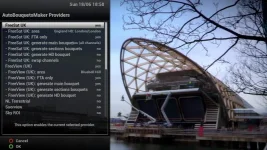
Notes: My ABM set-up is as attached, Note that in some parts of the UK BBC One HD is a part time channel that reverts to a generic "test card" for regional programs hence the need, for me, for both BBC One HD and BBC One SD in the same bouquet.
 

Attachments

  • abm.webp
    abm.webp
    61.3 KB · Views: 6
Notes: My ABM set-up is as attached, Note that in some parts of the UK BBC One HD is a part time channel that reverts to a generic "test card" for regional programs hence the need, for me, for both BBC One HD and BBC One SD in the same bouquet.
I only use BBC One HD for timers/autotimers, except the local weather on Look North, which is an autotimer created from BBC One SD in "All Channels", which also includes BBC One HD in that bouquet.
 
In summary...
Restrict to service only, this works.
Restrict to service and also restrict to bouquet, the bouquet restriction nullifies the service restriction.

We'll need to get someone to look at code. Service restriction should be priority. This should hopefully fix the issue
 
In summary...
Restrict to service only, this works.
Restrict to service and also restrict to bouquet, the bouquet restriction nullifies the service restriction.

But only AFTER is has gone wrong.
If a set a brand new auto-timer for restricting one service and one bouquet it works
If the auto-timer is deleted and then recreated not restricting services or bouquets it also work. If the auto-timer is again deleted and recreated the same as the original is can go permanently wrong unless the bouquet restriction is removed.
 
... do you explicitly delete the timers when testing - I've found that deleting autotimers doesn't always delete associated timers even when you ask it to get rid of them. And if you delete the files autotimers.xml or timers.xml, you need to stop enigma first.
 

OpenViX Feeds Status

Back
Top