Superb quality and spec AB-Com PULSe 4K SE. Crazy offer! Only £129! FREE UK DELIVERY! 4K UHD, Enigma 2, Multiboot 4 images & more!...
Superb quality and spec AB-Com PULSe 4K Rev II Twin Satellite tuner only £179! FREE UK DELIVERY! 4K UHD, Enigma 2, SATA HDD facility, Multiboot 4 images & more!...

[VU+ Solo4K] Channel scan doesn't find dvb-t2 mux

  • Thread starter Thread starter Tobbe
  • Start date Start date
T

Tobbe

Guest
hi

i have a new solo4k box and first thing i did was to boot it using the stock image, all channels including the hd channels was found without any problems.
then i decided to flash openvix and did same thing, all dvb-t channels is found but not the t2 channels (hd)
so a lot of interesting channels is not there.

i have of course retried the scan several times with a few different tunner options for region and country but the one i focused mostly on was the europe & middle east one since it was most similar to what the stock image had that worked.

any advice on what to do and how to get the t2 mux working?
a manual scan of the missing mux frequency also fails to find anything.
 
tested a bit more.

following images does NOT work:
openvix-5.0.020.release-vusolo4k_usb
openvix-4.2.030.release-vusolo4k_usb

following stock image work just fine:
vuplus-image-vusolo4k-20170630163639_usb

with stock image scanning finds all channels without any problems.
on openvix image 5.0 or 4.2 scanning behaves the same, it consistently skips the frequency with the hd channels even if i manually scan that frequency.
i have also double checked the settings between stock & openvix to make sure i tried the right ones.

one thing i also noted on the stock image is that on one of the problematic hd channels audio tends to drop out periodically.
 
Where are you located?

Note:
IIRC, there was a scanning issue that was fixed and will be in next Release image.
 
sweden

i also noticed that the stock image have a much better hdmi-cec support than what i saw in openvix, was possible to setup so a/v receiver also was powered on/of with the vu+ box, never seen that kindof support before.
 
i also noticed that the stock image have a much better hdmi-cec support than what i saw in openvix, was possible to setup so a/v receiver also was powered on/of with the vu+ box, never seen that kindof support before.
Assuming that by "powered off" you mean "put into standby" then if you have an HDMI ARC receiver it works. (Well, it did for me until I put a second box on the HDMI bus, which insisted on doing something weird on the HDMI bus when in Deep Standby, but that was a hardware/firmware issue).
 
regarding hdmi-cec, i have had same tv & receiver for several years, my old mbtwin box that broke and the opevix image on my new vu+ solo4k all behave same when it comes to hdmi-cec, same options and no way to specify a/v receiver and what to do with it.
on stock image hdmi-cec is a plugin with a lot more relevant options that actually work, i wish those where available in openvix

but back to my initial problem (the really annoying one), it looked like all dvb-t2 channels where missing during my scans with openvix on my vu+ solo4k so i'm guessing on a driver issue.
any idea when it might be fixed?
also i suspect this is a bug but have others also found this problem? note that 4.2 was just as broken as 5.0 when it comes to channel scanning so whatever the problem is it has likely existed for a long time.
 
one more thing, before i got this new vu+ solo4k i was doing some reading, i dont know exactly where i found it or if it was for the vu+ or not but i read about a tuner module having some kind of dip switches that had to be correct for things to work properly and i think this depended on image used.
unfortunately i didn't save the link.

does this make any sense or did i just get it mixed up with another box?
 
regarding hdmi-cec, i have had same tv & receiver for several years, my old mbtwin box that broke and the opevix image on my new vu+ solo4k all behave same when it comes to hdmi-cec,
It worked fine with my MBTwin and an HDMI ARC speaker.
 
Where are you located?

Note:
IIRC, there was a scanning issue that was fixed and will be in next Release image.

are you sure it was just a scanning issue?
i suspect it is more of a driver issue or something.

anyway, i was looking around the git repositories but i know too little of the code to be of any help, log did look interesting with a few commits related to problems with dvb-t2.
fyi the tuner module i have is named TT3L10
 
My mistake, the commit was on 6th of June. So it is in the release image. I have a Solo 4k also with the TTL310. It found DVB-T2 channels in the UK.
 
Is this a tuning or scanning issue?

To rule out tuning, use a lamedb file from the "working" image on the "non-working" image.
You can also try the terrestrial scan plugin.
 
Is this a tuning or scanning issue?

To rule out tuning, use a lamedb file from the "working" image on the "non-working" image.
You can also try the terrestrial scan plugin.

i have already tried the terestrial scan plugin on openvix image, didnt help and it got exactly same problem.

but good suggestion to copy over the lamedb from stock working image to openvix.
i always backup the /etc/enigma2 folder so i can restore my favorite list after any upgrade.
i will give your suggestion a try and let you know the outcome.
 
one more thing, stock image have a completely working samba that works with win10 but on openvix it didn't work at all with win10.
not sure why, ill backup some more config files and compare.
 
looks like the problem is a scanning issue.
i copied over lamedb & userbouquet favorites and it works just fine.
tested several of the channels i never found before via a scan directly on openvix and they work just fine.

also, while testing this i have noticed it is quite easy to get enigma2 to crash and restart.
crashed once already and yesterday during my initial testing it crashed a lot, it felt like when it is slow to respond and you press buttons to quick it crashes.
 
Attach your working lamedb file here please.

What is your tuner configuration? Please do not confuse with what you tried. Post what you are using now.

Enable debug logs and restart.

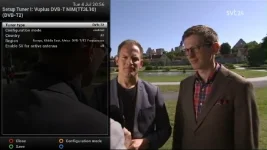
Can you post a screenshot of your scan settings page.
Perform a scan and then attach debug log too.
 
i have attached the working lamedb and a screenshot of how the first dvb-t2 tuner is currently setup, this was also the main config i used during my testing.
second dvb-t2 tuner is setup identically.
the two built in dvb-s2 tuners is set to not configured since i don't have satellite

where and how do i turn on debug logging?
 

Attachments

  • lamedb.zip
    lamedb.zip
    1.4 KB · Views: 4
  • 1_0_1_366_3FD_22F1_EEEE0000_0_0_0.webp
    1_0_1_366_3FD_22F1_EEEE0000_0_0_0.webp
    26.2 KB · Views: 22
frequency starting with 650 is one of t2 frequencies that tend to get missed
 
Debug logging is enabled as follows:
Menu -> Setup -> System -> Logs -> Enable debug logs = yes, and then GUI Restart.
 
Which part of Sweden are you in? We only have Gavle listed. Is there a website with cities and their frequencies?

Which of these frequencies are the T2 ones?
498000000
514000000
522000000
546000000
570000000
650000000
 
Place this in /etc/enigma2 and then restart the receiver.

Re-set the tuner configuration (both of them) to Sweden, Tobbe. Perform a complete scan and report back if it works.
 

Attachments

OpenViX Feeds Status

Back
Top