Superb quality and spec AB-Com PULSe 4K SE. Crazy offer! Only £129! FREE UK DELIVERY! 4K UHD, Enigma 2, Multiboot 4 images & more!...
Superb quality and spec AB-Com PULSe 4K Rev II Twin Satellite tuner only £179! FREE UK DELIVERY! 4K UHD, Enigma 2, SATA HDD facility, Multiboot 4 images & more!...

[OS-mega] Update to 5.0.023 Killed my USB Port and Picons

kokojnr

Member
Joined
Jul 25, 2016
Messages
320
Reaction score
0
Points
16
Just updated to 5.0.023 my receiver stopped recognising the USB stick that is plugged in the back USB port that i use to store image backups and Picons.

I rebooted the receiver and it stuck on Vix screen, i then powered it down, removed the USB stick and booted again, receiver boots properly.

I have tried various USB sticks on same USB port but the receiver wont recognise any of them, but if attach the USB on the front USB port the receiver will recognise it and boot load properly.

Any help in resolving this please?
 
No, I bought 2 new 8Gb kingston after that issue and its one of them that im using
 
Is this the same USB stick you had issues flashing with?
Just waiting for my pc to finish windows update, then I can grab a debug log.
Probably will be in the morning.

Sent from my SM-N910F using Tapatalk
 
Tried again this morning on same back USB Port and still same problem.
I have attached a log file
 

Attachments

The enigma2 log isn't going to show much if you reckon enigma2 can't see it.

However, it does report:
Code:
[Picon] adding path: /media/sdb1/picon/
.

Are you sure that it doesn't see it? Or is it just that it isn't mounting it as /media/usb?
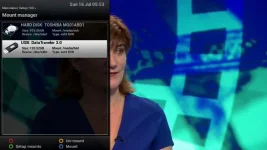
Have you looked in the mount manager to see what it sees?
 
The problem is with the USB port, the receiver sees all my USB stick if i attach them to the front USB port.

If i attach any USB stick to the back USB port and restart the receiver, it boots and stuck on the openvix screen, and i cant FTP or Telnet into the box
 
Not sure why it is reporting this

Code:
<    42.568> [Harddisk] new Harddisk sdb -> /dev/sdb -> /dev/sdb
<    42.585> [Harddisk] new Harddisk sda -> /dev/sda -> /dev/sda

Have you tried a new install with no-restores. Backup your image before you do so, this is so that you can restore your image afterwards.
 
Not sure why it is reporting this

Code:
<    42.568> [Harddisk] new Harddisk sdb -> /dev/sdb -> /dev/sdb
<    42.585> [Harddisk] new Harddisk sda -> /dev/sda -> /dev/sda

Have you tried a new install with no-restores. Backup your image before you do so, this is so that you can restore your image afterwards.
Probably picking up the USB connected to the front port.


Sent from my SM-N910F using Tapatalk
 
Probably picking up the USB connected to the front port.
It appears very early on, before you've used the remote.

Are you powering the box down or going into deep standby before swapping the usb stick around?
 
Last edited:
It appears very early on, before you've used the remote.

Are you powering the box down or going into deep standby before swapping the usb stick around?
I put it into standby with the remote and then power down from the on/off button at the back.
This is strange cos it's been working since I bought the receiver until.this latest update of 5.0.023

Sent from my SM-N910F using Tapatalk
 
You should put it into deep standby before powering off. Standby only turns off the display.
 

OpenViX Feeds Status

Back
Top