Superb quality and spec AB-Com PULSe 4K SE. Crazy offer! Only £99! FREE UK DELIVERY! 4K UHD, Enigma 2, Multiboot 4 images & more!...
Superb quality and spec AB-Com PULSe 4K Rev II Twin Satellite tuner only £149! FREE UK DELIVERY! 4K UHD, Enigma 2, SATA HDD facility, Multiboot 4 images & more!...

[ABM-DVB-C] Sky Sports channel names on cable

  • Thread starter Thread starter zino
  • Start date Start date
Z

zino

Guest
How do I "hack" to rename the following cable channels to the new proper names? I don't want to rename using remote as the next scan will just undo the changes.
I only know how to swap channels. I just want to learn how to rename any channel to whatever name I want using custom mix file.


Could someone give me one example please.
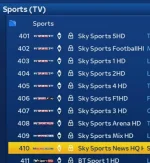
Rename Sports.webp

I've run ABM a few times and not all the new channel names for sports don't come up under Cable bouquet.
(ignore channel order, i use custom mix file to put ss premier lge at 401)
 
Last edited by a moderator:
@abu baniaz Is there any way we can incorporate the delete channel data command into ABM delete bouquets but for it to only effect ABM bouquets?

Code:
nit 4 && sleep 10 && rm -f /etc/defaultsat.tar.gz && rm -f /etc/enigma2/lamedb && rm -f /etc/enigma2/*.tv && rm -f /etc/enigma2/*.radio  && rm -f /etc/enigma2/*.del &&  init 3

Also what command would we need to use to just delete ABM bouquets and lamedb file?
 
Thank you.

I would still like to learn how to rename channels.

I dislike really long CABLE channel names like
Universal Channel HD
Sky Sports Football HD

I want to change them to
Universal HD
Sky Sports FB HD

How do I use ABM to permanently change CABLE channel names to anything I want, and it is kept even after ABM runs everyday?
 
Sky Sports FB is even worse. lol.
On a serious note you would need to create your own channel list if you want to mess about with channel names etc, but beauty with ABM, it does all the dirty work for you. Only other option is to disable ABM running a scan once you've initially set this up.


Sent from my iPhone using Tapatalk
 
Sky Sports FB is even worse. lol.
On a serious note you would need to create your own channel list if you want to mess about with channel names etc, but beauty with ABM, it does all the dirty work for you. Only other option is to disable ABM running a scan once you've initially set this up.


Sent from my iPhone using Tapatalk

lol you do realise worse for you doesnt mean worse for everyone else. That is why ABM allows customisation. Preferences.

There is a possibility to rename channels within ABM, that is why I stated above within ABM. I just don't know how it's done for cable. It's called a "hack", within the customisations you can do. I customise my ABM to my preference and want to learn as much as possible about the things ABM can do but I'm unfamiliar with python so I learn one step at a time for different things slowly.

I currently want to learn how to rename any channel. There are maybe 5 or 6 I want to rename just to "tidy" up how it looks on my EPG with my current EPG settings. Cable names are longer, sometimes HD attached without space... call me pedantic by I like a "clean" look.

Anyone familiar with how to rename channels within ABM "environment" within custom mix file?
 
I know buddy. hehe. I'm sure someone with more knowledge can help you. [emoji4]


Sent from my iPhone using Tapatalk
 
The HD channel names on Cable don't dynamically update properly. On Sat and SD cable, just tune to the channel and it will pick up the changed channel name. On the HD channels, you need to sit on the channel for several minutes to get it to update. ABM doesn't update a channel name, it will add the name if it doesn't exist in lamedb but won't change an existing name. Hope that makes sense :)
 
I'm getting wrong EPG on Sports Football. Anyone else getting this?
My EPG is using Rytec Virgin Uk/Ireland XMLTV.
Is this the way to go or another provider for EPG?
 
I'm getting wrong EPG on Sports Football. Anyone else getting this?
My EPG is using Rytec Virgin Uk/Ireland XMLTV.
Is this the way to go or another provider for EPG?

It is a known problem with Rytec sources. Contacting the author usually helps.


Sent from my iPhone using Tapatalk
 
Thank you.

I would still like to learn how to rename channels.

I dislike really long CABLE channel names like
Universal Channel HD
Sky Sports Football HD

I want to change them to
Universal HD
Sky Sports FB HD

How do I use ABM to permanently change CABLE channel names to anything I want, and it is kept even after ABM runs everyday?

If you look at cable_ie_mk2.xml in providers github you'll see renames on there line 79 and 95. The only issue is that I don't think it will work for sat custommix but should for a cable custommix.
 
Last edited:
The HD channel names on Cable don't dynamically update properly. On Sat and SD cable, just tune to the channel and it will pick up the changed channel name. On the HD channels, you need to sit on the channel for several minutes to get it to update. ABM doesn't update a channel name, it will add the name if it doesn't exist in lamedb but won't change an existing name. Hope that makes sense :)

Here's a thought - how about having an option in ABM to delete the current lamedb when doing an ABM scan? It would have to be optional in case the user has non-ABM channels in the lamedb. Not only would that solve the VM rename problem but also keep the lamedb size in check.
 
Here's a thought - how about having an option in ABM to delete the current lamedb when doing an ABM scan? It would have to be optional in case the user has non-ABM channels in the lamedb. Not only would that solve the VM rename problem but also keep the lamedb size in check.

You could probably add a delete os on line 75 under self.onFirstExecBegin.append(self.firstExec) in the main.py
 
If you look at cable_ie_mk2.xml in providers github you'll see renames on there line 79 and 95. The only issue is that I don't think it will work for sat custommix but should for a cable custommix.

There are numbers next to the rename channels like

# List channels to be renamed
rename = {
219: "Discovery HD",
423: "Eurosport 1",
424: "Eurosport 1 HD",
425: "Eurosport 2",
426: "Eurosport 2 HD",
620: "Cartoon Network",
}

What do the numbers correspond to?
Not channel numbers, as they are different numbers for those channels.

For eg, If I want to rename Universal Channel HD to Universal HD, I wouldn't know what number to type. I tried using cable ch number 164 for Universal HD.
Either than number is wrong or it's because sat custom mix wont work like you said it may not.

All I want to do is rename channels to whatever I want, and I want it to stick even after ABM scans so I need an ABM "hack" that can be added to my sat custom mix file
 
Last edited by a moderator:
ABM primarily deals things in terms of numbers.

I know that, I just want to know what the number corresponds to so I know where to get the number that I need for the channnel that I want to change the name for, for eg, what number do I enter for Universal Channel HD to be changed to Universal HD, for cable. Is there a table somewhere with the corresponding number for each cable channel?
 

OpenViX Feeds Status

Back
Top