Superb quality and spec AB-Com PULSe 4K SE. Crazy offer! Only £99! FREE UK DELIVERY! 4K UHD, Enigma 2, Multiboot 4 images & more!...
Superb quality and spec AB-Com PULSe 4K Rev II Twin Satellite tuner only £149! FREE UK DELIVERY! 4K UHD, Enigma 2, SATA HDD facility, Multiboot 4 images & more!...

VU+ duo Stream

digicell

New member
Joined
Aug 25, 2010
Messages
171
Reaction score
0
Points
0
Hi all

I am trying to stream my VU+ Duo so i can view channels from an external PC or my phone. i want to try and watch some channels while i am at work.

Can someone provide me some assistance in how i set this up. If someone has a step to step guide this would be useful. I am using a NETGEAR Router which is connected to the box.

Thanks for your assistance in this issue
 
Last edited:
how do i set remote desktop to access my home PC from an external location?
 
Hi

I am trying to follow the guide you have provided the link for and I am trying to forward the port 01222 which is what is set on my Web Interface section in my VUDUO

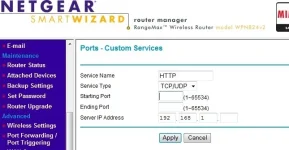
Can you tell me what I need to fill in in the screenshot attached?

new.webp

Please can someone help me - I am trying to set my netgear WPN824v2 router so that i can view my box on another pc outside my home
 
Use port 01222 in both boxes.

I put this number into the two boxes and in the IP address box i put in the IP Address (local) of the BOX (192.168.1.6) but I dont know what else i need to do as its not working when i open a browser and type the dyndns.org address folowed by 01222
 
I put this number into the two boxes and in the IP address box i put in the IP Address (local) of the BOX (192.168.1.6) but I dont know what else i need to do as its not working when i open a browser and type the dyndns.org address folowed by 01222

Are you testing on a pc within your own network or outside it?
 
Hi digicell,

Have a read of this sticky firstly:
http://www.world-of-satellite.com/showthread.php?656-Remote-Access-Remotely-access-your-reciever

Then read this one:
http://www.world-of-satellite.com/s...-to-stream-your-VU-Duo-over-the-WEB-using-VLC

I havent tried to use VLC as yet, I was attempting to get AirVideo server working to stream to my iPhone! I'm having trouble with my Vu Duo being password protected.

Good luck!!

Thanks for the post. am following this thread and will give a go by weekend.
 
I tried typing in 192.168.1.6 on the same network but it doesnt work i also tried xxx.dyndns.org:1222 and thta doesnt bring up anything.

can you please list out step by step exactly what i need to do?

I would appreciate that.
 
Hi digicell,

Here are the steps I used:

1. Changed my WebInterface settings to use port 1222
2. Internal network, 192.168.1.6:1222 to access box (192.168.1.6 VuDuo ip)

3. External access, WAN:
3.1. Set up account on www.dyndns.com and added router WAN ip
3.2. Download DynDns update client, keeps your WAN ip in sync with your dyndns Acc
3.3. Set up port forward on router to VuDuo (Port 1222 to 192.168.1.6)
3.4. On external pc, http://xxxx.dyndns.com:1222/

I also had to alter my firewall from Medium to Low on the router as Medium level was blocking external access to my network. This might just be related to Netopia routers however!

And that was it, hope this helps!
 
I tried typing in 192.168.1.6 on the same network but it doesnt work i also tried xxx.dyndns.org:1222 and thta doesnt bring up anything.

can you please list out step by step exactly what i need to do?

I would appreciate that.

Whats the IP of your Duo? The dyndns will only work outside of your network. You need to post forward to the IP address of your receiver.
 
I click virtual server on my router and its asking me for user name and passworld. Anybody have idea where i can get this? Thanks
 
Hi jfk,

My router defaults to:

Username: admin
Password: (blank, not set)

Try this, not sure if this is a standard though! If you are enabling remote access I'd set a password though, not a good idea to leave your network unprotected..

Good luck!
 
I got bellow after login, Can somebody tell me what to do next? thanks

Virtual Server Configuration

DMZ HostPort ForwardingDynamic DNS ALG
DMZ Host Help
A DMZ host is a computer on your local network that can be accessed from the Internet regardless of port forwarding and firewall settings.

Those IP packets from the Internet that do NOT belong to any applications configured in the port forwarding table will be:
Discarded
Forwarded to the DMZ host


IP address of DMZ host:
 
My router is BT Voyager 2110 (wireless adsl)

Hi Jfk, No disrespect but it would help if you created your own thread - LIKE I DID as THIS WAS MY THREAD I CREATED TO RESOLVE THE WEB ACCESS PROBLEM.

I am using NETGEAR WPN824v2 router and my local IP Address of the box is 192.168.1.6

In my VU DUO I went to plugins > Web Server seciton and set the port from 80 to 1222 however when i type in 192.168.1.6 in a laptop in the same network it doesnt load the VU Page

In the router setup under PORTFORWARDING I put the following
Service Name - VUDUO
Service Type - UDP/TCP
Starting port - 1222
Ending port - 1222
server IP add - 192.168.1.6
 
Last edited:
I currently use vlc. I have a separate shortcut (on PC Win XP SP2) for each channel that I typically watch. That is all I needed!!!

Example Shortcut:

Target:
"C:\Program Files\VideoLAN\VLC\vlc.exe" http://192.168.1.6:8001/1:0:1:133:3:69:6180000:0:0:0: --program="307" --crop="16:10"

Start in:
"C:\Program Files\VideoLAN\VLC"

In this example, the Vu+Duo is at 192.168.1.6
the program option selects the correct service ID in decimal because VLC is not clever enough to grab the 133 hexidecimal out of the stream specificied.
the crop option just gets rid of some of letter box effects.

This example is for Southern Cross TV channel 7 Central which comes off Optus C1 to Australia.
 
Hi Jfk, No disrespect but it would help if you created your own thread - LIKE I DID as THIS WAS MY THREAD I CREATED TO RESOLVE THE WEB ACCESS PROBLEM.

I am using NETGEAR WPN824v2 router and my local IP Address of the box is 192.168.1.6

In my VU DUO I went to plugins > Web Server seciton and set the port from 80 to 1222 however when i type in 192.168.1.6 in a laptop in the same network it doesnt load the VU Page

In the router setup under PORTFORWARDING I put the following
Service Name - VUDUO
Service Type - UDP/TCP
Starting port - 1222
Ending port - 1222
server IP add - 192.168.1.6

Hi Digicell,

I dont think i needed to creat my own thread since we both aiming to achieve the same thing but with different router. This will help other users in the forum to narrow their seach and be able to resolve their issues.
 
Last edited:
OK No problem makes sense :)

I get a message saying somehting like "cannot read network on 192.168.1.6:01222" on my box

I am not sure why this is - I followed the instructions but it is still not working
If someone can provide a detailed stp by step process that would be great.


Hi Digicell,

I dont think i needed to creat my own thread since we both aiming to achieve the same thing but with different router. This will help other users in the forum to narrow their seach and be able to resolve their issues.
 

OpenViX Feeds Status

Back
Top