Superb quality and spec AB-Com PULSe 4K SE. Crazy offer! Only £129! FREE UK DELIVERY! 4K UHD, Enigma 2, Multiboot 4 images & more!...
Superb quality and spec AB-Com PULSe 4K Rev II Twin Satellite tuner only £179! FREE UK DELIVERY! 4K UHD, Enigma 2, SATA HDD facility, Multiboot 4 images & more!...

[OS-mini] Empty buttons (no text) in timer and sanity error views

  • Thread starter Thread starter GezAndJaack
  • Start date Start date
G

GezAndJaack

Guest
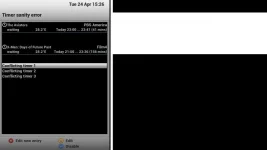
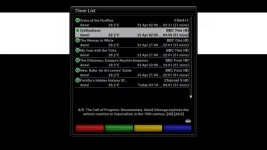
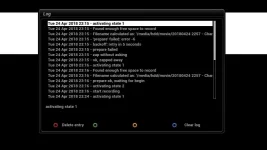
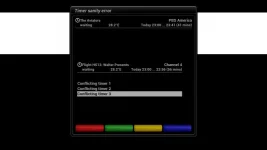
I'm missing the text on the buttons in two views - the timer list and also the sanity timer error pop-up. I've attached screenshots.

My first question - easy to answer and more urgent than a fix - what texts are supposed to be there? I've searched for screenshots but can't find any.

Second question - ideas what might have caused this, and is there a fix?

EmptyButtons1.webp

EmptyButtons.webp
 
Which skin are you using?
 
Which skin are you using?

Thanks, btw, for this tip - changing the skin has revealed the button texts at least! I'd still rather have it work with the dark skin though.....
 
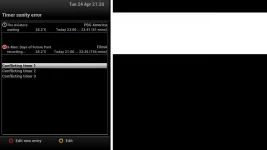
Actually with the daylight skin there's still no button or text for "green" in the timer sanity error view.

Sanity_revealed_lightskin.webp
 
I think something was changed in 5.1.014. There's no text on the buttons in KiddaC's skins either.

openvix: developer 5.1.014.003
update /lib/makefile with missing makefile.inc
ClientModeScreen: Add VKeyIconSupport
SystemInfo: redefine transcoding properties
NimManager: parse blindscan property
NimManager: whitespace fix
cosmetic: fix SystemInfo misnomer
SystemInfo: add systeminfo for transcoding
[TimerEdit/StreamingClients] convert some buttons to StaticText.
[CCcamInfo] Cosmetics in last commit.
[CCcamInfo] Normalized color buttons.
 
Here's my report.

First, I made sure skin was set to "default" which is the one I originally posted about

Went to timer list

Code:
<  4241.068> [eInputDeviceInit] 1 16a 1
<  4241.075> [InfoBarGenerics] KEY: 362
<  4241.077> [MORPHEUS] key
<  4241.077> [ActionMap] InfobarTimerButtonActions timerSelection
<  4241.138> [Skin] processing screen TimerEditList:
<  4241.199> [Skin] No skin to read...
<  4241.200> [Skin] processing screen <embedded-in-'TimerEditListSummary'>:
<  4241.290> [eInputDeviceInit] 0 16a 1
<  4241.299> [InfoBarGenerics] KEY: 362
<  4241.300> [MORPHEUS] key

which gave this screenshot

EmptyButtons.webp

Then went back to epg. I didn't notice anything wrong (so no screenshot) but this is what the log file says:

Code:
<  4267.439> [MORPHEUS] key
<  4267.461> [ActionMap] InfobarEPGActions EPGPressed
<  4267.542> [Skin] processing screen GraphicalEPGPIG:
<  4267.619> [GUISkin] warning, skin is missing element number in <class 'Screens.EpgSelection.EPGSelection'>
<  4267.621> [GUISkin] warning, skin is missing element jump in <class 'Screens.EpgSelection.EPGSelection'>
<  4267.627> [GUISkin] warning, skin is missing element primetime in <class 'Screens.EpgSelection.EPGSelection'>
<  4267.628> [GUISkin] warning, skin is missing element timeline2 in <class 'Screens.EpgSelection.EPGSelection'>
<  4267.629> [GUISkin] warning, skin is missing element timeline3 in <class 'Screens.EpgSelection.EPGSelection'>
<  4267.629> [GUISkin] warning, skin is missing element timeline0 in <class 'Screens.EpgSelection.EPGSelection'>
<  4267.630> [GUISkin] warning, skin is missing element timeline1 in <class 'Screens.EpgSelection.EPGSelection'>
<  4267.631> [GUISkin] warning, skin is missing element timeline4 in <class 'Screens.EpgSelection.EPGSelection'>
<  4267.632> [GUISkin] warning, skin is missing element timeline5 in <class 'Screens.EpgSelection.EPGSelection'>
<  4267.641> [GUISkin] warning, skin is missing element change_bouquet in <class 'Screens.EpgSelection.EPGSelection'>
<  4267.660> [GUISkin] warning, skin is missing element page in <class 'Screens.EpgSelection.EPGSelection'>
<  4267.716> [Skin] processing screen SimpleSummary:
<  4270.696> [eInputDeviceInit] 1 67 1
<  4270.702> [InfoBarGenerics] KEY: 103 UP
<  4270.703> [MORPHEUS] key

Then I attempted to record something that would clash.

Code:
<  4305.835> [InfoBarGenerics] KEY: 399 GREEN
<  4305.836> [MORPHEUS] key
<  4305.934> [eDVBFrontend] opening frontend 1
<  4305.936> [eDVBFrontend] opening frontend 0
<  4305.953> [TimerSanityCheck] conflict detected!
<  4305.954> [RecordTimer] timer conflict detected!
<  4305.955> [RecordTimerEntry(name=The Aviators, begin=Tue Apr 24 23:00:00 2018, serviceref=1:0:1:CD19:844:2:11A0000:0:
0:0:, justplay=False, isAutoTimer=False), RecordTimerEntry(name=X-Men: Days of Future Past, begin=Tue Apr 24 21:00:00 20
18, serviceref=1:0:1:2404:7F9:2:11A0000:0:0:0:, justplay=0, isAutoTimer=0), RecordTimerEntry(name=Chivalry and Betrayal:
 The Hundred..., begin=Tue Apr 24 23:00:00 2018, serviceref=1:0:19:22E3:80D:2:11A0000:0:0:0:, justplay=0, isAutoTimer=0)
, RecordTimerEntry(name=Flight HS13: Walter Presents, begin=Tue Apr 24 23:00:00 2018, serviceref=1:0:1:23FB:7F9:2:11A000
0:0:0:0:, justplay=0, isAutoTimer=0)]
<  4305.978> [TimerSanityCheck] conflict detected!
<  4305.978> [RecordTimer] timer conflict detected!
<  4305.979> [RecordTimerEntry(name=The Aviators, begin=Tue Apr 24 23:00:00 2018, serviceref=1:0:1:CD19:844:2:11A0000:0:
0:0:, justplay=False, isAutoTimer=False), RecordTimerEntry(name=X-Men: Days of Future Past, begin=Tue Apr 24 21:00:00 20
18, serviceref=1:0:1:2404:7F9:2:11A0000:0:0:0:, justplay=0, isAutoTimer=0), RecordTimerEntry(name=Chivalry and Betrayal:
 The Hundred..., begin=Tue Apr 24 23:00:00 2018, serviceref=1:0:19:22E3:80D:2:11A0000:0:0:0:, justplay=0, isAutoTimer=0)
, RecordTimerEntry(name=Flight HS13: Walter Presents, begin=Tue Apr 24 23:00:00 2018, serviceref=1:0:1:23FB:7F9:2:11A000
0:0:0:0:, justplay=0, isAutoTimer=0)]
<  4305.990> [TimerEdit] TimerSanityConflict
<  4306.013> [Skin] processing screen TimerSanityConflict:
<  4306.021> [Skin] Error in screen 'TimerSanityConflict' widget 'widget': [Skin] {skin.xml}: component with name 'key_g
reen' was not found in skin of screen 'TimerSanityConflict'!. Please contact the skin's author!
<  4306.061> [Skin] processing screen SimpleSummary:
<  4317.389> [MORPHEUS] serviceref 1:0:19:52D0:814:2:11A0000:0:0:0:

And this is the screenshot of that:

EmptyButtons1.webp

Next I went to change the skin - I selected the one called "ViX-Night-HD" and pressed OK

Code:
<  4345.525> [Skin] processing screen SkinSelector:
<  4345.559> [ePicLoad] setPara max-X=280 max-Y=210 aspect_ratio=1.000000 cache=1 resize=1 bg=#FF000000 auto_orient=0
<  4345.560> [ePicLoad] decode picture... /usr/share/enigma2/./prev.png
<  4345.560> [EXIF] getting exif from PNG
<  4345.563> [Skin] processing screen SimpleSummary:
<  4345.572> [eInputDeviceInit] 0 160 1
<  4345.579> [InfoBarGenerics] KEY: 352 OK
<  4345.580> [MORPHEUS] key
<  4346.540> [eInputDeviceInit] 1 6c 1
<  4346.546> [InfoBarGenerics] KEY: 108 DOWN
<  4346.547> [MORPHEUS] key
<  4346.548> [ActionMap] DirectionActions down
<  4346.549> [ePicLoad] decode picture... /usr/share/enigma2/Magic-FHD/prev.png
<  4346.549> [EXIF] getting exif from PNG
<  4346.732> [eInputDeviceInit] 0 6c 1
<  4346.739> [InfoBarGenerics] KEY: 108 DOWN
<  4346.740> [MORPHEUS] key
<  4347.008> [eInputDeviceInit] 1 6c 1
<  4347.015> [InfoBarGenerics] KEY: 108 DOWN
<  4347.015> [MORPHEUS] key
<  4347.016> [ActionMap] DirectionActions down
<  4347.017> [ePicLoad] decode picture... /usr/share/enigma2/ViX-Day-HD/prev.png
<  4347.017> [EXIF] getting exif from PNG
<  4347.236> [eInputDeviceInit] 0 6c 1
<  4347.243> [InfoBarGenerics] KEY: 108 DOWN
<  4347.245> [MORPHEUS] key
<  4347.332> [eInputDeviceInit] 1 6c 1
<  4347.338> [InfoBarGenerics] KEY: 108 DOWN
<  4347.339> [MORPHEUS] key
<  4347.339> [ActionMap] DirectionActions down
<  4347.340> [ePicLoad] decode picture... /usr/share/enigma2/ViX-Night-HD/prev.png
<  4347.341> [EXIF] getting exif from PNG
<  4347.398> [MORPHEUS] serviceref 1:0:19:52D0:814:2:11A0000:0:0:0:
<  4347.398> [MORPHEUS] no Radio
<  4347.399> [MORPHEUS] no Audio Mediaplay
<  4347.399> [MORPHEUS] not paused
<  4347.400> [MORPHEUS] nokey since 0 sec
<  4347.524> [eInputDeviceInit] 0 6c 1
<  4347.531> [InfoBarGenerics] KEY: 108 DOWN
<  4347.532> [MORPHEUS] key
<  4348.412> [eInputDeviceInit] 1 160 1
<  4348.419> [InfoBarGenerics] KEY: 352 OK
<  4348.419> [MORPHEUS] key
<  4348.420> [ActionMap] SetupActions ok
<  4348.421> [SkinSelector] Selected Skin: /usr/share/enigma2ViX-Night-HD/skin.xml
<  4348.427> [Skin] processing screen MessageBox:
<  4348.466> [Skin] processing screen MessageBox_summary:
<  4348.604> [eInputDeviceInit] 0 160 1
<  4348.610> [InfoBarGenerics] KEY: 352 OK
<  4348.611> [MORPHEUS] key
<  4349.600> [eInputDeviceInit] 1 160 1
<  4349.607> [InfoBarGenerics] KEY: 352 OK
<  4349.609> [MORPHEUS] key
<  4349.609> [ActionMap] MsgBoxActions ok

GUI rebooted (actually I ended up prompting it with init 4 when it didn't seem to be happening)

Went to timer list. It seemed normal (despite what this output says) so I didnt take a screenshot

Code:
<  4446.252> [eInputDeviceInit] 1 16a 1
<  4446.258> [InfoBarGenerics] KEY: 362
<  4446.259> [MORPHEUS] key
<  4446.259> [ActionMap] InfobarTimerButtonActions timerSelection
<  4446.322> [Skin] processing screen TimerEditList:
<  4446.462> [Skin] No skin to read...
<  4446.463> [Skin] processing screen <embedded-in-'TimerEditListSummary'>:
<  4446.558> [eInputDeviceInit] 0 16a 1
<  4446.564> [InfoBarGenerics] KEY: 362
<  4446.565> [MORPHEUS] key

Then via EPG (with similar output to before using default skin, mentioning skin missing elements) I attempted the clashing recording again

Code:
<  4485.150> [InfoBarGenerics] KEY: 399 GREEN
<  4485.151> [MORPHEUS] key
<  4485.262> [eDVBFrontend] opening frontend 1
<  4485.264> [eDVBFrontend] opening frontend 0
<  4485.280> [TimerSanityCheck] conflict detected!
<  4485.280> [RecordTimer] timer conflict detected!
<  4485.281> [RecordTimerEntry(name=The Aviators, begin=Tue Apr 24 23:00:00 2018, serviceref=1:0:1:CD19:844:2:11A0000:0:
0:0:, justplay=False, isAutoTimer=False), RecordTimerEntry(name=X-Men: Days of Future Past, begin=Tue Apr 24 21:00:00 20
18, serviceref=1:0:1:2404:7F9:2:11A0000:0:0:0:, justplay=0, isAutoTimer=0), RecordTimerEntry(name=Chivalry and Betrayal:
 The Hundred..., begin=Tue Apr 24 23:00:00 2018, serviceref=1:0:19:22E3:80D:2:11A0000:0:0:0:, justplay=0, isAutoTimer=0)
, RecordTimerEntry(name=Flight HS13: Walter Presents, begin=Tue Apr 24 23:00:00 2018, serviceref=1:0:1:23FB:7F9:2:11A000
0:0:0:0:, justplay=0, isAutoTimer=0)]
<  4485.302> [TimerSanityCheck] conflict detected!
<  4485.303> [RecordTimer] timer conflict detected!
<  4485.304> [RecordTimerEntry(name=The Aviators, begin=Tue Apr 24 23:00:00 2018, serviceref=1:0:1:CD19:844:2:11A0000:0:
0:0:, justplay=False, isAutoTimer=False), RecordTimerEntry(name=X-Men: Days of Future Past, begin=Tue Apr 24 21:00:00 20
18, serviceref=1:0:1:2404:7F9:2:11A0000:0:0:0:, justplay=0, isAutoTimer=0), RecordTimerEntry(name=Chivalry and Betrayal:
 The Hundred..., begin=Tue Apr 24 23:00:00 2018, serviceref=1:0:19:22E3:80D:2:11A0000:0:0:0:, justplay=0, isAutoTimer=0)
, RecordTimerEntry(name=Flight HS13: Walter Presents, begin=Tue Apr 24 23:00:00 2018, serviceref=1:0:1:23FB:7F9:2:11A000
0:0:0:0:, justplay=0, isAutoTimer=0)]
<  4485.315> [TimerEdit] TimerSanityConflict
<  4485.342> [Skin] processing screen TimerSanityConflict:
<  4485.424> [Skin] processing screen SimpleSummary:
<  4492.312> [MORPHEUS] serviceref 1:0:19:52D0:814:2:11A0000:0:0:0:
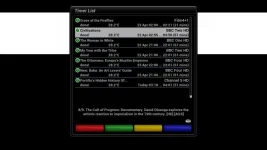
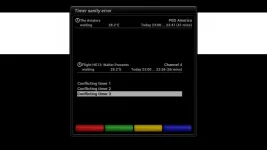
Here's a screenshot of that. Should there be a green and blue option?

SanityNightSkin.webp
 
Default skin = Emergency/fallback screen. This is shared among images, so some changes are not possible.

Standard skin = Vix Night HD

The buttons are conditional. They should show when required
 
Can someone please answer my first question: what are the actual options supposed to be on the timer sanity error screen and what colour are they supposed to be associated with?

With Vix Night HD I only have two options - "edit" (yellow) and "edit new entry" (red) Screenshot with previous post
With Vix Day HD there were three options - "edit", "edit new entry" and "disable" (blue). Screenshot earlier in thread
I am 90% sure there used to be a fourth option with a green button. I've been using the default skin for a year and until this problem arose about a month ago I remember four buttons in the four colours with text on each of them. But I can't remember the texts!
 
As I said on the other forum Willo, I am not changing my skins until all the image makers follow this idea of standardising this button naming.
It is completely impractical to have a version of my skins for vix and then a version for other builds. Especially as all my skins are now both hd and fhd. Thats 10 skins I would have to change. With multiple elements in them all. I am sure most other skinners have the exact same mind set. Vix jumped the gun on this. Therefore its their issue for now.
 
@GezAndJaack
As mentioned above, the buttons are conditional depending in which context/function they are called upon.

The error is here

Code:
<  4305.990> [TimerEdit] TimerSanityConflict
<  4306.013> [Skin] processing screen TimerSanityConflict:
<  4306.021> [Skin] Error in screen 'TimerSanityConflict' widget 'widget': [Skin] {skin.xml}: component with name 'key_green' was not found in skin of screen 'TimerSanityConflict'!
 
Even if the button pngs are there, it does not mean there should/would be text/wording.

As an example, this screen has all four colours.

Code:
    <screen name="TimerLog" position="209,100" size="845,520" backgroundColor="window-bg">
        <widget name="loglist" position="20,0" size="805,375" font="Regular;20" selectionPixmap="ViX-Common/buttons/FocusBar_H25x805.png" scrollbarMode="showOnDemand"/>
        <widget name="logentry" position="10,400" size="825,30" font="Regular;20" backgroundColor="window-bg" transparent="0"/>
        <ePixmap pixmap="ViX-Common/buttons/red.png" position="45,488" size="25,25" alphatest="blend"/>
        <ePixmap pixmap="ViX-Common/buttons/green.png" position="235,488" size="25,25" alphatest="blend"/>
        <ePixmap pixmap="ViX-Common/buttons/yellow.png" position="425,488" size="25,25" alphatest="blend"/>
        <ePixmap pixmap="ViX-Common/buttons/blue.png" position="615,488" size="25,25" alphatest="blend"/>
        <widget name="key_red" position="66,487" zPosition="1" size="150,25" font="Regular;20" halign="center" valign="center" backgroundColor="window-bg" transparent="1"/>
        <widget name="key_green" position="258,487" zPosition="1" size="150,25" font="Regular;20" halign="center" valign="center" backgroundColor="window-bg" transparent="1"/>
        <widget name="key_yellow" position="448,487" zPosition="1" size="150,25" font="Regular;20" halign="center" valign="center" backgroundColor="window-bg" transparent="1"/>
        <widget name="key_blue" position="638,487" zPosition="1" size="150,25" font="Regular;20" halign="center" valign="center" backgroundColor="window-bg" transparent="1"/>
    </screen>

I attach a screenshot

The python file that invokes/gives the button/labels are here

TimerEdit
https://raw.githubusercontent.com/OpenViX/enigma2/master/lib/python/Screens/TimerEdit.py

TimerSanityCheck
https://raw.githubusercontent.com/OpenViX/enigma2/master/lib/python/Components/TimerSanityCheck.py

You will have to look at the file for a full list of labels. Ctrl & F for the colour you want to search for.
 

Attachments

  • timer log.webp
    timer log.webp
    26.6 KB · Views: 9
Last edited:
You will find that OpenPLi And OpenVix have both adopted it. OpenBlackHole and also TeamBlue have it.

What is a "button"

Is it the png?
Is it the action?
Is it the wording?
If wording, is the "wording" a "label" or is it "text"

The thread is here
Code:
https://forums.openpli.org/topic/56924-button-and-label-pli-opinion

The confusion started over a decade ago. Pretty sure it was 2005. It will take time for it to be untangled.

On Rob's skin, his "buttons" are just "wording". On other skins, the different versions have been added in the templates. So if a plugin uses an old definition, that will still be present.
 
Vix jumped the gun on this.
What? How has ViX "jumped the gun"? It is an issue in your skins, not in ours. Are you suggesting that our enigma has to remain identical to all other distros so things are easier for skinners? And by the way, once adopted, our button bar is zero maintenance for skinners, not like previously where every screen needed the buttons hard coded. Saves literally hundreds of lines, and countless hours of work for skinners. If I add a button somewhere in enigma it just displays automatically, no need to edit any of our skins. Same with text/menu buttons, etc.
 
Last edited:
It is an issue in your skins, not in ours.

No... its an issue with every skin ever designed with the exception of a small tiny handful of vix only skins that have been amended.

Are you suggesting that our enigma has to remain identical to all other distros so things are easier for skinners?

Nice... typical vix attitude. With that attitude I am surprised skinners even attempt to make their skins work on Vix if you have an us against the world attitutde.

not like previously where every screen needed the buttons hard coded.

Do these buttons now magically appear. No. Every screen still needs button code in. What are you talking about???

Saves literally hundreds of lines

It doesn't save hundreds of lines of code. It is actually more code if you recommend putting in a conditional statement for each button graphic.
Also in the documentation it recommends to actually double up the code to appease legacy. So literally adding hundreds of line of code.

, and countless hours of work for skinners.

So all skinners have got to spend countless hours changing all their skins, just because some bright spark had an idea to change 10 years plus worth of code.


And I am not saying a disagree with trying to unifying all this code. I fully agree it is tiresome trawling through every element trying to work out which button code or widget is being used on that particular screen.
But as mention quitely clearly in the doucmentation for this .

For all the Enigma2 builds there is a significant legacy of code and skins that needs to be preserved and protected.

It seems there has been no transition of this. It would have been a hell of lot smoother and better if when you were changing the python components in, you wrote in rules in the python file to check if legacy or new buttons are used.
The hard work could have been done in the python code. Instead of adding in extra parameters, or asking skinners to duplicate buttons or even change buttons in old skins.
Then in the future any new skins could adopt this button policy and it would affect anything. It really wouldn't have been that difficult. But now it is a pain in the bum.
 
Nice... typical vix attitude. With that attitude I am surprised skinners even attempt to make their skins work on Vix if you have an us against the world attitutde.

Really?? You're accusing OpenViX team of having an attitude for trying to make improvements? I've just looked through some of your dozen posts here and you're accusing us of having attitude :lol3:

You've never posted any of your skins here (even when requested) or even offered any support for your skins here.

If these changes are so bad why have OpenPLi, OpenBlackHole and TeamBlue adopted these changes?
 

OpenViX Feeds Status

Back
Top